
AI summary
May's updates meet your team where they already work, making every workflow faster and more connected.
- •Agents in your existing tools: BYO APIs, MCP Apps support, and the Typeface A2A agent in Google Marketplace connect your agents directly to the systems your organization already runs on.
- •Brand kit management, simplified: Set up and manage brand kits through chat or by uploading a link. Track how your copy evolves through Typeface's brand pipeline, all in one place.
- •Faster channel production: Turn an email brief into a send-ready campaign. Repurpose existing footage into social-ready sizzle reels without scrubbing through hours of video.
- •Plus: Document versioning, banner ad propagation, agent testing, and more.
Welcome back to Feature Focus!
Following our recent launch of new creative team solutions and native Figma integration, May's updates keep the momentum going. This month's focus: less manual work, fewer disconnected handoffs, and a faster path from idea to execution.
Let’s dig in:
Simplify how you manage and maintain brand kits
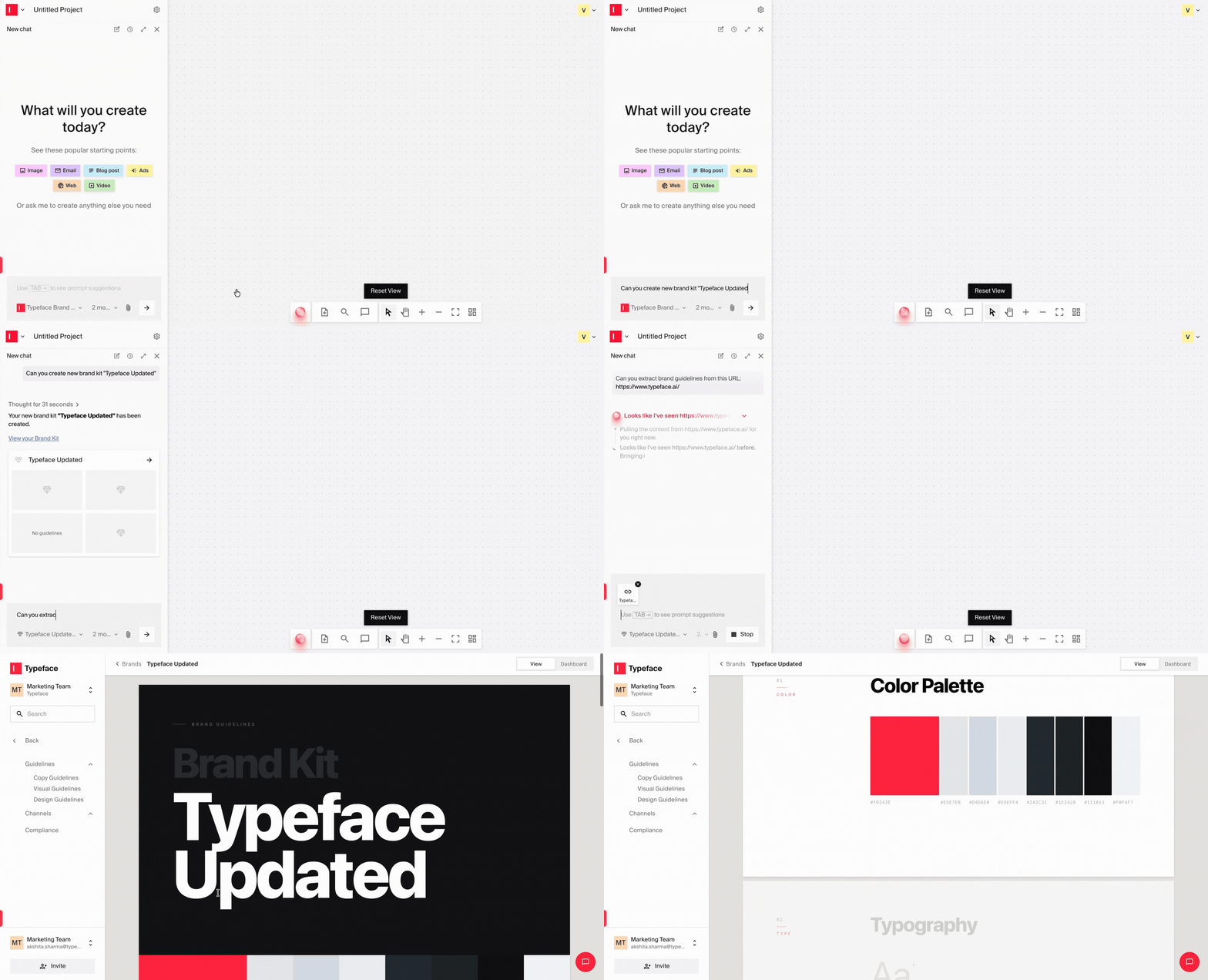
Brand systems become harder to maintain when every update requires jumping between tools or workflows. With chat-driven brand kit management, your team can now set up, update, and explore brand kits conversationally, without breaking out of the workflow they're already in.
You can generate a brand kit from a marketing website URL, update copy guidelines, manage words to avoid, adjust brand settings, and retrieve specific brand details directly through chat. A new Preview mode also gives a cleaner, read-only view of your brand kit.
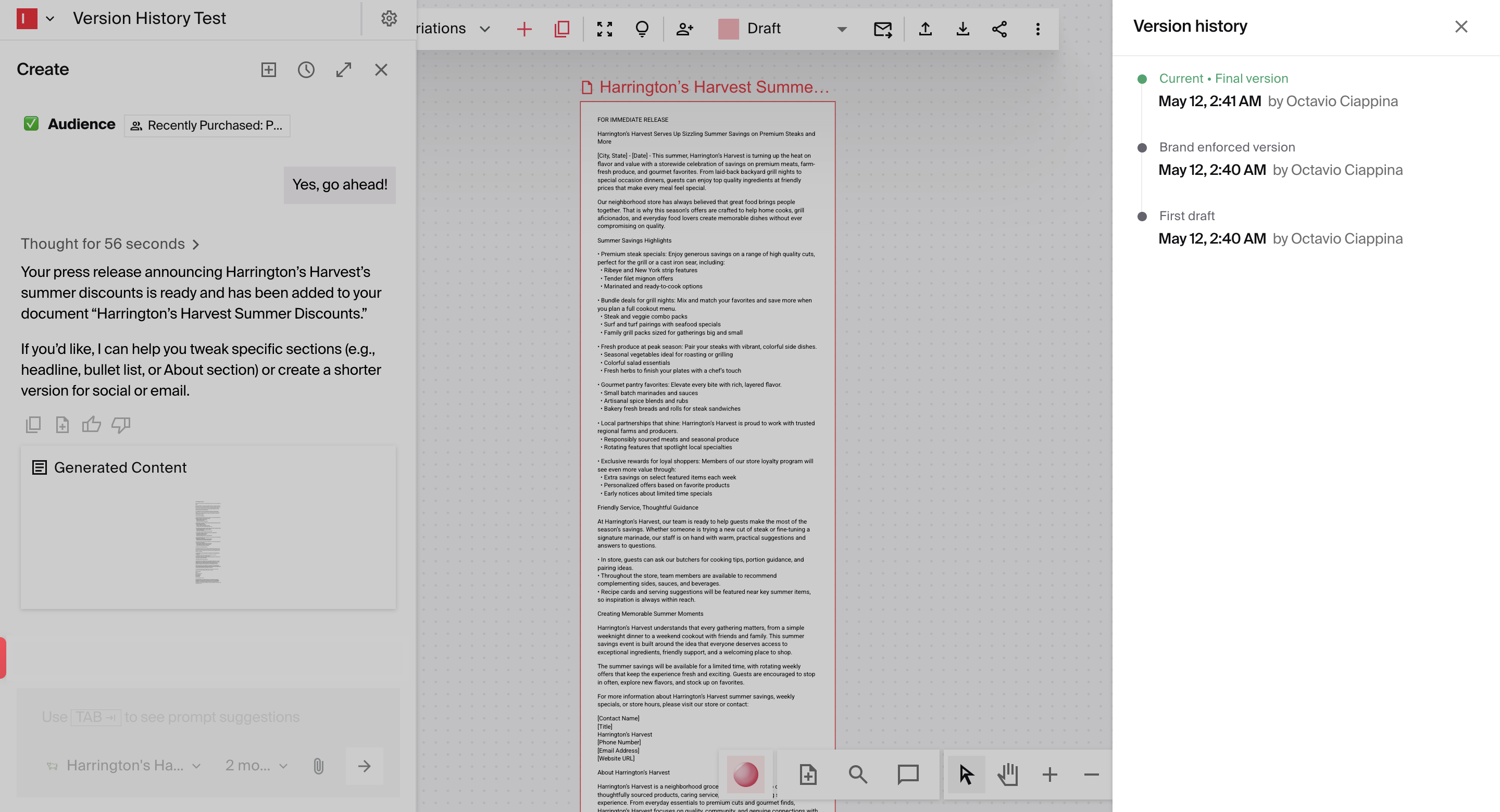
You can also see how copy evolves throughout the brand enforcement process: from the original draft to the brand-enforced version, and finally the fully validated final version.
That same governance now extends beyond text with the new Visual Brand Evaluator, which automatically checks images and creative assets against your visual guidelines as content is produced.
Learn more about Arc Graph.
Go from campaign brief to fully assembled, on-brand emails
Building an email campaign often involves a lot of manual work before the messaging is even finalized. You have to pull the right modules, assemble layouts manually, draft the copy, and then adapt that content across every touchpoint in the campaign.
Now, you can skip the manual assembly and go from campaign briefs to ready-to-send emails. Simply provide the brief, and Typeface automatically finds the most relevant layouts in your brand kit and assembles the email around your brand guidelines and campaign brief.
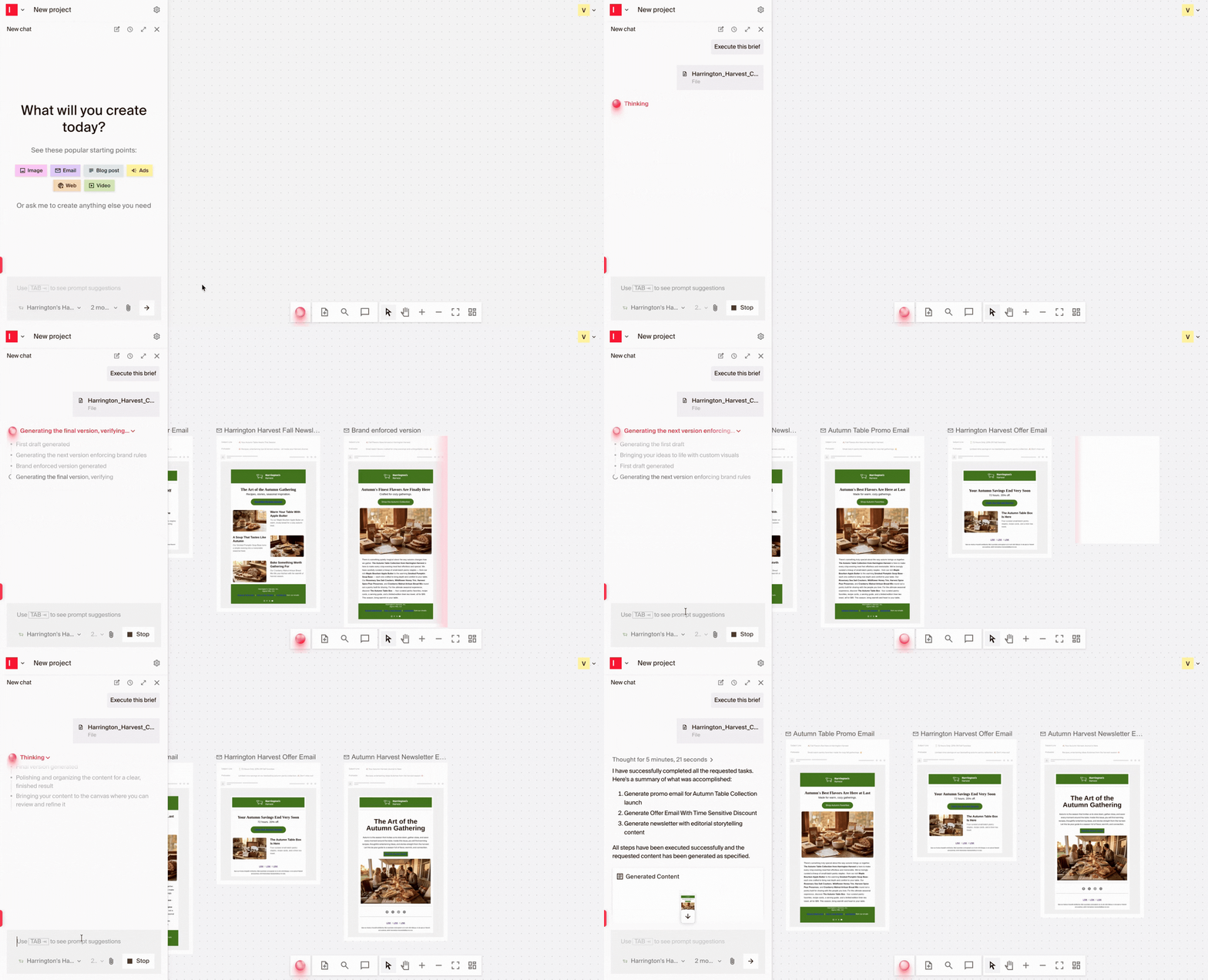
One customer is already using this workflow to generate entire email sequences from a detailed campaign brief, freeing their team to focus on strategy rather than assembly.
For tighter control on copy, a new "Generate variations" option inside Generative Refine spins up multiple copy options for any text element in your email copy, so you can pick the angle that fits without starting over.
Repurpose your existing videos into ready-to-publish sizzles
Short-form video is one of the highest-performing types of content, but it’s also one of the slowest types of content to turn around. Creating sizzle reels often requires hours of scrubbing through footage, pulling the right clips, and stitching them together manually.
The latest updates to Video Agent are designed to speed up that entire process. Simply provide a prompt, and the agent will automatically identify the most relevant clips from your existing content and assemble a post-ready sizzle.
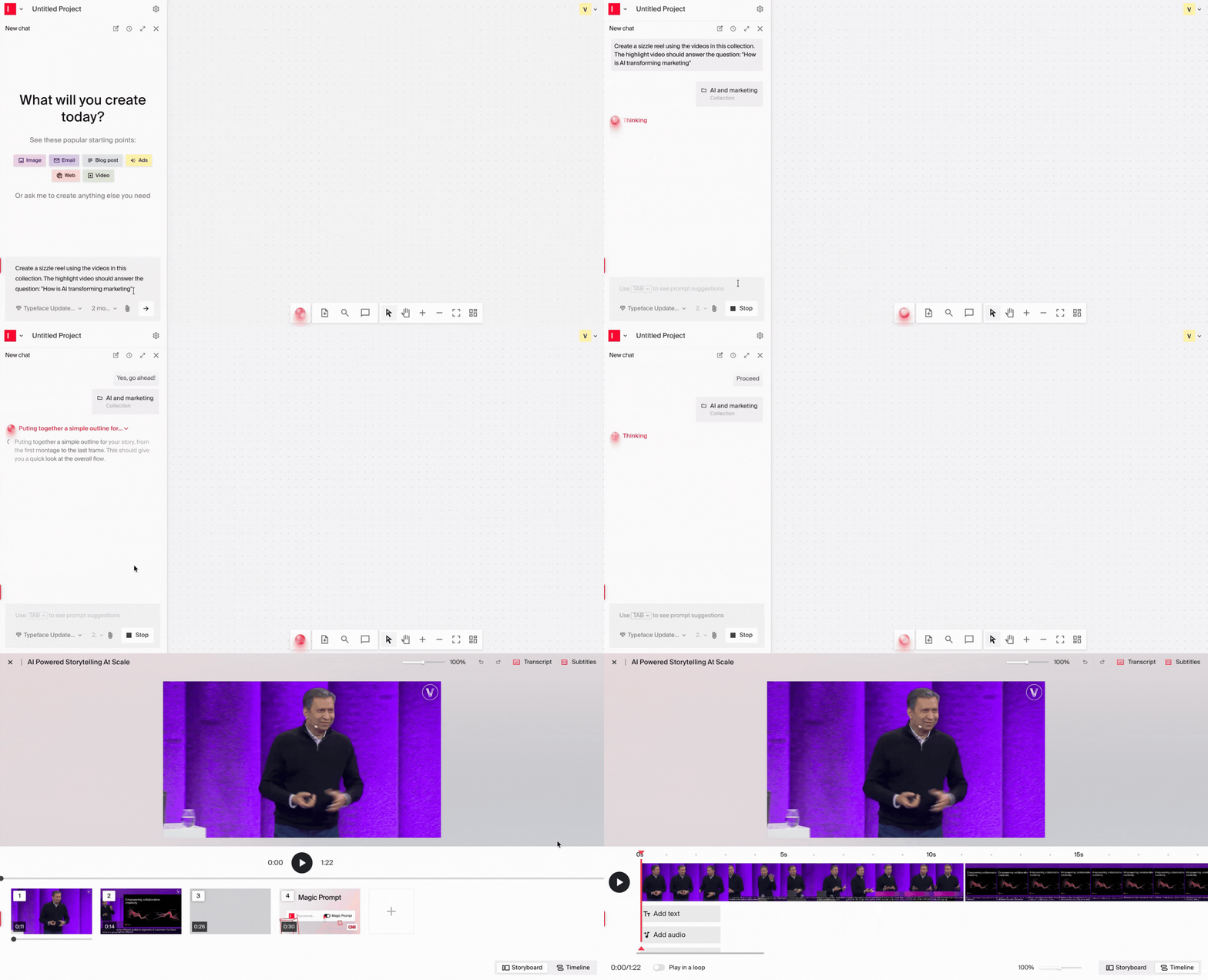
We also rolled out several upgrades to the video editor, including text-based editing, smoother transcript editing, support for multiple music and audio tracks, easier transitions, title scene generation, and seamless sub-clip creation.
Learn more about Video Agent.
Keep your workflows moving across the tools your team already uses
Every time your team has to switch between platforms to complete a task, workflows become harder to manage. Context is lost, manual steps start piling up, and handoffs are ultimately delayed.
To help reduce that friction, Typeface now connects more directly into the tools, systems, and agent workflows your team already relies on.
Connect Typeface agents more easily across Google’s ecosystem. The Typeface A2A agent is now available in Google Marketplace, which makes it easier for teams to interact across agent ecosystems directly from Google’s environment.
Access the information and actions you need directly inside your existing workflows. Typeface MCP, which we introduced earlier this year, now renders embedded UI experiences inside the apps where you work. You get what you need without being redirected to the platform.
Connect external systems directly into your workflows with less custom setup. IT teams can now bring existing business systems into Typeface. Once connected, agents can use it mid-workflow to pull data from internal systems or trigger actions in external ones.
Reduce manual coordination after uploading your assets to Typeface. When a new image lands in Asset Hub, Typeface automatically triggers whatever comes next in your workflow, whether that’s a review step, a distribution action, or a handoff to another system.
Bonus enhancements
Go back to any version of a document, anytime: Review and restore the exact version of content that works best, without losing visibility into how copy changed along the way. Typeface now automatically saves changes to your document at key moments like major edits or collaborative sessions.
Make structured content easier to organize and review: You can now add tables directly inside Typeface documents. This makes it easier to structure information in a way that’s faster to scan and compare.
Reduce the manual work of updating banner ads at scale: Make a change once and push it across every banner ad on your canvas, regardless of layout, feed, or container. Works for content updates like images and text, as well as formatting changes like font and fill colors.
Build production-ready agents with less guesswork: The updated Agent Studio experience makes workflows easier to assemble with clearer tool organization and built-in search, while new testing capabilities let you validate exactly how agents behave before they go live.
Create polished campaign assets faster without moving between design tools: Teams can now generate flyers, posters, infographics, and other visual assets that combine image and copy in a single output. Attach a reference image to carry over a style from a previous piece.
Get more control over how images are generated: Choose the image generation model that best fits the style and quality of the content you’re creating. You can now switch between Nano Banana and GPT Image 2 directly from the chat interface.
That's a wrap for May! Stay tuned for what's coming next, and happy creating with Typeface.
Related articles
May 5, 2026
Welcome back to Feature Focus! We're building on our evolution into a Marketing Orchestration Engine, giving teams more flexibility in how they create and distribute content. This month, that means t
March 25, 2026
Welcome back to Feature Focus. This month marks Typeface’s biggest evolution yet: we’ve crossed a new frontier as a Marketing Orchestration Engine, bringing Marketing, IT, and Creative teams together
January 28, 2026
Welcome back to Feature Focus! We've added generative sizzle video creation, team collaboration features, and saved webpage modules to help you scale content production faster. Let’s dive in → Creat