January 27, 2026
Introducing Typeface MCP: Context-Aware Content, Right Where You Work

Arshkrit Chowdhury
Sr. Product Marketing Manager
AI summary
Typeface MCP brings AI-powered content creation directly into your workflow. Learn how to generate on-brand, context-aware content in ChatGPT, Claude, Gemini, VS Code, and other tools you use daily.
Modern marketing teams work across dozens of tools, bouncing between briefs, brand guidelines, asset libraries, audience docs, chat threads, and a plethora of desktop AI assistants and developer tools. Every handoff comes with a tax: copy-pasting between tabs, re-explaining context, losing momentum, and watching “on-brand” drift into “close enough.”
That friction adds up, but it doesn’t have to.
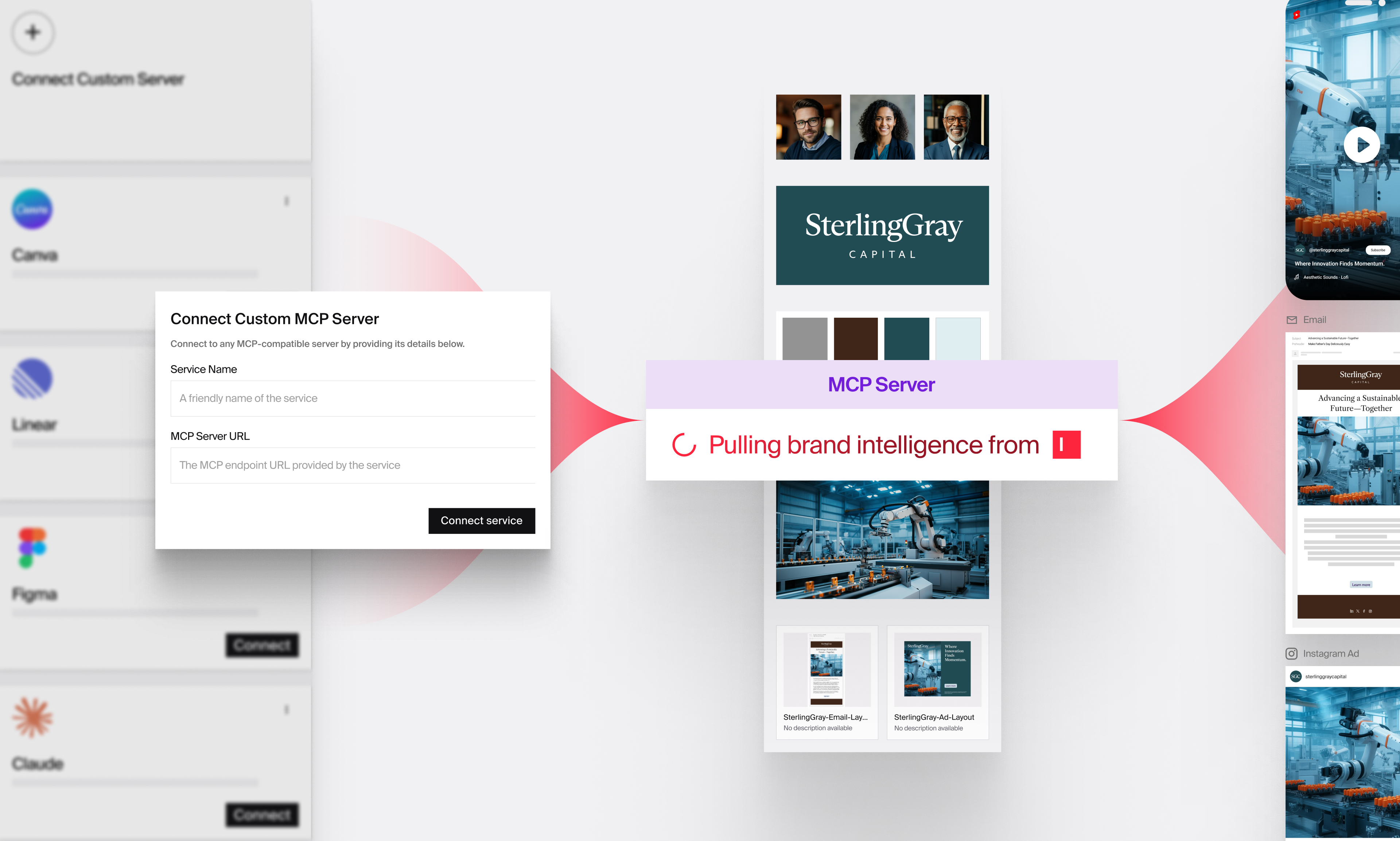
Late last year, we launched Typeface MCP (Model Context Protocol): a secure bridge that lets MCP-compatible AI clients—like Claude Desktop, ChatGPT, and VS Code—pull approved brand and campaign context from your Typeface environment. So, you can create content grounded in your brand intelligence and campaign context without ever leaving your workflow.
The big idea: Bring your brand intelligence to your AI assistant
Generic AI is great at writing. But marketing requires writing with constraints: voice, tone, layout rules, approved assets, and audience nuance. Typeface MCP gives your AI assistant access to what makes your brand unique: brand kits, proven templates, approved assets and layouts, audience segments, and project history—so every output is context-rich and brand-aligned.
What is Typeface MCP?
Typeface MCP is a standardized, secure integration layer that makes your brand intelligence accessible in any MCP-compatible environment—IDEs, AI assistants, and more. Instead of logging into Typeface separately, copying brand guidelines, and manually feeding context to your AI tool, MCP automatically brings your brand kits, audience segments, approved visual assets, and campaign history into your existing workflow.
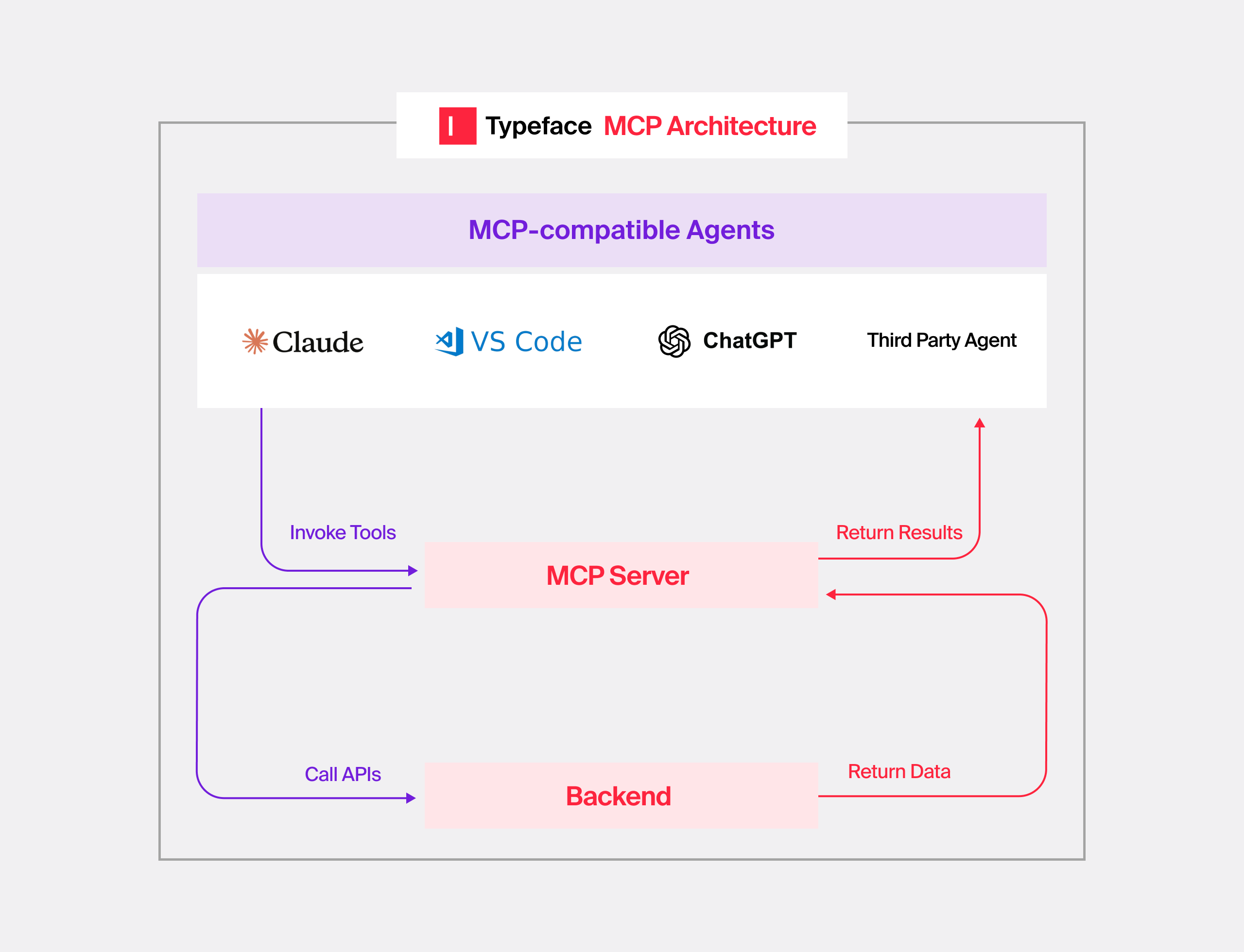
Here’s what you can do with Typeface’s MCP:
Access brands, audiences, layouts, and assets at team or org level
Generate personalized content within project context
Create new projects within any team
Discover all teams and organizations you're part of
Access project and chat history to maintain campaign continuity
Why should your team use Typeface MCP?
1. No-code setup instead of months of integration work
Traditionally, connecting your tools to a content platform means custom API integration. That's weeks of development work just to handle authentication, endpoint mapping, and token management.
With Typeface MCP, the setup is straightforward. Once you authenticate, the system automatically discovers all your available accounts. From there, you can create and organize projects using simple, natural language commands. What used to require custom development becomes a fast, repeatable setup that anyone on your team can complete
2. Eliminates platform-switching and context loss
Five minutes per platform switch doesn't sound like much. But across a team making dozens of switches per day, that's hours of wasted productivity, and more importantly, lost creative momentum.
With Typeface MCP, you can work the way you already work: code landing pages in VS Code, draft in Claude Desktop, brainstorm in ChatGPT. Typeface MCP brings your brand ecosystem into the tools you’re already using.
Your AI assistant already knows your brand's voice, has access to your approved assets, understands your audience segments, and can reference your campaign history. You stay in the flow. You generate faster. You deliver on-brand content.
3. Multi-modal content creation, guided by brand intelligence
Marketing teams currently juggle separate AI tools for every content format: one for writing, another for images, another for layouts. Each tool requires separate brand explanations and manual coordination to ensure consistency.
Typeface MCP consolidates multi-modal creation into your workflow. Generate text, images, video, and layouts from a single AI assistant, all guided by the same Brand Kit. Your visual identity, messaging guidelines, design system, and brand voice apply consistently across every format automatically.
4. Secure by design, with enterprise-grade governance
Content generated through disconnected AI tools creates risk: brand inconsistency, compliance violations, data exposure, and lack of audit trails.
Typeface MCP is built for enterprise security requirements from the ground up:
OAuth 2.1 authentication: The same secure authorization flow you use for the Typeface web app.
Permission-based access: The MCP Server respects your existing team and organizational permissions. Users only access the Brand Kits, audiences, layouts, and assets they're authorized to use, regardless of which AI tool they're working in.
Data isolation: Your brand assets, audience insights, and campaign context stay inside your secure Typeface environment. Content is generated using your data, but that data never leaves your controlled perimeter.
Complete audit trails: All content generation through MCP is logged and traceable, critical for compliance reviews and governance oversight.
How Typeface MCP works
Authenticate: Set up a secure connection between Typeface and your preferred AI tools in minutes using QAuth 2.1 authentication. Typeface automatically surfaces everything you need—your brand kits, audience segments, approved assets, and layouts—right where you're working.
Generate content: Create personalized, on-brand content directly in your projects without leaving your AI workspace or developer tool. Specify which brand, audiences, layouts, and assets to use, or let Typeface guide you to the right resources.
Collaborate and publish: Everything you create flows back into Typeface for team collaboration, approvals, and publishing.
What’s next
Typeface MCP is the foundation—connecting the tools you already use with the brand intelligence you’ve already built using Typeface. And we’re just getting started.
Next up:
More customization and flexibility to fit your workflows and governance needs
More integrations to connect even more of your marketing ecosystem
Get a technical walkthrough and see how Typeface MCP keeps your team in flow.
Related articles
November 5, 2025
Connect Typeface to your daily tools, automate campaigns in Salesforce, and publish complete webpages in minutes. Welcome back to Feature Focus! Last month, we expanded how and where you can access T
December 11, 2025
You've probably seen it happen: an AI pilot that shows real promise, gets everyone excited, then somehow never makes it past the initial team. We've worked with dozens of enterprise marketing teams th
September 16, 2024
New intelligent agent technology, strategic acquisitions, and product advancements automate complex multimodal workflows to deliver unparalleled personalization in the flow of work. Enterprises have l