

AI summary
Tool integration or an AI marketing platform? Discover how to turn your existing marketing stack into a connected, AI-powered workflow.
No single marketing platform can replace sets of purpose-built tools. Extending capability has always meant providing easy integrations so that tools can talk to each other and streamline how work moves from creation to publication.
With AI content creation, integrations have to do more than that. Brand context now needs to move across content generation tools to ensure AI creates compliant campaigns.
This is where a workflow-governed AI marketing platform comes in.
It enables context-aware content generation without the heavy lift of repeated document uploads or manual brand checks, giving teams speed without sacrificing governance. This is a better approach than developing an all-in-one tool or consolidating tools that connect workflows but keep brand intelligence siloed.
TL;DR
Consolidation isn't one tool replacing your stack. It's one brand intelligence layer running through all of it.
Arc Graph holds your brand knowledge. Orchestration runs it through every campaign. MCP carries it into every tool your team uses.
Your DAM, CRM, and MAP stay exactly where they are. What changes is how your team works with them.
Implementation takes 90 to 120 days, mostly for change management, not tech.
What makes this kind of consolidation possible?
Think of an AI marketing platform as the layer that links every tool you already use, instead of replacing them. Three things make that possible:
1. A brand intelligence layer
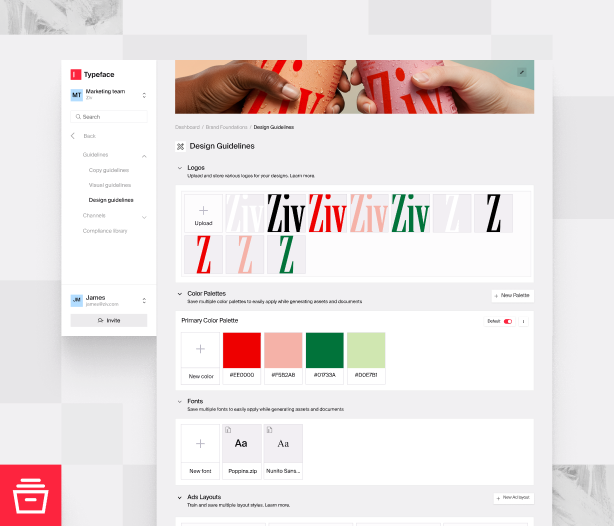
Holds brand intelligence — brand knowledge, visual and copy guidelines, approved assets, and campaign context that AI draws from when creating a campaign.
What it means for your team
Without brand context, AI generates generic output. With a generative AI tool and brand guidelines sitting in a doc or portal, enforcement isn't a given. You expect teams to apply guidelines but can’t confirm it until drift shows up later in the campaign cycle or after it’s already live.
With it, teams review content that already has brand guidelines and approved assets applied. Scale that to hundreds of multi-channel assets across sub-brands and regional locations, and manual effort alone can’t keep up.
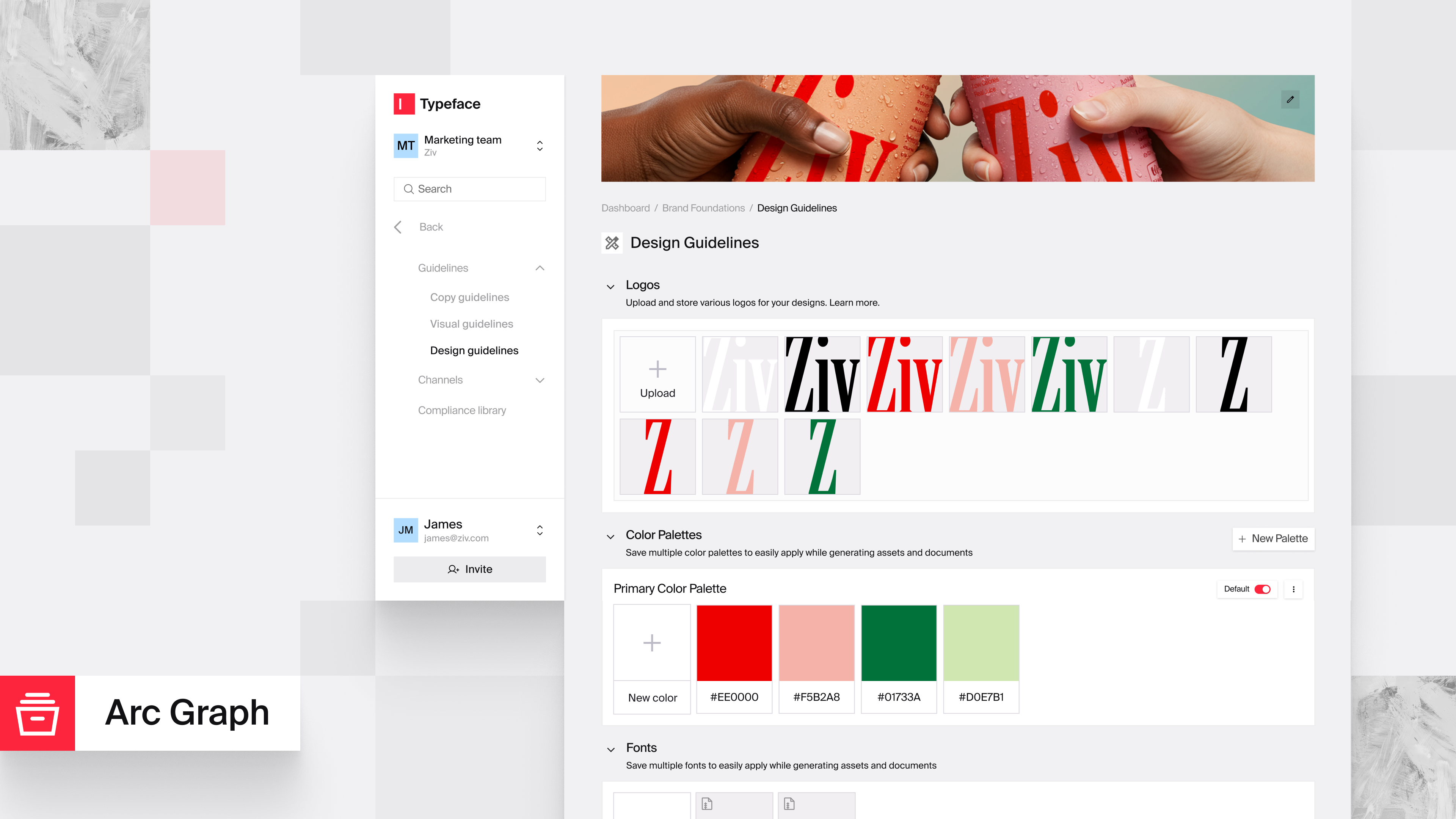
In Typeface, this layer is Arc Graph, a dynamic "brand brain" that applies brand context to every piece of content and updates dynamically with new brand information. Set it up once, and Typeface applies your guidelines every time you create content after that.
2. An orchestration layer
Executes brand intelligence across the workflow. If the brand intelligence layer establishes what AI knows, orchestration is what AI does with that knowledge.
What it means for your team
Point solutions generate individual pieces. Each comes out of a separate tool, and someone on your team has to pull them together into a finished campaign manually. An AI marketing platform replaces those separate hand-offs with one connected flow, from brief to generation to review to publishing, with brand intelligence applied at every step. Brand-governed workflows let teams move at speed without compliance taking a backseat.
Saving hours is an early win. The AI ROI story comes from what teams do with that capacity — reach more audiences, launch in new markets, and expand to more channels.
3. Model Context Protocol or MCP
The bridge between your brand intelligence and every AI assistant your team works in.
What it means for your team
Your team loses a few minutes every day manually briefing each tool or re-pasting guidelines. MCP ensures that whichever AI assistant your team uses works from the same brand context, keeping voice, design, and claims compliant across every format. Without it, brand context stays trapped in one platform, and the moment your team reaches for an external tool, consistency breaks.
Typeface: Enterprise AI marketing with shared governance
In Typeface, brand intelligence plugs into your existing campaign workflows, through every step, and every tool your team uses. Here’s what that looks like from campaign to launch:
Set up your brand system
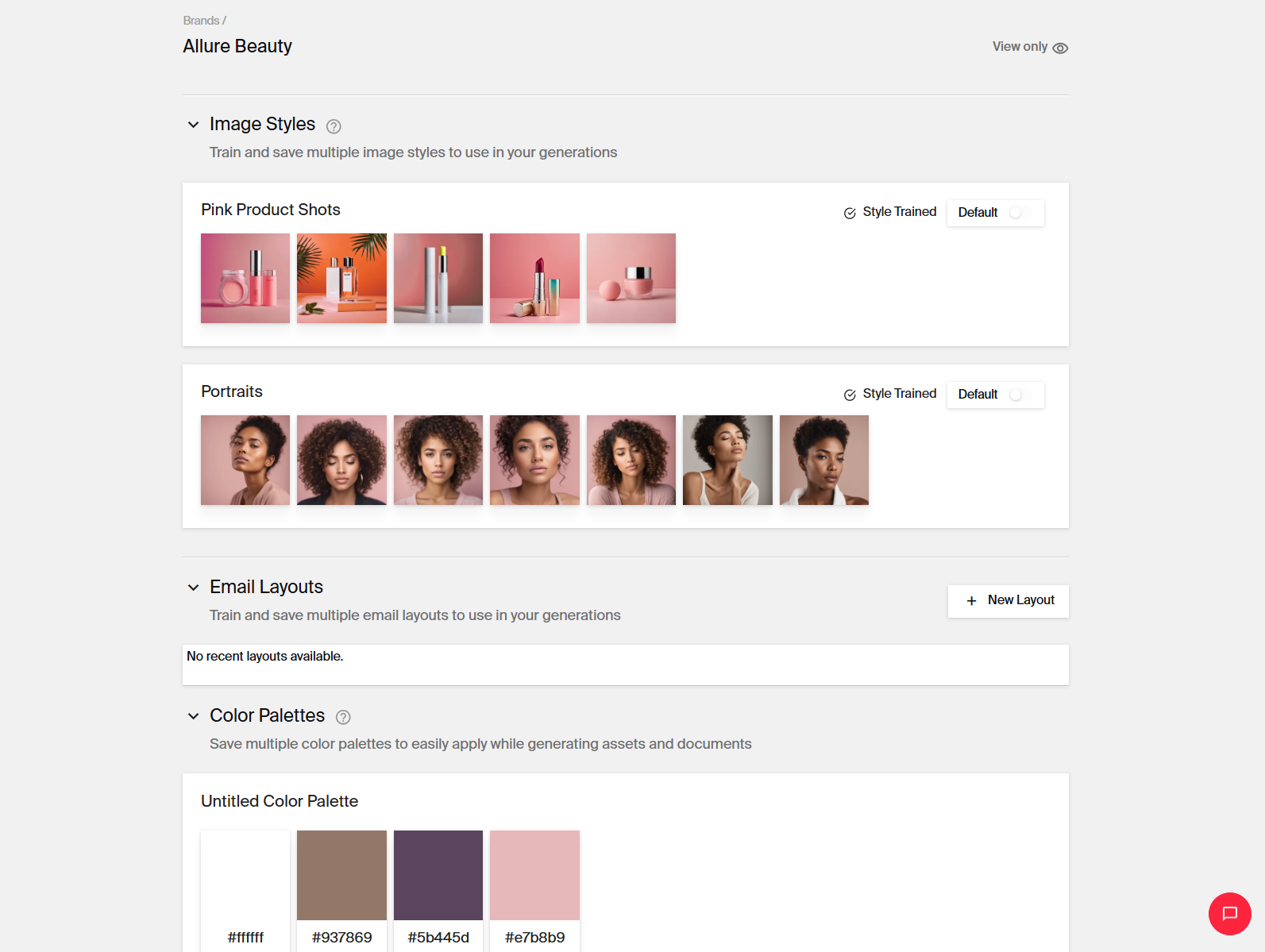
- Bring in your brand guidelines and assets:
Copy: Your rule book, words to avoid, and default output language and tone
Design: Logos, color palettes, fonts, and layouts for email, web, banner ads, and push notifications
Visual: Image styles, illustration styles, product photography, and custom imagery
Approved assets: Product images, videos, and documents to anchor content in
- Import audience segments from your CDP. Build out personas with demographics, professional roles, interests, challenges, and objections.
- Arc Graph organizes your assets and applies relevant audiences during campaign generation. It evolves with brand rule updates, customer feedback, new audience context, and compliance patterns across campaigns.
- Brand Agent adds real-time governance on top. It checks every piece of text and every image against your guidelines as it's generated, flagging issues before anything ships.
Create assets
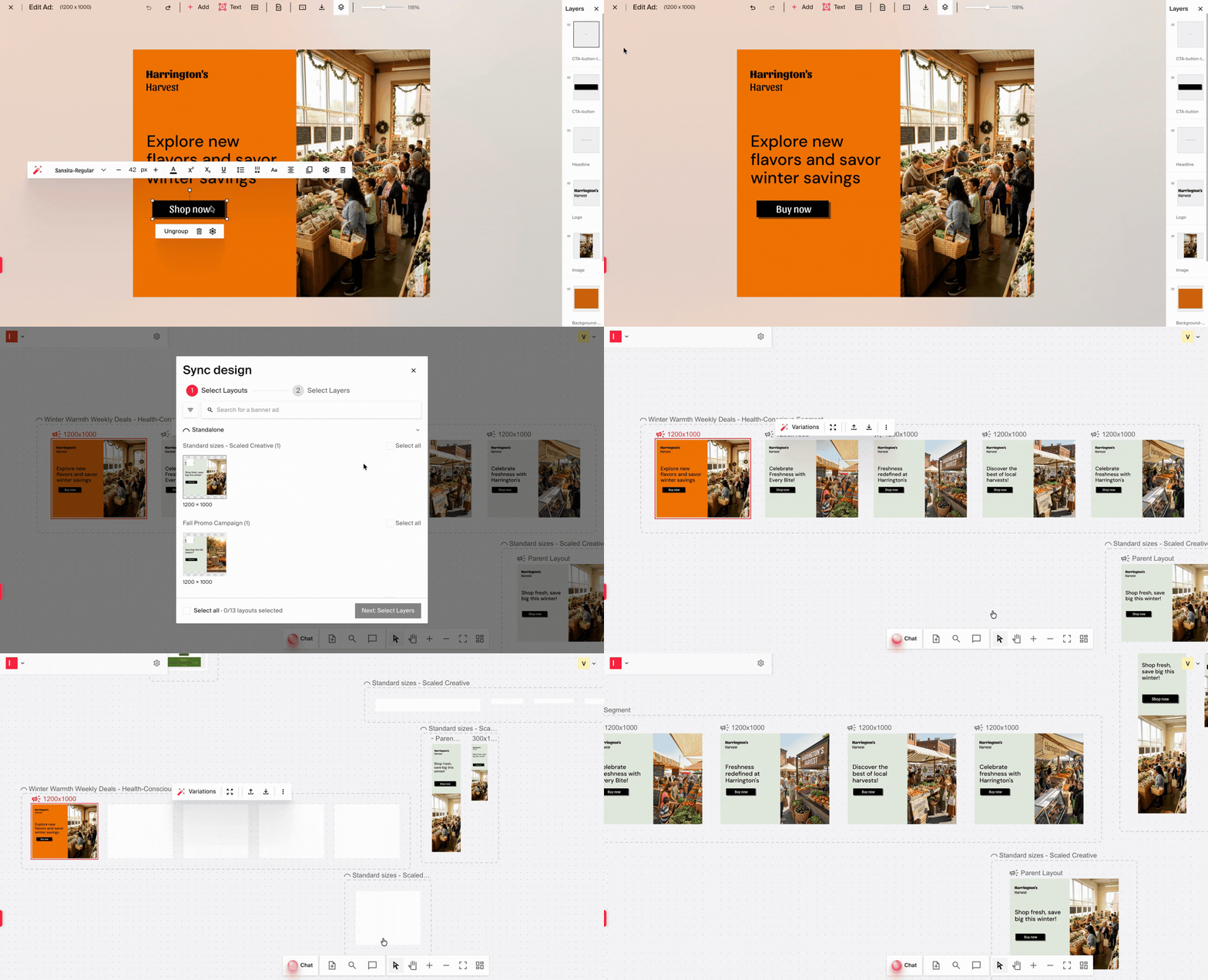
- Purpose-built Arc Agents draft emails, web pages, social media posts, ads, and blogs. They work off your campaign brief, and use your approved images, videos, templates, and knowledge sources. A few examples of what you can generate:
Banner ads, social media ads, and video ads
Blogs, with automated keyword and answer engine optimization (AEO) suggestions
Product and service pages, and localized variations
Email customer journeys and personalized variations
Images and their platform-specific adaptations
Sizzle reels and social media clips
Audience-specific variations, asset batches, and content repurposing
- You can also build and test custom agents in a sandboxed environment in Typeface. These agents can work alongside your internal agents, managing more of that same work, faster.
- Bring in your existing workflows. Add teams and set permissions for who can do what.
- Create and organize campaigns on Arc Spaces, an interactive canvas where copywriters, creatives, and legal can see the full campaign in one place. Typeface MCP extends that same workflow into whichever AI assistant your team already works in.
Review and approve
- Your copywriters and creatives review AI’s outputs. Brand Agent (for copy) and Visual Evaluator (for visuals) cut review time for essential rule checks.
- Further downstream, legal and executive review and sign-off happen. Email and Slack notifications keep everyone in the loop.
Launch campaign
- Push campaigns live to Google Ads, Campaign Manager 360, and Meta Ads via integrations. Or export straight to your tools, or download content as HTML, PDF, PNG, JSON, or Excel.
What’s the implementation timeline?
With connectors to your existing marketing tools already in place, and further integrations built as you start using the platform, what sets your timeline is change management. Teams need time to work through their doubts before tool use becomes intentional.
A good strategy plans for 90-120 days to roll out AI properly. That time goes into four things:
Decide what goes to AI and what stays with your team
Not every workflow needs to move to AI, and an audit will make that clear. Check where your team's time goes, how long a campaign brief or a localized landing page takes, and where approvals stall or brand inconsistency creeps in.
The strongest early candidates are high-volume, repetitive work, like resizing, localization, and channel adaptation. That's where the platform delivers immediate, measurable time back.
Work that needs a human call, like brand positioning or high-stakes messaging, stays with your team by design. Everything else can move over time, based on how the platform performs in early tests and how confident your team gets handing off more.
Get the right people involved
Brand governance needs to be in place before teams start creating campaigns. Creative leads help define governance from the start. Legal and compliance get the audit trails and controls they need to sign off. Marketing managers learn what to brief and how to shape AI output into finished assets.
Measure and adjust after launch
Track activation rate and time-to-publish at 30 days, brand review pass rate at 60, and cost per asset and team satisfaction at 90. Keep that rhythm going past the 90-day mark, adding new metrics as your use cases expand, and using check-ins to analyze what's working and adjust what isn't.
Your stack and Typeface: See it in action
When it comes to content creation with AI, consolidation doesn't mean replacing your tools with one "AI transformation platform." The choice between fewer tools and more control is a false one. With the right platform, you get both: best-in-class capabilities, brand governance, and the flexibility to add new tools as you need them. Typeface fits that bill.
Run a campaign brief and your actual brand guidelines through Typeface. Book a demo or talk to our team to see what consolidation looks like with your own stack.
FAQs
Q. Can an all-in-one AI marketing platform replace specialized point solutions?
No. Your DAM, CRM, and marketing automation platforms stay exactly where they are, doing what they already do well. What comes together is the work itself: briefs, content creation, brand checks, and approvals, all in one place. Your existing tools feed into it instead of sitting one tab away.
Q. What's the biggest risk in AI platform consolidation for enterprise marketing?
Brand consistency across campaigns. When one platform powers all your content, the cost of a misaligned output is higher. Ask every vendor how brand rules are enforced at the generation layer, not just stored in a settings panel.
Q. Is AI marketing consolidation cost-effective compared to channel-specific tools?
Often yes, but the real savings aren't in licensing. They're in coordination overhead from all the time your team spends on tool-to-tool handoffs, reformatting outputs, and chasing approvals across systems.
Q. Does an AI marketing platform replace our CRM and MAP, or sit on top of them?
Neither, fully. AI marketing platforms like Typeface connect to your CRM and marketing automation tools to pull audience data and campaign context.
Q. How does an AI platform handle data from multiple tools without creating a new silo?
It integrates with your existing tools so data flows in both directions. Brand guidelines and approvals flow downstream into content creation, while campaign performance and engagement data flow back upstream to inform future content.
Q. Is AI marketing consolidation right for every team?
It works best for teams whose content workflows are high-volume, multi-channel, and brand-sensitive. If you're a five-person team producing one campaign a quarter, the coordination overhead you'd eliminate is small. If you're running hundreds of content variations across a dozen markets, it's not.
Related articles
March 16, 2026
Creating on-brand content that performs—across channels, teams, and regions—is harder than ever. Brand guidelines live in PDFs. Approved assets are scattered across folders. Audience insights sit in

September 23, 2026
The other day I caught up with a friend who is a content lead at a mid-size B2B company. She told me her team was gearing up for a product launch campaign, and this is how she described the process: "
August 12, 2026
Welcome back to Feature Focus. July's updates are about making the work your team has already done go further: your brand guidelines, your approved email creative, and the web content you've been pub