
AI summary
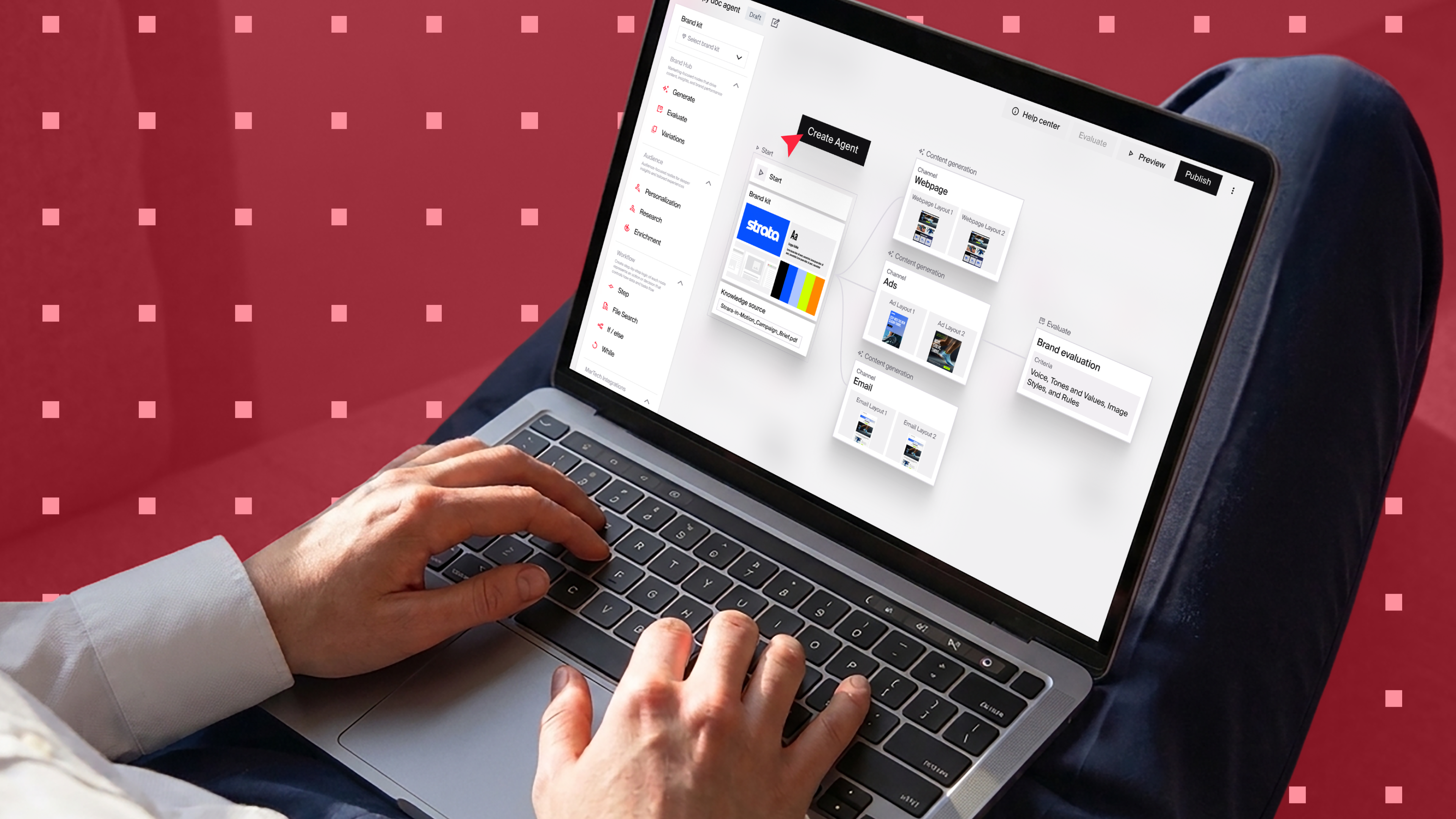
Orchestration uses specialized agents and your brand intelligence to run multichannel campaigns. Go from fragmented point solutions to a shared workspace where marketers and creatives direct agents to personalize, scale, and repurpose content, boosting operational readiness and brand presence.
You can now build AI agents for most marketing tasks. Each specialized agent is useful on its own but can start to feel limiting when you move from smaller tasks, like creating an email to running multichannel campaigns.
Agent orchestration is more effective because now you have an agent handling each task in a workflow, connecting to everything you need to execute context-aware campaigns that resonate. In this post, you’ll understand the nuts and bolts of AI agent orchestration and the steps to set it up in Typeface.
TL;DR
In AI marketing orchestration, multiple agents deliver multichannel campaigns in a single platform, with your teams’ oversight.
Agents built for a specific job often create stronger campaigns than one general-purpose agent handling the full workflow.
Content marketing teams use agent orchestration to scale personalization and testing.
Effective orchestration relies on brand governance, human checkpoints, and flexible workflow extensions.
Typeface is a marketing orchestration platform with specialized AI agents handling complex marketing and creative workflows.
How does AI agent orchestration in marketing work?
In AI agent orchestration, multiple specialized agents run end-to-end campaigns in one platform, with your team overseeing them. A platform like this is typically built on a few key components:
1. LLMs (the brain): LLMs help agents (a) interpret goals, (b) think through steps, (c) decide when to ask for more information, and (d) adapt when something changes.
A simple example is if you give a blog creation agent a blog topic without specifying the audience or ideal length, the agent can ask follow-up questions to gather the context it needs to create a more informed blog.
2. Agents (the execution units): Each purpose-built agent handles a specific task in a workflow. It does what it’s best at, delivering better results.
3. Connectors (the bridges): APIs, webhooks, or a Model Context Protocol (MCP) make it easier to plug in whatever tools and brand intelligence the workflow needs to run multichannel campaigns.
4. Collaborative workspace (the hub): Marketing and creative teams work from a common space designed for easy collaboration. Role-based access and status updates keep everyone aligned while ensuring control.
5. Human in the loop (the checkpoint): Your team checks and enhances AI outputs. Handoffs are managed within the collaborative workspace.
6. Governance (the guardrails): Brand safety with AI workflows is part intentional design and part approved brand data. Your brand rules and assets keep your campaigns contextual and compliant.
Bottom line: LLM-powered agents run complete campaigns inside a governed workspace.
Why are marketing teams turning to agent orchestration?
Marketing teams use orchestration for specialized, high-volume tasks like ad variations, product photography, location pages, and personalized emails. Multiple agents working together not only boost scale and speed but also improve the overall quality of multichannel campaigns.
Let’s talk specifics:
If you’re a retailer running summer ad and social media campaigns with changing offers and product visuals, you can update assets and launch faster with channel agents.
Personalization is a top AI marketing use case. Agent orchestration extends personalization to more channels and use cases. For example, you can create a LinkedIn ad, personalized email, and a landing page variant from a single customer profile in one workflow run.
On top of SEO, teams now have to write for AI answer engines (AEO). Doing that well takes time (and not every team has enough of it). A blog workflow orchestrating specialized agents can help you consistently use strong AEO-boosting blog structures and writing guidelines.
Orchestration doesn’t lock you inside one system but extends your enterprise AI agent workflow to the LLMs your team already uses via MCP connections. When you move your work outside the platform, audience context and brand rules carry forward automatically.
AI agents fluent in your brand’s messaging and visual guidelines keep content recognizable across channels. Brand Agent checks drafts for violations and flags them for real-time fixes.
Bottom line: Agent orchestration spans multiple use cases across channels. With band rules built in, every asset stays consistent at any scale.
Steps to orchestrate AI agents for multichannel marketing
Connect the AI marketing platform to the workflows and tools your teams already use. When you bring your creative workflows into Typeface, you could connect to Adobe Experience Manager (AEM) to import brand assets and publish AI-generated content back to AEM. Campaign assets and data can similarly flow between Typeface and your existing review, publishing, and analytics platforms.
Step 1: Define use cases
Start with campaign workflows you run repeatedly and identify where AI agents can reduce the manual lift or cut waste.
Example: One common marketing problem is not having enough creative to surface relevant ads to a variety of segments. And generic ads are less likely to attract customers. With AI, you can personalize a banner ad for ten segments, then repurpose them into animated ads for Meta.
To get the workflow started, you’ll need a parent ad and your brand advertising guidelines. You’ll also need to set up review checkpoints that include your ads and legal teams.
When you identify a use case, map the workflow you already have for it, noting:
What starts the task
What outputs are needed
Which tools and teams are involved
This is the blueprint that will guide how you set up your workflow inside Typeface.
Step 2: Bring in your data and workflows
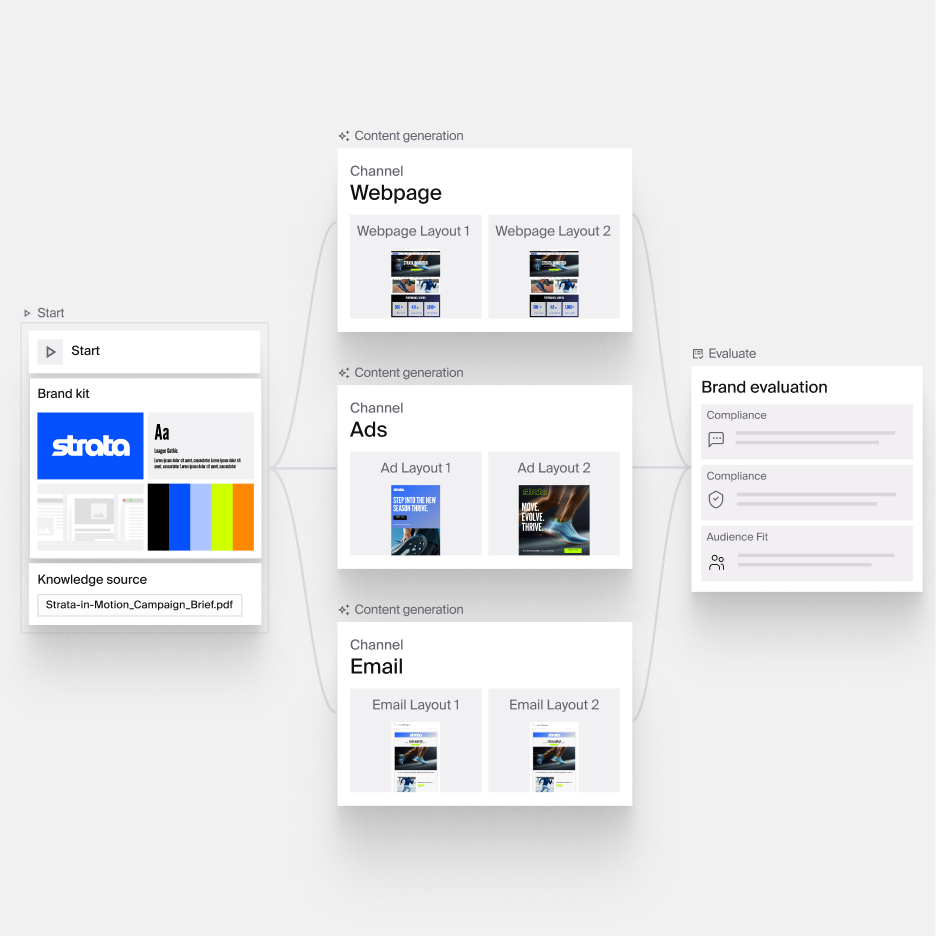
Once the use case is clear, bring the process into Typeface. To do this, you’ll need to create your Brand Kits and workflows.
Set up Brand Kits
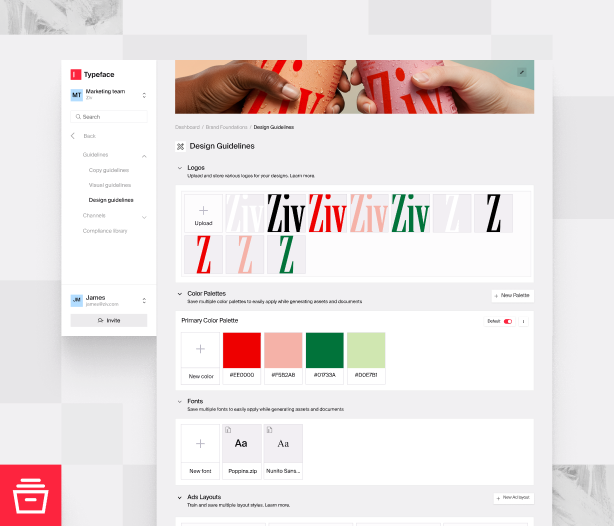
Sync or upload your brand guidelines and audience data to give agents the context they need to create personalized, on-brand campaigns. Your brand intelligence is centralized in Arc Graph, which updates with changes and is organized into Brand Kits you apply during generations.
Review your workflow steps
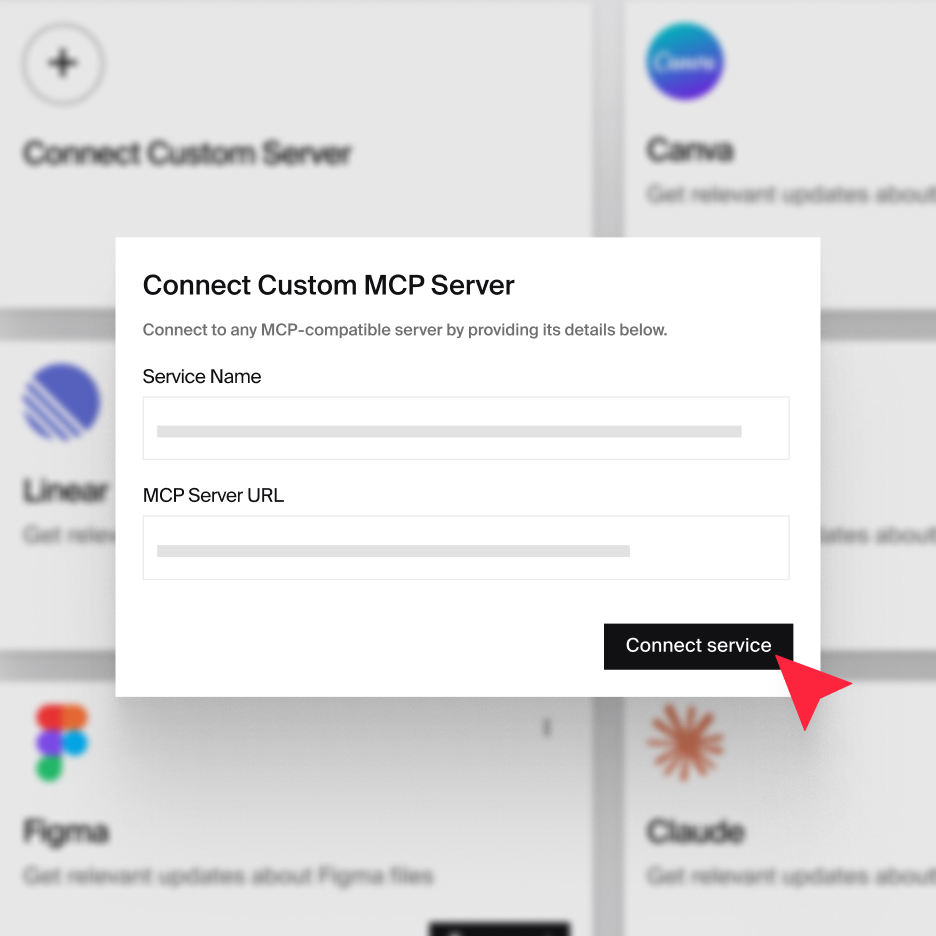
Your existing marketing workflows — from campaign approval gates to workflow extensions to external LLMs — transfer directly to Typeface. The set-up is supported by APIs, webhooks, custom code, and Typeface’s MCP.
Step 3: Create campaigns
Typeface offers channel specialists called Arc Agents and the collaborative workspace Arc Spaces to run marketing campaigns end to end.
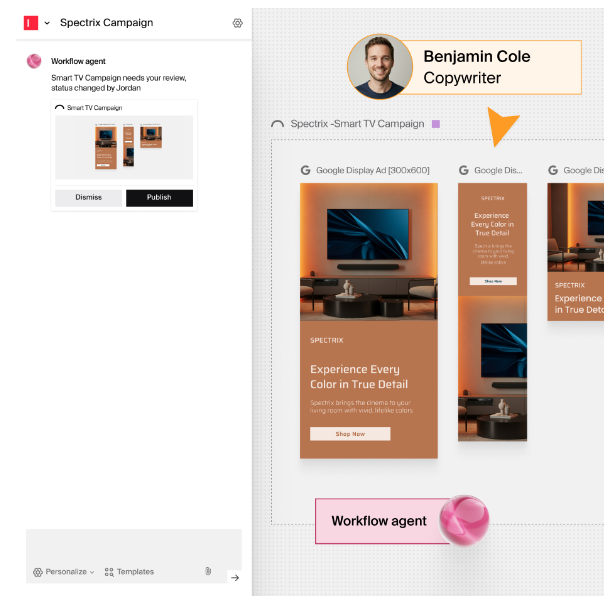
Our AI agents for content marketing:
Ad Agent for banner and social ad campaigns
Email Agent for personalized email sequences
Web Agent for blogs and webpages
Image Agent for product and lifestyle photography
Video Agent for sizzle reels, clips, and video ads
Call on any agent with a simple @agent mention and give them your prompt and campaign brief in the chat box. If required, agents will request more information. The outputs are generated in Arc Spaces, where you can review them side by side and see the full campaign flow.
Example: Scale location pages with Web Agent
Give Web Agent a prompt, like “Build location pages for our Kentucky chain” and answer the follow-up questions on your campaign.
Attach layouts and product sheets from your Brand Kit. Select audience segments and tone of voice.
See the full webpage in the canvas. Use the inline AI editor to tweak copy. If you need a different image, select a replacement or regenerate it with Image Agent.
Click “Create Variations” to generate localized images and new language versions of the page.
Send the page directly to your CMS or download content as HTML, PDF, PNG, JSON, or Excel.
Beyond the core agents, you can create new workflows in Agent Studio, a safe, sandboxed environment for building custom marketing agents. You don’t need to be a coder, although complex workflows and integrations are best handled by your IT team or our engineers.
Bottom line: Typeface is a marketing orchestration engine that combines workflows, AI agents, and brand intelligence to scale storytelling across marketing channels.
Orchestrate AI agents easily with Typeface
Marketing and agency teams are turning to AI agents to cut the cost and time of copy and visual production. Beyond efficiency, agent orchestration can be a real performance catalyst, helping teams scale personalization today and move toward 1:1 engagement. Brands that start using agents intelligently now are widening that edge as AI evolves and competitors catch up.
Channel agents are a great starting point for AI orchestration in marketing. Typeface’s marketing agents offer a simple and intuitive way to build multichannel campaigns at scale. Explore more with a demo or talk to sales.
FAQs
Q. How is agent orchestration different from traditional marketing automation?
Automated workflows follow a linear process in a predictable sequence of steps. If anything breaks in a traditional automated workflow, it stalls. Agent orchestration adds reasoning agents inside that structured workflow, allowing it to adapt when something unexpected happens. For example, if an agent is missing the audience context needed to create a millennial-targeted campaign, it can request more details or think of alternative ways to retrieve the right context before moving forward.
Q. What marketing tasks are best suited to agent orchestration today?
Agent orchestration is well-suited to repetitive, high-volume marketing tasks such as personalized email nurtures, blogs, image creation, and video repurposing. A common use case is turning a single version of a deliverable into hundreds of personalized assets at a fraction of the cost.
Q. Do I need developers to set up agent orchestration?
High-volume workflows and custom integrations need IT in the room early. Once they're set up and your team gets comfortable using agents, they can create workflows for approved use cases using a visual workflow builder that lets them connect agents and external tools without necessarily needing IT's assistance.
Q. What do AI agents need to orchestrate marketing campaigns effectively?
AI agents need enough campaign context and the right tool integrations to orchestrate marketing campaigns effectively. Give them detailed campaign briefs to ensure accuracy and connect workflows across tools to preserve context at every step.
Q. How many agents should be in one marketing workflow?
The right number depends on how many distinct tasks there are in the workflow. Build agents only when the task needs a different skill. A comparison page may pull in competitor research, copywriting, and SEO agents while content summarization may need just one.
Q. What’s the biggest mistake you can make when using AI marketing agents?
One of the biggest mistakes is giving agents too little brand and audience context, which leads to generic content and weak personalization. Another is trying to create a workflow around agents rather than integrating agents into your existing processes. The most effective AI marketing teams start by centralizing brand intelligence and defining clear workflows from the beginning.
Related articles
September 23, 2026
Your team is excited to use AI. Leadership has approved a budget. And in a vendor demo, everything looked seamless. But once you are in your actual environment, the real question arises: How do we ge
September 23, 2026
Marketing automation handles the tasks your team would otherwise have to do manually, on repeat, at scale. It’s useful — of course — but limited. A CMO at a financial services company I spoke to recen
March 25, 2026
Welcome back to Feature Focus. This month marks Typeface’s biggest evolution yet: we’ve crossed a new frontier as a Marketing Orchestration Engine, bringing Marketing, IT, and Creative teams together