

AI summary
Create custom videos across accounts or cohorts using simple prompts and editing workflows. See how you can personalize videos at scale with agentic AI.
Scaling video personalization with agentic AI means using AI agents to customize video content (text, audio, visuals) for individual viewers or audience segments, at a volume and speed manual production can't match. Agentic AI adapts and repurposes the assets you already have, so personalization becomes an ongoing workflow.
Let's see how AI removes the limitations of manual personalization and helps your team generate professional videos.
What is video personalization?
Personalized video content has scenes and messages customized to the viewer's needs, interests, or past activity. When a video speaks directly to the viewer, they're more likely to pay attention and take the desired action, such as scheduling a call, signing up for a free trial, or booking a trip.
A video can be personalized at three levels: to the individual, to a segment, or at scale through templates.
In individual-level personalization, the video is made specially for a named individual in a B2B sales or marketing context, someone you hold specific data on. This high-touch interaction can make all the difference, such as when you send a personalized video to a sales prospect that speaks to their challenges, goals, or recent news. As these videos are highly data-driven, they should be used judiciously to avoid coming across as intrusive or overly familiar.
In segmented personalization, a different version of the video is made for each cohort, such as an industry, a region, or a target-account tier. It's broad but targeted, much like one-to-few account-based marketing (ABM). Brands already personalize for a few segments, but producing versions for more of them takes significant effort and time, which AI tools can ease.
In template-based personalization, the same base video is used for everyone, and each viewer’s name, company, product, or location is inserted via text, voiceover, or overlays. At scale, AI tools make this practical, such as a retailer sending thank-you videos to thousands of customers after a purchase, each mentioning the customer’s name and the item they bought.
When should you invest in video personalization?
Personalizing video for key segments or customers creates a better experience for them, and that’s worth pursuing. Practically, you also need to know whether it will improve outcomes enough to justify the cost. The answer depends on four factors: audience size, deal or customer lifetime value, available resources, and industry.
Match the level of personalization to the value at stake:
High value, small audience: Individual-level videos make sense when each deal or relationship is worth the cost of a custom video.
Mid-sized cohorts with shared needs: Segmented videos give you relevance without producing a version for every person.
Large audience, lower value per person: Template-based videos let you personalize at volume with automation.
Consider your audience
Video personalization deserves a look when your audience is diverse, with different needs and preferences. Tailoring video to each cohort can drive more engagement overall than sending one message to everyone.
Consider your industry
Industries with large audiences, repeat touchpoints, or high lifetime value are often a good fit. These include retail, eCommerce, hospitality and travel, B2B SaaS and enterprise sales, edtech, financial services, and nonprofit. B2B SaaS and enterprise sales tend to use individual or segmented videos, while retail and nonprofit fundraising often lean on templates.
Check your assets
Personalization at scale is easier when you have a library of reusable assets: videos, images, graphics, and product footage. Even finished videos can be adapted by trimming scenes, stitching clips across videos, or adding overlays and voiceover. AI can speed up video repurposing and make it practical at high volumes.
How does video personalization work in Typeface?
Typeface is the orchestration engine for creating personalized, on-brand marketing campaigns at scale. It's multimodal, generating text, images, and videos to help marketing teams create content faster without sacrificing brand integrity.
Five components power Typeface's content creation approach:
Video Agent: This is our video generation agent, and just one specialist agent in a team of out-of-the-box campaign agents. It creates videos based on your text prompts, combines video clips into a sizzle reel, and animates static images for motion ads.
Brand compliance: Typeface maintains brand voice, creative guidelines, and compliance across AI-generated content. Getting started means training the AI on your brand's visuals and voice, which is then stored in Arc Graph and applied during generation for uniformly branded output.
Connected workflows: Typeface works across your asset libraries and your CDP or CRM for audience profiles and brand guidelines. Every AI-generated piece routes through customizable copy, legal, and team review workflows, then connects to your automation and publishing platforms to deliver content across channels as fast as you create it.
Collaborative workspace: Generate, edit, clip, and animate videos in Arc Spaces, and bring team members in to boost collaboration and creative output.
Responsible and ethical AI: Typeface's AI models block harmful prompts, keep your data, prompts, and outputs private, review AI outputs against safety standards before display, and implement the C2PA standard to increase transparency and brand trust.
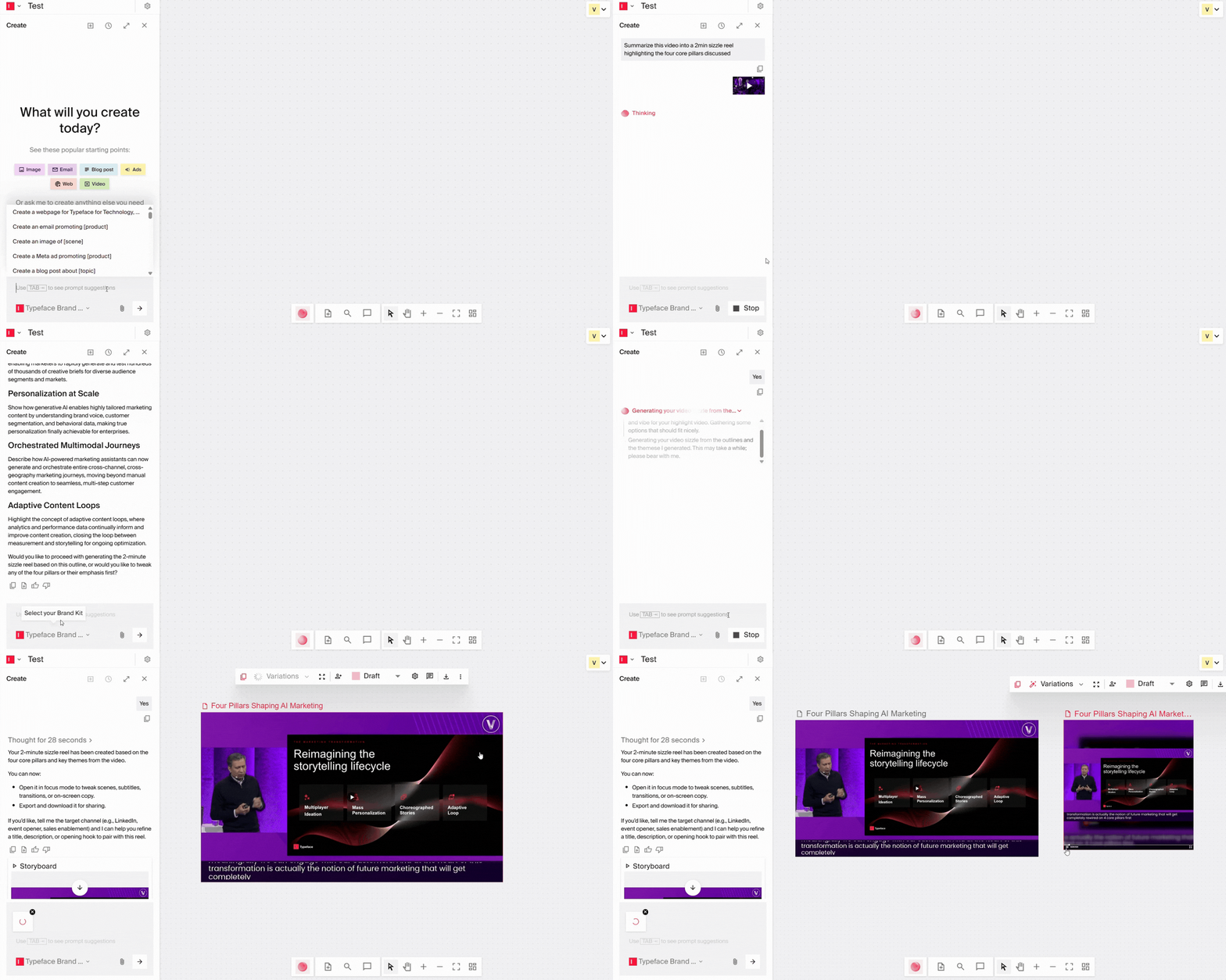
Generate a personalized sizzle reel from a brief
A sizzle reel (also called a highlight reel, sample reel, or demo reel) captures your brand's best moments through fast-paced, lively video storytelling. Averaging 1–2 minutes in length, it can be repurposed from videos you already have, for various marketing purposes, including audience personalization.
Example: A travel company can instantly personalize sizzle reels for different types of travelers using the same destination videos: cliff jumps and treks for adventure seekers, serene retreats for wellness travelers, and historical sites for cultural tourists, each with tailored visuals, voiceovers, music, and text.
Video creation steps:
State the goal of your video and its themes or key messages, specifying the target audience. Optionally, upload a video brief.
Video Agent finds relevant existing clips and suggests a script. Accept or edit it by describing the scene you want in a few words.
Customize the video: select length and format, upload an audio clip for music, and specify spoken/subtitled language, brand voice, and text styling.
Generate the video, make edits as needed (text overlays, CTAs, effects, transitions), then download it or add it to a content piece in Typeface.
Auto-resize videos for different platforms
Creative automation auto-resizes images and videos for different placements and platforms by cropping and adjusting aspect ratios while keeping focus on the important elements of a scene. With Video Agent, adapt video size by selecting the required dimensions (9:16, 4:5, 1:1, and more), and generate multiple campaign videos and audience-personalized variations from one workflow — scaling to multilingual, multi-market assets without extending timelines or budgets.
Animate still shots
AI can animate static images by adding motion, layering dynamic text or overlays, simulating camera movement, animating lighting, and adding ambient effects. Tell AI how to animate the video and choose the format and duration, and personalize it with tailored visuals, text, offers, voiceovers, or CTAs based on your audience segment.
Example: Animate a static product image, like a pair of sneakers, with a rotating price tag and a CTA for budget-minded shoppers, then animate high-end leather sneakers with premium cues.
Break down long-form content for new formats
Video Agent can trim a 5-minute destination video into bite-sized, platform-ready formats such as TikTok-style clips, a 30-second YouTube pre-roll ad, or a series of Instagram Stories from the same content, tailored for every channel.
Localize for regions or languages
Swap voiceovers into different languages and adjust currencies, offers, or booking URLs. Whether your viewer is in the Middle East or Australia, the message will feel accessible and relevant.
Also consider:
Videos welcoming team members and celebrating employee work anniversaries and business milestones
Personalized sales and marketing videos for targeted outreach
Micro demos tailored to specific prospects
ABM videos addressing individual accounts
Webinar and event invite videos
Related reading: Scale Video Content with Video Agent
Getting personalization at scale right: Key factors to consider
Personalization depends on a deep understanding of the customer. A single source of truth for customer data is a prerequisite to effective personalization. Even so, you may not have the information you need to create truly personalized experiences, so start by auditing your existing data to see what's missing and keep it clean and consistent.
Keep in mind that you may never know your customers as well as you'd like, since under GDPR and CCPA, they can request their data be anonymized. This personalization-privacy paradox must be handled thoughtfully, remembering that customer trust matters above all else.
Further, departmental silos can hinder personalization just as much as fragmented data. If marketing and sales send the same person different messages, it can confuse the customer and make your organization look disorganized. When your whole team is on the same page and communicating the same value, personalized content becomes more powerful and persuasive.
Create personalized videos at enterprise scale
Video personalization is a great strategy to cut through the noise, but it's complex, even for enterprises. AI agents guided by your team speed up content creation for each cohort, ensuring personalized experiences are delivered consistently across touchpoints. Agentic workflows automate repetitive manual tasks, streamlining content development and driving greater focus on strategy and storytelling.
Typeface is designed to meet the video personalization and volume needs of enterprises creating for multiple cohorts and markets. A strong AI safety framework, adaptable workflows, and integration with enterprise martech keep creative output compliant, consistent, and ready to scale.
Get a demo or contact sales.
FAQs
1. How can I ensure brand safety when using AI for video personalization?
Use an AI marketing platform that keeps your data, prompts, and outputs private, and generates output aligned with your brand guidelines. These are responsible AI (RAI) practices, which Typeface implements across our workflows: all outputs follow the brand standards in Brand Graph (animations, fonts, logos, and voice style), and your data isn't shared with third parties or models. Human oversight in data management is still essential to ensure brand safety.
2. Can Typeface integrate with existing video production tools?
Typeface works across your marketing tech stack, including your image and video editing software, and can support tailored workflows for large-scale operations. See our developer documentation for details.
3. What metrics should be used to measure the success of personalized video campaigns using AI?
Use these metrics:
Engagement: View duration, completion rate, and clickthrough rate, broken out by audience segment
Conversion: Conversion rate versus non-personalized versions of the same video
Business impact: Cost per acquisition, pipeline, or revenue influenced
Brand impact: Recall and sentiment, measured through brand lift surveys
Production efficiency: Time and cost per video, and the number of variants you ship
Related articles

February 12, 2026
Organizations are accumulating vast video libraries but struggling to repurpose their video content into bite-sized videos across platforms. There are clearly identifiable reasons for valuable video c

October 5, 2026
To scale video using AI, identify where AI fits your video strategy. Pilot it on low-risk use cases, build repeatable workflows with quality guardrails, and use AI to repurpose every finished video in

June 17, 2025
Creating video content (whether it’s a customer interview, a product demo, a webinar, or a training session) takes a lot of time, energy, and budget. But once the video is live, turning it into writte