April 2, 2026
How to Write a Blog Post in Under an Hour with AI

Akshita Sharma
Senior Content Marketing Associate

AI summary
You can write a publish-ready blog post draft in under 60 minutes using an AI blog generator.
Give the tool a topic, target keywords, tone, and any reference material. It generates an outline and full draft. Then you review, edit, and add your original perspective before publishing.
Total time: ~60 minutes vs. 6–8 hours with traditional methods.
The AI handles the drafting. You bring the insight, the audience knowledge, and the editorial judgment.
With 70% of people preferring to learn about brands through articles, it’s clear content should be every marketer’s priority. Yet most marketing teams start each quarter with ambitious content plans, only to watch them crumble. The blog schedule gets delayed, drafts sit unfinished, and great ideas never make it to the page. Teams are trapped in a lengthy cycle of research, writing, and (often chaotic) review processes.
An AI blog post generator compresses most of that into about 60 minutes. It can be your steady companion through ideating, creating, and optimizing content at scale. The right tool removes bottlenecks that slow your team down and becomes a productivity multiplier. A process that once took days now takes hours, freeing your content producers to think like editors and strategists.
In this article, we'll show you step-by-step how you can use an AI blog generator to create a blog post in 60 minutes without sacrificing quality. You'll learn practical workflows and tips that help you create more engaging content while maintaining your brand's distinct voice.
TL;DR: How to write a blog post with AI in under an hour
Step 1: Prepare (15 mins)
Choose your blog topic
Understand your target audience
Research keywords and queries with tools like Google Keyword Planner, Semrush, Ahrefs, and AEO-focused platforms like Profound
Compile reference materials
Step 2: Generate (10 mins)
Input topic and keywords into your AI tool
Set targeting parameters (word count, audience, brand voice)
Upload reference documents
Review and edit AI-generated outline
Step 3: Edit (30 mins)
Add your expertise and insights
Verify facts and statistics
Optimize for SEO and UX (keywords, internal links, readability)
Check brand alignment
Step 4: Publish (5 mins)
Generate compelling images
Create meta title and description
Final review and publish
Total time: 60 minutes vs. 6-8 hours with traditional methods
Time saved: 83%
What is an AI blog post generator?
An AI blog post generator is a generative AI agent designed to assist writers in creating high-quality blog content with minimal human intervention. You feed it a brief; it returns a structured draft with a headline, introduction, body sections, and conclusion.
Most AI blog generators, however, are built around a simple input-output model: you give them a prompt, they give you text. That works for one-off tasks, but it creates real friction at scale. These AI blog generators have no knowledge of your brand voice, approved messaging, or existing content, so every output needs heavy editing to sound like you.
Typeface is built differently. As a marketing orchestration engine, it's designed for the entire content lifecycle, not just the moment of generation.
Web Agent is purpose-built for blog and web content, with SEO optimization and competitive insight built into the workflow.
Arc Graph grounds every output in your brand. It's a continuously evolving brand intelligence layer that connects your brand standards, approved assets, audience data, and performance signals. When you generate a blog post, the AI draws from your specific voice and existing content library.
Arc Spaces makes content a team workflow. Creation, review, approvals, and publishing happen in one collaborative workspace, with status updates and workflow coordination built in.
Typeface can help you craft SEO-friendly blogs with target keywords and relevant insights while preserving your brand tone and visual style. With our tool, you can drastically reduce the time needed to create a first draft from hours to minutes.
In the words of one of our customers, "Now I get to be a copy editor instead of just a copywriter. AI handles the first draft, I perfect the message."
Find the right balance: When (and when not) to use an AI blog generator
Great content helps brands stand out. Blogs, in particular, serve a dual purpose: they capture attention through strong SEO and distribution, and build thought leadership through quality, insight-driven writing. AI blog generators can help teams manage the challenge of creating diverse content — for customers and across products, services, and business units.
But like any tool, they work best when used in the right situations.
Use AI blog generators when:
✓ You need to scale content production quickly
✓ You're writing about well-established topics with existing research
✓ You want to maintain consistent brand voice across multiple posts
✓ You're facing writer's block or tight deadlines
✓ You need to repurpose existing content into blog format
Write manually when:
✗ You're sharing highly personal or unique experiences
✗ You're breaking completely original news
✗ You're conducting and analyzing original research
✗ The topic requires very specialized technical knowledge
Best approach: Use AI for the 80% foundation, add human expertise for the final 20%
How to prepare before using an AI blog post generator
Before using an AI blog post generator, it’s crucial to complete a few simple steps to streamline the blog writing process.
1. Choose blog topics that rank
Method 1: Gap analysis
Look at what your competitors are ranking for that you're not. Use tools like Semrush or Ahrefs to identify opportunities.
Method 2: Customer questions
Mine your customer service tickets, sales calls, and social media comments for recurring questions. These make excellent blog topics.
Method 3: Keyword research
Use Google Keyword Planner to find high-volume, low-competition keywords in your niche. Filter for questions (how, what, why, when).
2. Do audience research
Knowing what people are searching for and why allows you to create relevant, resonant content that connects, influences, and drives results.
Identify who your ideal customer is, what problems they face, and what they hope to achieve.
Note the triggers that lead them to search. Is it internal to the individual or organization or based on the market or economic environment?
Map the audience journey stages:
Awareness: They realize a problem or opportunity
Discovery: They explore possible solutions
Decision: They choose or compare options
Align content and search intent to each stage
4. Uncover content opportunities from what the audience needs.
3. Optimize for keywords (and conversational queries)
A cornerstone of SEO, keyword research helps you understand what customers are searching for and how they’re searching for it.
Brainstorm seed keywords based on your core topics, products, or pain points your readers face.
Use tools like Ahrefs Keywords Explorer or Semrush Keyword Magic Tool to expand your seed ideas. Also look at People Also Ask questions for inspiration.
Analyze keyword metrics (search volume, keyword difficulty, traffic potential)
Understand search intent (informational, navigational, commercial)
Use Semrush’s Organic Research or Ahrefs’ Site Explorer to see what your competitors rank for. Identify the topics and keywords they target that you don’t.
Cluster and prioritize keywords. You could initially focus on topics that are easy to rank for but still have good traffic or conversion potential.
For each keyword cluster, decide the content type (opinion, how-to, guide, etc.). Map target keywords and secondary/semantic terms to include naturally.
Check the current search results for your target keyword. Note what ranks: blogs, videos, product pages? Analyze the content depth, angle, and structure, and aim to create something better or more unique.
While it’s recommended that you do keyword research, you can also include the SEO keywords AI suggests if they can enhance optimization.
4. Optimize for AI search
With half of consumers using AI-powered search, SEOs now have to optimize for AI overviews and generative engines. While AEO uses many SEO tactics, it has some unique techniques mirroring how AI processes queries and cites information.
For example, long-tail conversational queries and structured, hyper-specific content tend to do well in AI search. Apart from keyword research, these optimizations help your content’s visibility across search platforms.
5. Research your topic
Good research is the backbone of a compelling blog. Depending on the topic, writers may spend 4-5 hours researching a topic and 2-3 hours writing it. Now, AI — with its ability to analyze information orders of magnitude faster than the human brain — can help.
But remember, AI’s knowledge bank doesn’t extend beyond its training data, which makes your inputs crucial to create unique content. You can add them as reference material during blog generation or include them when reviewing the completed blog.
Tips on researching blog topics
Find fresh facts and data points from internet articles
Dive into research studies
Extract unique insights from Twitter, forums, and transcribed podcasts
Interview experts
Tap internal documents (customer reports, usage dashboards, whitepapers)
Request insights from customer success managers, product managers, or relevant experts
With this, you can start generating your blog with the AI blog post generator. Here’s how it works.
How to use AI blog post generator for blog writing
AI agents need basic inputs to generate blogs. It’s no different from giving writers a blog brief to create relevant and focused content. Here’s how the process works in Typeface:
1. To create personalized, on-brand blogs, set up your Arc Graph:
Connect your customer data platform (CDP) or CRM to Typeface to automatically sync your audience segments. When creating blogs, simply select the target segment to tailor content specifically for those readers.
Train our AI in your brand voice or the unique tone of voice you use for your blogs. Don’t stop there: you can even train Typeface in your experts’ voices for thought leadership posts that sound authentically like them.
Connect your DAM to Typeface to import your brand guidelines, images, videos, and knowledge documents.
2. Content creation in Typeface happens in a dynamic workspace called Arc Spaces.
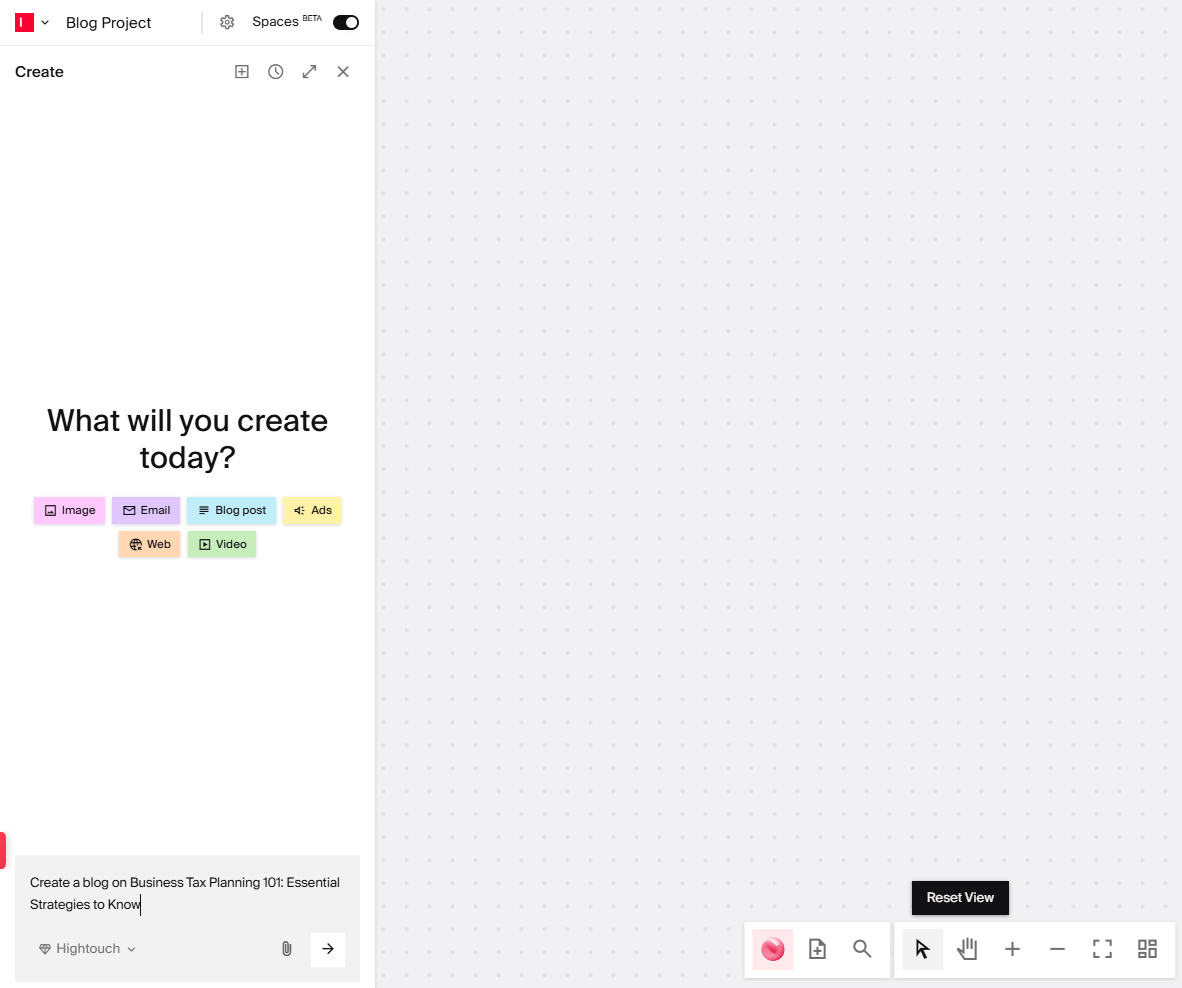
Open a new chat in Spaces, and tell the Web agent your blog topic. For example, “Create a blog on Business Tax Planning 101: Essential Strategies to Know”.
3. Add blog details:
Audience
Word limit
Reference material: Enable web search for live web search or attach your own documents or URLs to help the AI create original, well-informed content.
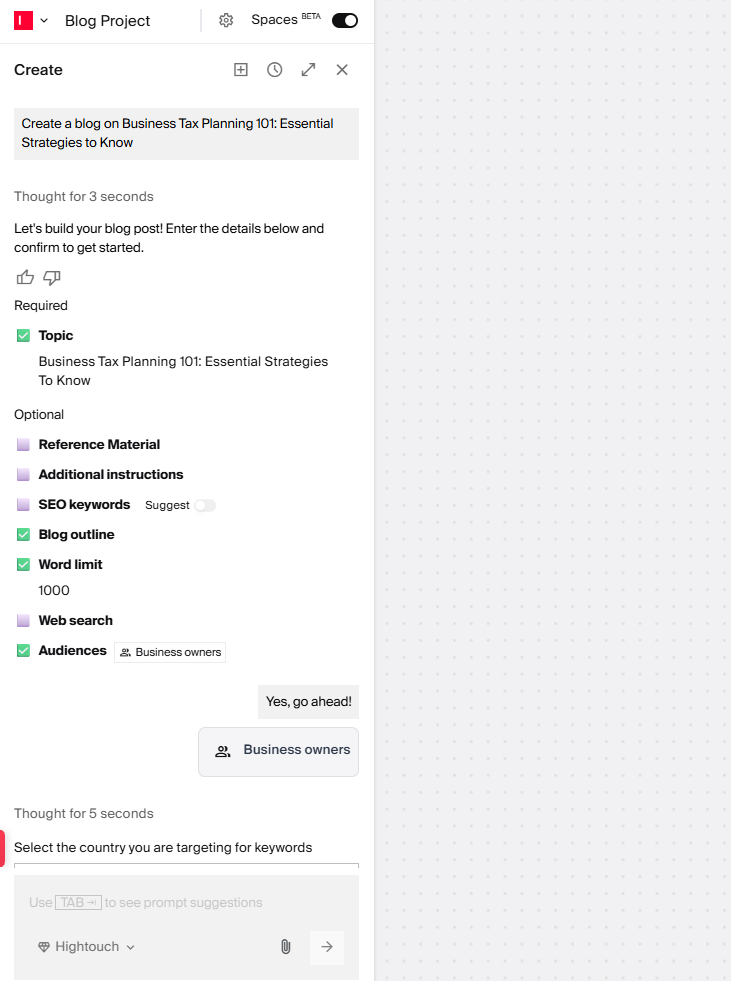
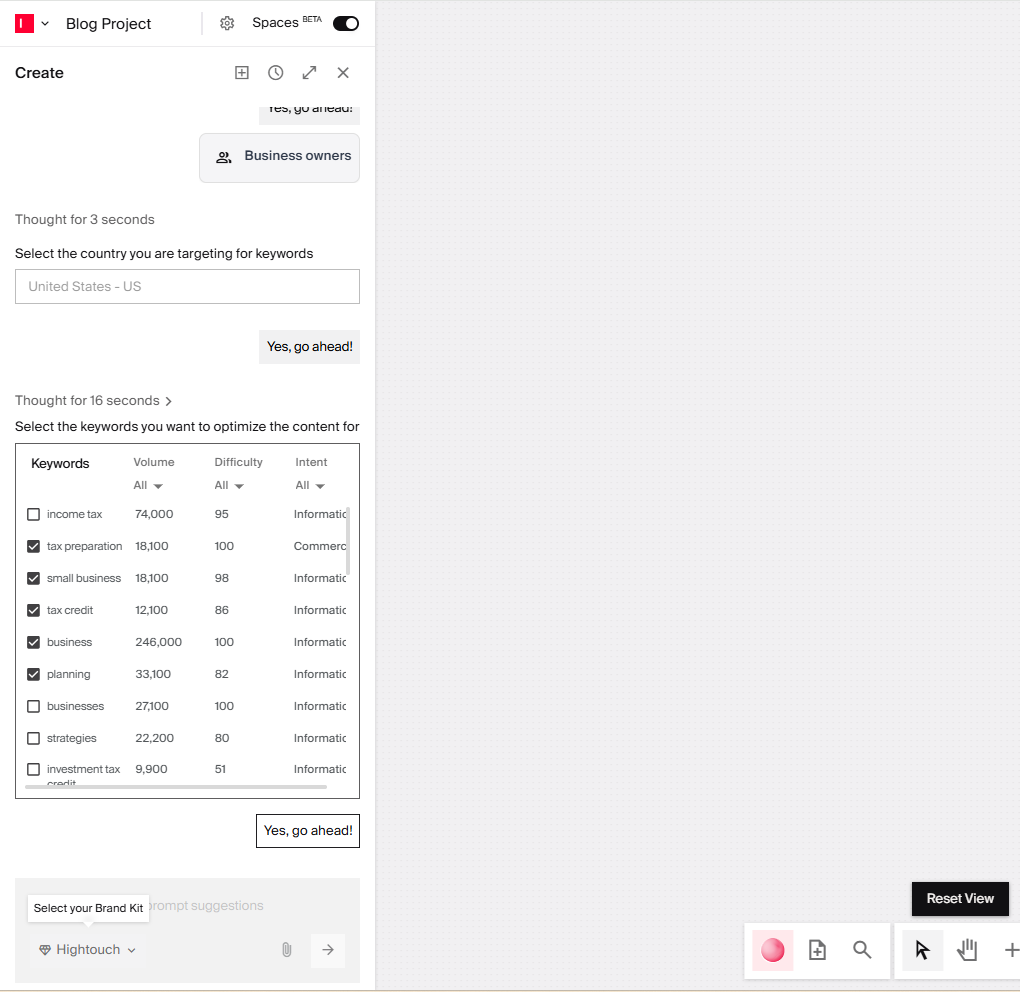
SEO keywords: You can add your own keywords or turn on AI keyword suggestions for instant ideas.
Brand Kit: Make sure to select your Brand Kit to apply your brand voice and English variant (US or UK).
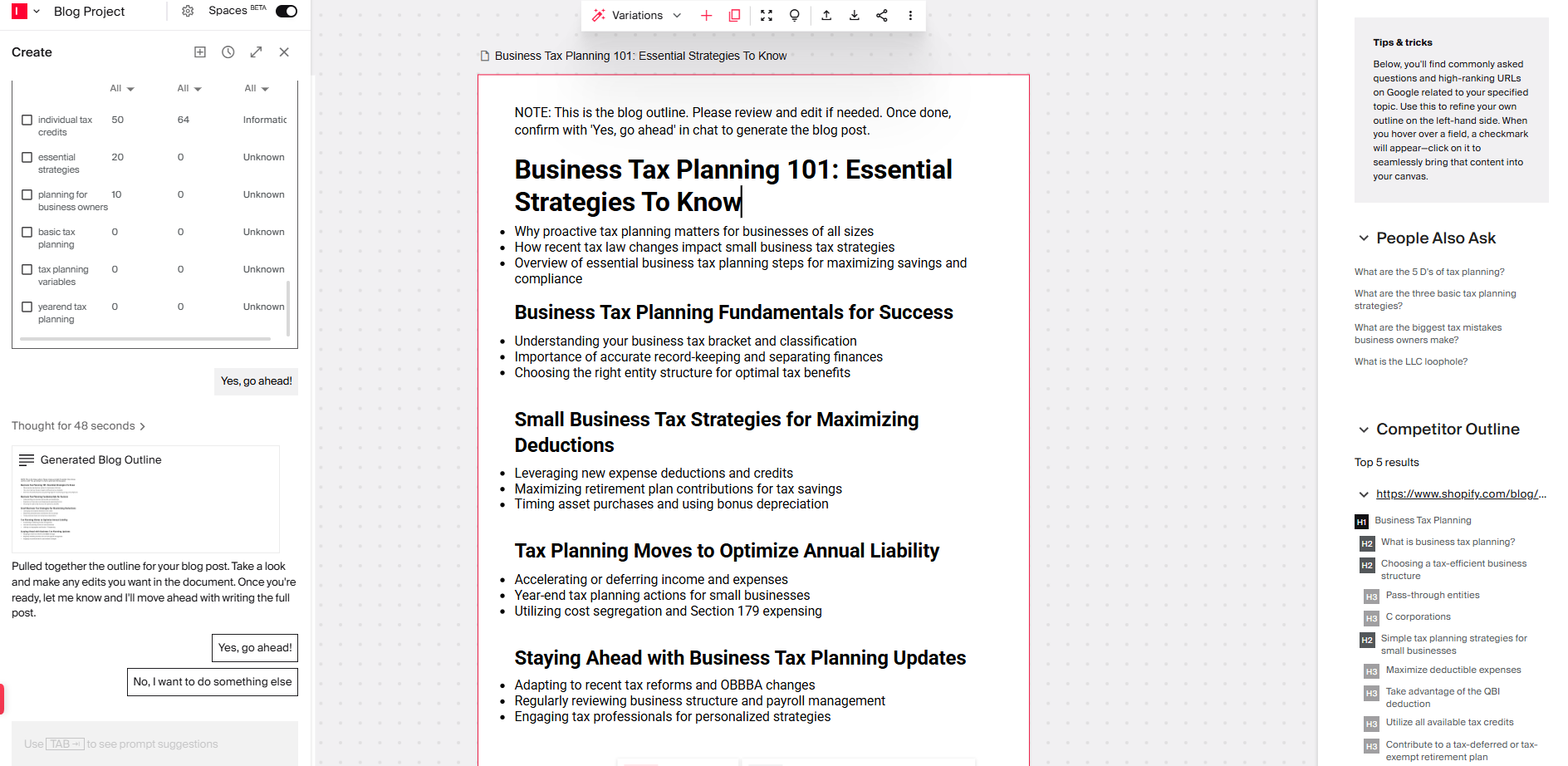
4. Generate an outline and refine it directly in the document, with AI-sourced competitor outlines and People Also Ask questions to guide you.
5. Generate your full blog and polish it line by line for grammar, tone, and clarity using the built-in editor.
6. Use the Content Explainability feature to check for:
Keyword optimization
Audience alignment
Brand alignment
Reading score
Guideline violations
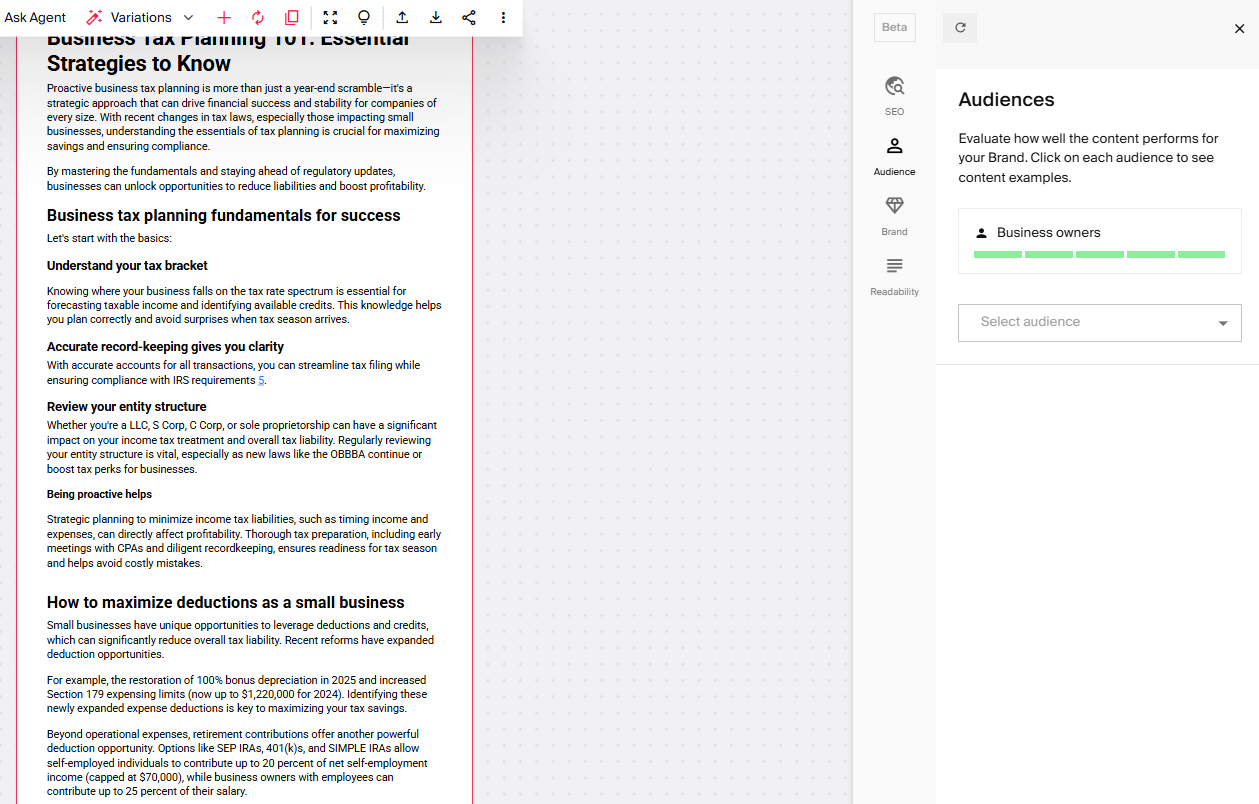
7. Add an image/video clip from your Assets library. Or generate a fresh image or video in Typeface.

How do you optimize your AI-generated blogs for answer engines?
Optimizing AI-generated blogs for answer engines means structuring your content so AI tools like Perplexity, ChatGPT Search, Google AI Overviews, and Google AI Mode can easily extract and cite it when someone asks a relevant question. This approach is called AEO (Answer Engine Optimization) or GEO (Generative Engine Optimization).
It's not a replacement for traditional SEO. Ranking in Google's blue links still matters. AEO is a layer on top of it.
Practical AEO changes to make to every post:
Add a 'Quick Answer' box at the top. A shaded box with a 3–5 sentence direct answer to the post's core question tells AI engines exactly what to extract.
Reframe section headers as questions. Instead of 'Research Your Topic', try something like: 'How should you research before using an AI blog generator?' This is the difference between content AI skims and content AI cites.
Use the Question → Answer → Context pattern. Open each major section with a question, then give a 1–2 sentence direct answer, then expand with supporting detail. This mirrors how AI engines parse content for answer extraction.
Add an FAQ section. FAQ sections are among the most reliably cited content formats across all AI engines. They're already structured as question-answer pairs. Place it at the end of every post and make sure the questions are phrased the way someone would actually ask them out loud, not how you'd title a blog post.
Quantify everything. AI engines strongly prefer specific data over qualitative claims.
Build topical authority through internal linking. AI engines assess whether your site is a reliable, consistent source on a topic, not just whether a single post is good. Cross-link related posts that cover adjacent topics. A cluster of well-linked, high-quality posts on content marketing and AI will outperform an isolated great post.
Use anchor-linked section headers. Some AI engines (and Google's AI Mode) deep-link to specific sections of a page when citing answers. If your sections have anchor links, you're more likely to be cited at a granular level. And the citation is more useful to the reader, which reinforces the engine's decision to cite you again.
How do you troubleshoot AI blog writing?
AI isn’t perfect, but its outputs can be refined or regenerated for better results with a few simple adjustments.
What to do when AI-generated content isn't working
Problem: The tone feels off or too robotic
Solution: Refine your brand kit settings. Add examples of your best-performing content to help AI learn your voice.
Problem: Content is shallow
Solution: Training data apart, AI can only work with what you give it. Upload more reference materials. Add specific data, case studies, or proprietary insights to your input documents.
Problem: Blog missing key points or angles
Solution: Review and edit the AI-generated outline before generating the full post. Add sections manually, reorder as needed, or provide more specific keyword guidance.
Problem: Images don't match the content
Solution: Attach reference images to guide the AI. Be specific in your image prompts about composition, style, and subject matter.
Suggested reading
How We Reduced Blog Writing Time by 85%
Before using AI:
Research and outlining: 2 hours
First draft writing: 4 hours
SEO optimization: 1 hour
Finding/creating images: 1 hour
Editing and refinement: 2 hours
Total: 10 hours per blog post
After using Typeface AI:
Setup and input (topic, keywords, docs): 15 mins
AI generation: 5 mins
Human editing and expertise: 30 mins
SEO and images: 10 mins
Total: 60 minutes per blog post
Result: Published 4x more content with the same team size
Increase your volume of on-brand, relevant blogs with AI
From reducing blog creation time, to increasing blog volume, using AI to generate blogs can help you connect with your audience and differentiate your brand with content.
Try Typeface to see the difference. Schedule a demo or talk to sales.
FAQs
Q. When to use AI for blog generation?
Use Case | Should you use AI? |
SEO blog posts | ✅ Yes |
Product roundups | ✅ Yes |
Thought leadership | ⚠️ Partially |
Original research | ❌ No |
Personal storytelling | ❌ No |
Q. Can I use AI blog generators for any topic?
AI excels at synthesizing existing information online into engaging blogs. For novel topics or original research, you'll need more human input. But AI can still help with structure and SEO optimization.
Q. How much editing does AI-generated content typically need?
Most teams report that AI does the heavy lifting — about 80-90% of the job — while they handle the remaining 10-20%, adding their insights, refining tone, and ensuring brand alignment.
Q. What if my AI-generated blog doesn't rank?
AI-generated blogs can perform as well as human-written posts so long as they’re relevant to search intent, anchored in your brand knowledge, and engaging to read. To improve visibility, you’ll still need to apply strong SEO practices.
Q. Is AI content penalized by Google?
No, Google doesn’t penalize content created by AI. It rewards quality content, regardless of how it was created. However, since AI doesn’t create perfect first drafts, you need to add your expertise to deliver value to readers. With AI, you can do this quicker and at enterprise scale!
Related articles

June 12, 2024
Welcome to our new Typeface on Typeface series where we invite our team to share insights into their everyday generative AI and creative processes. Today, we'll discuss how our brand and visual design

November 27, 2025
Maintaining a consistent flow of engaging blog content is an ongoing challenge for marketers. The traditional content creation workflow—from ideation through research, planning, content development, a

June 17, 2025
Creating video content (whether it’s a customer interview, a product demo, a webinar, or a training session) takes a lot of time, energy, and budget. But once the video is live, turning it into writte