

AI summary
See how your campaign briefs and image assets become reels and video ads within minutes in Typeface.
Multimodal AI is a real time-saver for short-form video production. It helps you get the most out of your video library and allows your marketing team to create reels and video ads with simple text prompts. Uses cases include:
Text to video: Input a single-line prompt plus your brand and campaign information, or a video script specifying the visuals, voiceovers, pacing, and other elements.
Static to motion ad: Take a high-quality product photo or static ad, and specify the animation to add, like “Slide tagline from left with smooth bounce” or “Sweep light across the logo”.
Multi-clip sizzle reels: Remix videos to create a fast-paced sizzle reel using prompts and editing features.
Semantic library search: Find videos to repurpose, with a quick "Search for video clips on [subject]."
Long-to-short form video: Repurpose long videos into highlight reels for social media.
Easy video editing: Modify a video with a text command, like “Make this an early morning scene”.
How to make videos in multimodal AI platform Typeface
Typeface orchestrates AI agents across 20+ advanced AI models from OpenAI, Anthropic, Cohere, Google, and others to create multi-format campaign assets. Each agent owns a specialized task, like image generation, blog generation, video generation, and so on. The agents coordinate tasks and create campaign assets using your brand rules and campaign specifics. They also edit, refine, and resize those assets.
Video Agent is our video generation agent, producing sizzle reels, social media snippets, video ads, and promotional videos from your videos and images, or net-new videos from your text prompts. When you’re repurposing your existing video footage, Video Agent searches your video library for assets based on your natural language query.
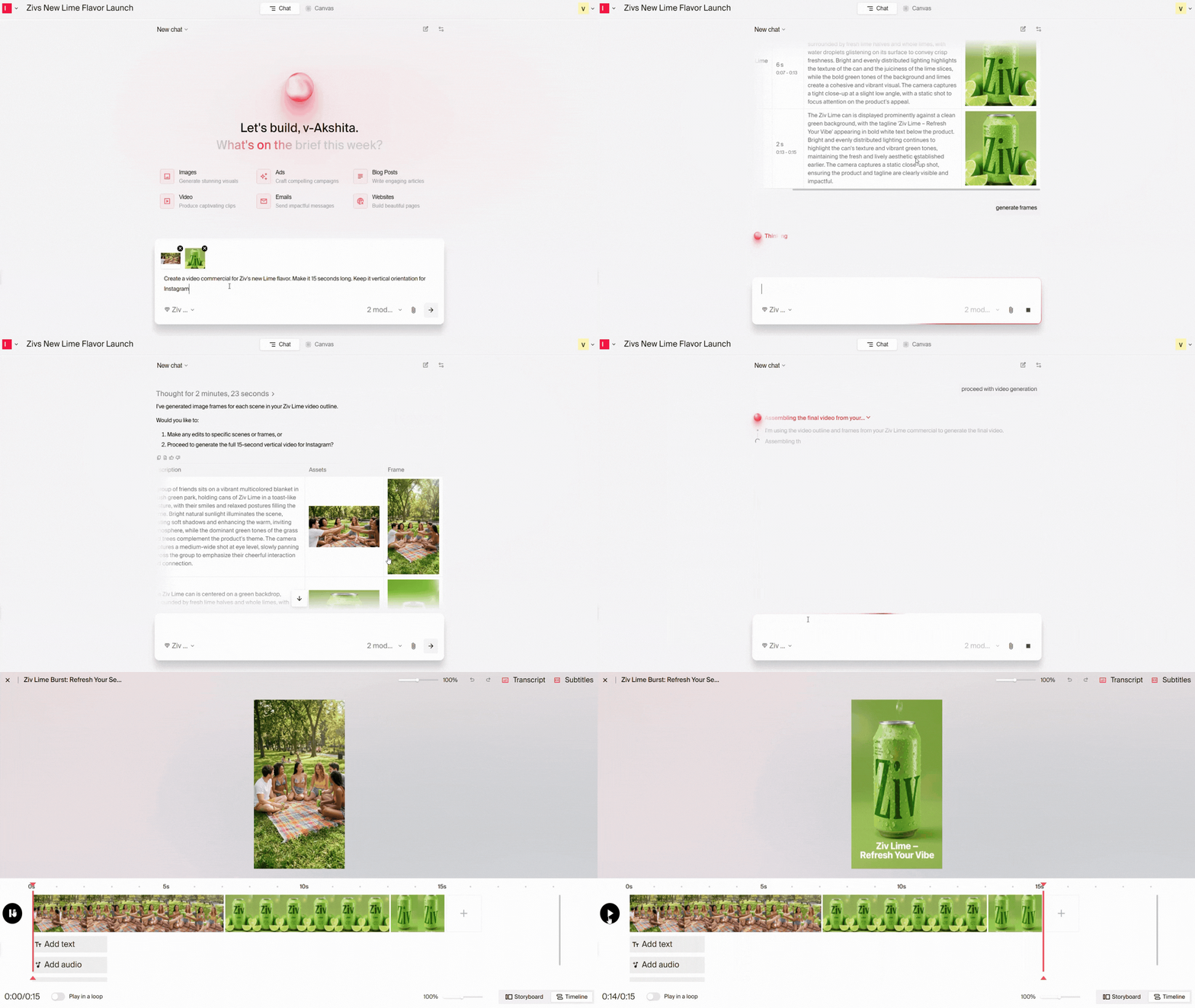
Video creation in Typeface follows a gentle learning curve. A library of raw materials, and a basic understanding of prompting and video customization help you make quick progress.
Typeface supports the full video production workflow. You can not only create video assets but also approve them in and publish them from our platform. A suite of integrations, which include out-of-the-box connectors, APIs, webhooks, and the Typeface MCP, let you create with the tools you already use and extend workflows securely.
Here's a quick platform walkthrough:
Set up your brand system
Centralize your brand assets
Import your brand style guide, videos, images, and messaging documents, to Typeface. A centralized knowledge graph called Arc Graph extracts and organizes these for agents and teams to use during video generation. It makes your brand standards usable by AI and ensures they’re applied automatically during every asset generation.
Connect your audience data
Import audience segments from your CDP or create audience segments in Typeface, including details like age, interests, and buying behaviors.
Set up approvals
Define who creates, reviews, approves, and publishes content. Then, connect your publishing platforms to move approved videos from Typeface to your marketing channels.
Once everything is in place, creating videos is straightforward.
Steps to create a video in Typeface
1. Describe what you want to create
Write a prompt to generate a new video, for example, “Create a 7-second macro shot of sparkling water being poured into a chilled glass”. Or upload an ad and tell AI how to animate it. For a sizzle reel, start with, “Create a 60-second event summary of our customer fireside chats, to a fast-tempo track."
2. Add contextual inputs
Include the campaign goal, images or video clips, target audience, and any supporting documents that provide additional context.
3. Generate the video
Video Agent animates the ad per your instructions. If producing a sizzle reel, it creates a storyboard, assembles scenes, and generates a draft reel based on your brief.
4. Review and refine
Preview the video and make edits as needed:
Add music using Google's Lyria model
Reorder, retime, replace, or regenerate individual scenes
Add or edit text overlays
Edit the transcript and subtitles
5. Create channel-specific versions
Resize your video for every platform, including 9:16 for Reels, TikTok, and Shorts, 16:9 for YouTube, and 1:1 for LinkedIn and Meta. Select all the formats you need, and Video Agent creates each version for you.
6. Send for approval
Assign the video to the next reviewer in your approval workflow. They'll receive an email or Slack notification.
7. Publish
Once approved, publish the finalized video to your connected marketing channels.
Related reading: How to Use Multimodal AI for Written Content
Try Typeface for multimodal video creation
Create high-quality, on-brand sizzle reels, video ads, and social media snippets in minutes, without losing brand consistency. See Video Agent in action with a demo, or talk to our team to learn how Typeface can support your marketing goals.
Related articles

October 7, 2025
When you use AI for video production, you're fundamentally changing how you create. Success depends on careful planning — to streamline workflows, maintain quality, and help your team get the most out

May 14, 2025
Image personalization is one of the most powerful yet underutilized tools in a marketer's arsenal. While marketing teams have made significant strides in content personalization, visual content often

August 12, 2026
AI automates the research-heavy groundwork behind every content brief, and a two-hour task becomes a two-minute one. All that without surrendering the strategic judgment that makes content rank, such