October 13, 2026
Enterprise AI Adoption for Marketing: Pilot to Production

Katie Murphy
Customer Success Manager

AI summary
A successful enterprise AI adoption plan for marketing involves a phased rollout, starting with low-complexity pilot use cases, building cross-functional teams, and training AI on brand assets. By mapping workflows, setting clear success metrics, and maintaining human oversight, organizations can refine, scale, and govern AI implementation for long-term impact and efficiency.
Implementing AI is a delicate balancing act. To transform operations, a new technology has to fit naturally into everyday workflows. Rolling it out in phases, within a limited environment, is the best approach: it minimizes risk, maximizes learning, and builds trust among users.
Here’s how marketing leaders and end users can plan and guide AI implementation from pilot to production.
AI rollout strategy: Key points for leadership
Everything starts at the top. Without a clear vision and adequate planning, AI pilots confuse teams, struggle to build consensus, and fail to reach production. Leaders can avoid this by establishing a few key things from the beginning.
Use cases
AI has plenty of marketing use cases, but not every process needs it. Define where AI will add value before launching a pilot. Without that foundation, pilots lack a clear target and scaling becomes directionless.
Example of an AI use case
Example of an AI use case
The marketing team handles highly technical, high-empathy, or original thought leadership blogs, while AI creates educational and search-focused blogs. On the visual side, internal or agency experts manage campaigns that require highly visual storytelling, and AI produces everyday visual content.
Success metrics
For enterprise marketing teams, AI is an incredible production tool. But how do you turn its ability to create at scale into meaningful outcomes?
Will producing ten articles a week with AI, rather than the usual 2-3 with human effort alone, actually improve marketing results? Or does AI’s value lie in creating personalized content for high-performing accounts in half the time?
Defining success metrics upfront steers pilots toward meaningful results rather than impressive output volumes.
A cross-functional AI “tiger team”
A tiger team is a small, cross-functional group of functional experts who pilot promising AI use cases. They test the tool, offer feedback, and guide implementation after a successful pilot.
A tiger team leading an AI marketing platform typically includes the marketing lead, copy team, creative team, and an IT representative. They train the platform on company data, define a prompting strategy, evaluate AI outputs, and suggest improvements.
Early pilot task: Train AI on your brand
Early pilot task: Train AI on your brand
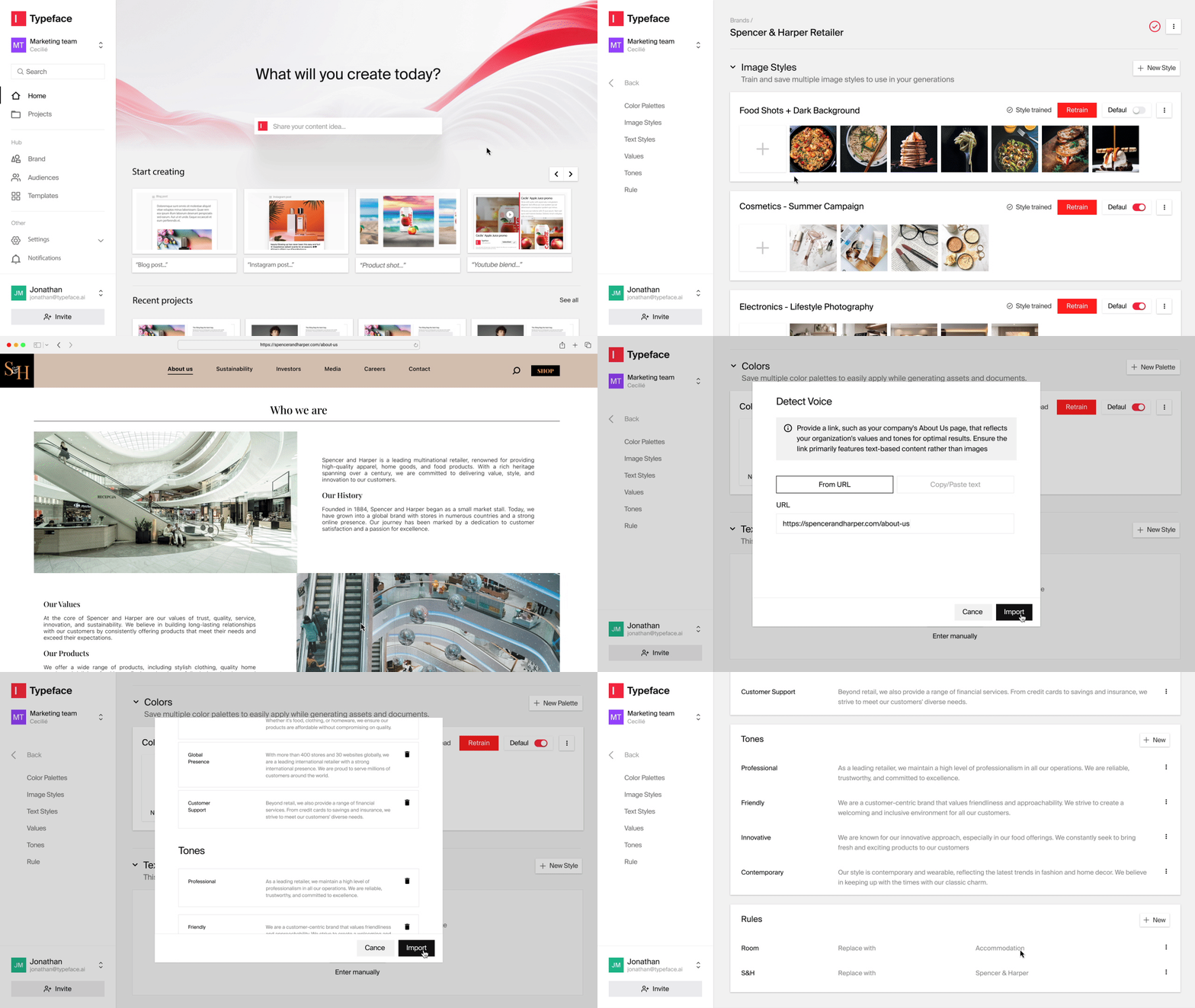
Early users of Typeface train the platform on their brand voice and visual styles, stored in Brand Graph for one-click application during content creation. They also import assets from their digital asset management (DAM) platform for AI-powered repurposing. Usually a one-time effort, this training ensures all future AI-generated content aligns with brand requirements.
AI implementation phases
AI fundamentally changes how work gets done. Marketers and copywriters become reviewers and spend more time on creative and strategic work.
A phased approach helps users ease into this shift rather than feeling overwhelmed. They can test thoroughly, learn as they go, and scale with confidence.
The 30-60-90 day AI implementation roadmap for enterprise marketing teams is built around this idea. It divides a pilot rollout into three stages:
First 30 days: Explore, prioritize, align
Next 30 days: Build, configure, and test
Final 30 days: Evaluate, refine, and plan to scale
Phase 1 (Days 1-30): Plan the pilot
In the first month, you develop your pilot project and put it on solid ground. Key actions in this phase:
Identify high-impact, low-complexity use cases
“Shouldn’t I start with the things I most want AI to solve?” It’s a valid question, but there’s strong logic behind starting with a low-complexity task that still addresses a real bottleneck.
At this stage, you’re proving AI works in your environment, and a low-stakes task suffices. Easy wins build team trust in the tool and allow safe learning without risking major disruption. A successful low-risk trial also builds momentum toward broader AI adoption.
Examples of high-impact, low-complexity use cases:
Email subject lines
Social captions
Ad copy
Blog feature images
Consider the counter-logic: why spend time on tasks that aren’t your biggest pain points? Because higher-complexity tasks carry more risk. Say you use AI for a task with multiple moving parts, like creative briefs, multiple review rounds, and tone nuances. Unless users align on a prompting strategy, they may get outputs of varying quality from the same tool, making success unclear and delaying progress.
Takeaway: Pick easy wins, then scale up
Takeaway: Pick easy wins, then scale up
Start simple with 1-2 pilot scenarios that are repeatable, scalable, and visible to stakeholders. Once your team learns how to guide the AI, move toward high-effort use cases.
Build your tiger team
The success of any enterprise AI initiative hinges on the people driving it. Your tiger team will become your organization’s first AI power users and tool experts, guiding peers through training and optimization.
Select representatives from marketing and IT operations to run the pilot. The group should include:
Head of marketing operations
Owns the project
Coordinates timelines and milestones
Tracks success metrics
Manages senior leadership communication and reporting
Marketing team members
Represent end-user perspectives and quality standards
Test across marketing use cases, document pain points, and iterate toward better outputs
Creative team
Tests, improves, and documents AI’s visual output
IT representative
Handles technical integration, security requirements, and platform connectivity
Map entire workflows, not just tasks
Use cases are starting points that show AI’s value quickly, but mapping workflows sets the stage for scaling AI strategically. For example, if your use case is generating social captions, map the entire social campaign workflow to find where AI can help further, such as:
Handoffs from social team to legal
Speed, by auto-generating caption variants for different channels or formats
Consistency, by ensuring brand tone and messaging rules match across formats
With Typeface, these steps run in a connected workflow that can mirror your current process or be designed from scratch. The same Brand Graph and campaign brief can power content creation across channels, so your team scales content without hopping from tool to tool.
Assess AI readiness
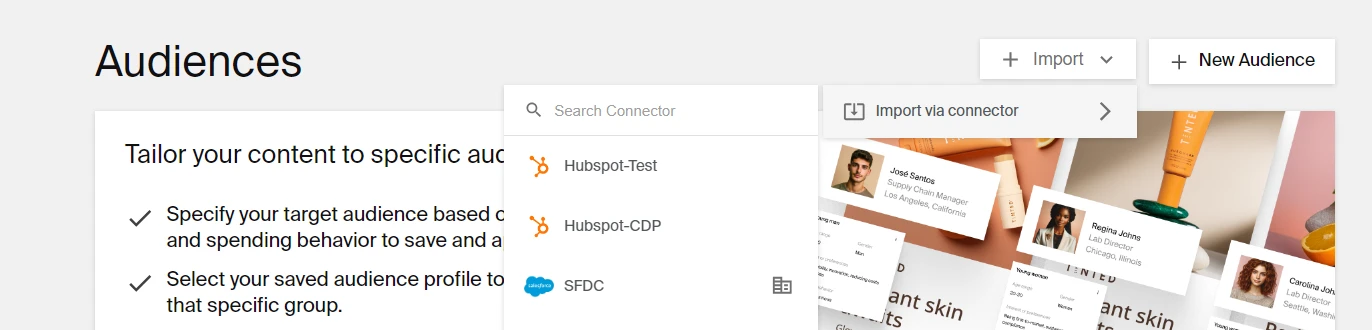
Enterprises have several choices in AI marketing solutions. What sets a platform apart is its ability to use your own data to create accurate, insightful, and on-brand content. That’s only possible if it works across your tech stack through MCP, APIs, and data connectors.
So check your technical and data readiness before you start generating content with AI agents.
What to check for:
Are APIs available for integration?
Can the AI agent access the audiences, assets, or brand guidelines it needs from your existing systems?
Do you have identity and access controls (e.g., role-based access) to manage how users interact with the AI platform?
Can humans audit or review the AI agent’s outputs before going live, especially in regulated environments?
Typeface helps teams create contextual content at scale, streamlining workflows across email, paid media, social, and web through seamless integrations with your tech stack, including Salesforce Marketing Cloud, Google Ads Manager, HubSpot, Slack, and more. You can create unique content, shorten review cycles, and go live from a single hub.
Define success metrics upfront
The only way to be certain AI is doing its job is to set specific, quantifiable metrics, like:
Reduce time-to-publish by 40%, maintaining current engagement rates
Improve speed-to-market for reels and short-form video by 50%
Grow output by 30% using your existing team and workflows
Activate 3-5 new audience segments previously out of scope
Produce 5x more asset variations per campaign without increasing design workload
Generate custom product catalog images 4x faster for seasonal updates
Communicate plan to broader team
AI is no longer optional; it’s becoming embedded in how work gets done. But employees deserve to understand why your organization is adopting it and what it means for them.
Open communication early on, grounded in your strategic goals and the value AI brings to employees, helps build acceptance and alignment. That includes acknowledging fears around AI adoption.
Also, even if the pilot is limited to marketing, the outcomes may affect other teams. Telling the broader team what’s happening, what’s being measured, and why creates transparency and increases buy-in.
Enterprise AI implementation: Results from phase 1
A clear pilot plan
An aligned team
Documented workflow
Initial success criteria
Readiness to move into configuration
Phase 2 (Days 31-60): Develop and test pilot
Now your team is ready to launch the pilot. Over the next 30 days, you’ll build a working prototype through testing, iteration, and workflow evaluation. Stick to the “start small” approach and limit scope to one region, channel, or product line. Key activities in this phase:
Train AI agents on real data
Arc Agents are built to perform a specific task, like generating a blog, by following the steps typical of blog writing: create an outline, provide SEO suggestions (keywords, competitor outlines, and people-also-ask questions), draft the blog, and score performance against specific criteria.
The agent knows what to do, but it needs to learn how your team creates content, with some help from you. Phase 2 of your pilot lays the foundation for training AI and reviewing whether outputs meet your quality standards.
Help AI learn your brand voice and visual styles
Upload top-performing past articles and images to give the AI enough performance context to create content that matches your team’s output. Use your Brand Graph during generation to create on-brand, personalized content. Compare outputs with and without your voice and image styles, and refine iteratively until you’re satisfied with the results.
Try repurposing
Turning existing assets into fresh content is a popular AI use case for enterprise marketing. Repurposing is typically low-complexity and safe to start with because it uses approved brand assets. Connect your DAM to Typeface and bring over your assets to start creating new variations.
Try scaling personalized content
AI can create content that speaks to a specific cohort, but it needs your audience data.
Connect your Customer Data Platform (CDP) and Customer Relationship Management (CRM) systems to Typeface to create targeted content: personalized emails, customized landing pages, retargeted ads, social ads aimed at specific interests, and more. You can also create dynamic audiences by adding demographic and psychographic data for the segment you want to target.
Test AI on content compliance
AI can also ingest your brand guideline documents to create compliant content. Once your pilot launches, monitor how reliably the AI follows your messaging rules and maintains legally compliant language. This is essential if you’re in healthcare, law, finance, pharmaceuticals, or manufacturing.
Typeface rates AI-generated content on how well it aligns with your audience and guidelines. Our AI content explainability feature helps your team optimize content faster and builds trust in the outputs.
Maintain human oversight
We’ve all used popular AI assistants and seen how human-like they can seem. But while AI can create engaging content, it isn’t perfect. Even when you give it all the context it needs, review what it creates, just as you would with any new team member or writer.
The pilot is your chance to critically evaluate how the AI agent makes decisions and what it produces. Based on your assessment, you can improve your training data and fine-tune your prompts.
This is also the time to set up a feedback loop that keeps quality standards on track. With Typeface, you can create connected workflows that send email and Slack notifications when content is ready for review, or customize the default workflows to match your team’s existing review and approval processes.
Go live, with limits
In the pilot, you’re testing the AI tool’s capabilities and learning how to get the best results from it safely and strategically. Guardrails around the workflow you’ve chosen to automate create a safe space to experiment before scaling. If something doesn’t work, the impact stays contained and your existing workflows aren’t affected.
Capture feedback
Create feedback loops to share the tool’s performance, and use the input to optimize results. Review performance against your established KPIs to determine the tool’s value for your marketing operations.
Enterprise AI implementation: Results from Phase 2
A working prototype
Initial performance data
Clear insight into what’s working and what’s not
Phase 3 (Days 61-90): Refine and plan to scale
Within 30 days, you can gather early impact signals. Use the initial AI agent experience and performance data to assess progress and decide whether to expand or adjust the pilot. Key focus areas in this phase:
Measure impact
Good performance doesn’t automatically mean meaningful impact. Revisit your success metrics and get qualitative feedback from your team. Did the agent reduce manual reviews? Did it reduce time-to-publish? Can you reallocate human effort to more strategic tasks? Build a complete picture of how AI is transforming your marketing operations.
Run a retrospective
A retrospective with your pilot team surfaces the insights you need to improve and shows what to do differently when you scale. Key questions to ask:
What worked? What didn’t?
Where did we see the most impact?
What surprised us about AI agent performance?
What failed that we need to address?
What succeeded that we could replicate?
What would we do differently in the next implementation?
What organizational changes are needed to support AI scaling?
Determine the governance model that supports long-term AI success
A governance framework for AI is a rulebook for how AI must be implemented, used, and managed. Establishing it early builds accountability, compliance, and safety, and ensures these principles hold as AI becomes more embedded in daily operations and gains new capabilities.
One of the first steps is to establish decision rights, like “What can the agent handle on its own, and what requires human review?” You should also assign ownership for different layers of the system: “Who trains and fine-tunes the agent?”, “Who monitors output quality?”, and “Who ensures alignment with legal and data policies?”
Create a scaling plan
If the pilot succeeded, expand the scope: identify the next workflow, channel, or region to activate. Set up quarterly check-ins to monitor performance and adjust your scaling approach.
If the pilot didn’t meet expectations, revise and retest based on lessons learned, focusing on building a system that can be improved rather than perfected immediately.
Once you’ve validated a use case:
Document the process, tools, and lessons
Identify other teams (e.g., sales, HR, business development) that can benefit from the platform’s capabilities
Reuse templates, training data, and workflows
Ensure adequate support for expanded deployment
Allow sufficient time for training and adoption
Enterprise AI implementation: Results from Phase 3
A validated pilot
Organizational readiness for scaled adoption
A foundation for long-term AI development
FAQs
1. What are the critical steps for successful AI change management within a marketing organization?
Successful AI change management has many moving parts, but these fundamentals can’t be overlooked:
Rethink your workflows: AI doesn’t always fit neatly into existing processes. Leadership must ask where AI can improve workflows or change them altogether.
Show the team what’s in it for them: The AI tool should address a real pain point for its intended users and be easier than their current workflow. If it checks both boxes, you’ve cleared a big hurdle to adoption.
Design your pilot for success: Rolling out AI tools safely requires collaboration between marketing, IT, and legal teams. Talk to your vendor about the best piloting approach and what you’ll need to handle internally, like tool training, integrations, and iterations.
2. What skills should marketing teams develop for successful AI adoption?
A growth and learning mindset drives successful AI adoption. Employees who embrace learning how AI can improve their daily workflows are more likely to help peers and leadership achieve better results. Their willingness to experiment, learn from mistakes, and keep improving creates the early momentum that spreads across teams.
3. How do you handle data privacy compliance with AI marketing tools?
Data privacy and security are table stakes, so get a few key confirmations from your vendor. For example, does the AI platform comply with the data privacy regulations that apply to you, like HIPAA in healthcare or CCPA and GDPR? Also review how well it supports integrations, single sign-on, and role-based access controls.
Typeface is enterprise-safe by design. Built-in guardrails protect your brand’s content, workflows, and data, in line with industry standards for responsible, secure AI use.
Next Steps
Prepare for the future of work by putting your team first and adopting the right enterprise agentic marketing platform. Fortune 500 companies across industries use Typeface, the orchestration engine for enterprise marketing, for the speed, scale, and strategic automation that let teams focus on strategy.
Try Typeface with a demo or contact sales.
Related articles
June 16, 2025
Earlier this month, I wrote a white paper for Typeface called Agentic AI and the New Era of Marketing. It’s a piece I’ve been thinking about for a long time — because beneath the hype and headlines a

August 4, 2025
The worst thing that can happen in an Amazon exec review isn't getting your numbers wrong. It's getting asked: "Tell me what you mean by this word." I learned this the hard way when presenting to exe

April 2, 2026
Most enterprise marketing teams are already using some form of generative AI. The real question isn't whether to use it — it's which workflows are actually worth your attention, and which ones will cr