December 11, 2025
The 4 Phases of Enterprise AI Rollout: A Field-Tested Framework for Marketers

Elah Horwitz
Founding GTM Lead, Enterprise Customer Success

AI summary
Learn how to roll out enterprise AI successfully with this field-tested 4-phase framework for CMOs and marketing leaders. Avoid common pitfalls, scale effectively, and drive real value from discovery to integration.
You've probably seen it happen: an AI pilot that shows real promise, gets everyone excited, then somehow never makes it past the initial team. We've worked with dozens of enterprise marketing teams that faced similar challenges before discovering Typeface.
In fact, recent MIT research says that almost 95% of Gen AI pilots at companies are failing, and we likely know why.
The difference between implementations that scale and AI rollouts that stall usually comes down to following a clear framework, not just having the best technology.
The teams that get AI working across their entire organization follow a similar path as we guide them through the different phases of AI rollout.
Let’s find out what this framework is and how to avoid common pitfalls as you scale from initial enablement to company-wide adoption.
Why do enterprise AI rollouts fail?
Most enterprise AI rollouts don’t fail because the tech doesn’t work; they fail because teams try to implement it alone. AI requires learning, iteration, and honest feedback loops.
The organizations I’ve seen succeed treat implementation as a partnership with their AI vendor, engaging in regular check-ins, not a one-time training. The ones who struggle go silent after enablement and try to figure everything out alone.
For example — one large fintech client I supported saw end-user engagement dip significantly after initial training. Why? It turned out that they weren’t sharing blockers and workflow issues across their team.
Once we sat down with their head of marketing, retrained their brand kit, and focused them on two high-value use cases, they quickly saw measurable wins. Then, with a stable, repeatable process, they were able to scale successfully.
That experience reinforced what I always tell new customer:
Start with a small team and 1–2 clear use cases
Prove value quickly
Use early wins to pull in the next wave of users
Trying to roll out AI across every channel and team at once is the fastest way to burn out and that is exactly how enterprise AI rollouts fail.
Now let’s take a look at it step by step.
The 4-phase enterprise AI rollout framework
Successful rollouts move through these phases:
Discovery and assessment
Controlled implementation
Guided expansion
Enterprise integration (ongoing)
Each phase has clear goals and exit criteria, though the timelines can vary depending on organization size and complexity of use cases.
Phase 1: Discovery and assessment
This phase feels slow when you're eager to start using AI tools. But those few weeks of upfront clarity can save months of rework.
In discovery, you identify where AI can make a real difference, what success looks like, and how AI fits into your existing workflows.
What should you know before starting an AI rollout?
Start with discovery and use case scoping. Map out your current workflows. Not just what your teams create, but how they create it:
How long does each step take?
Where does work get stuck?
Who reviews what?
Which processes are manual or repetitive?
Document your baseline metrics with specifics. For example:
“Creating a social post takes 3 hours, and we publish 15 per week.”
“Brand review adds 2 days to every deliverable.”
These numbers become the foundation for your ROI story later.
How do you identify the right use cases for early AI implementation?
The best early use cases aren’t always your highest-volume ones. They’re the ones where success is easiest to measure.
Look for tasks that are:
Repetitive
Time-consuming
Not deeply strategic
Think social post variations, email personalization, product descriptions, internal content drafts.
But what matters more than the use case itself is understanding your architecture needs.
What integrations will you need?
Where does this fit in your existing tech stack?
Which systems need to talk to each other?
Workflows that can be easily integrated with the AI platform should be prioritized for a smoother rollout.
How important is brand training during an AI rollout?
Brand training is often underestimated. It's the foundation for everything that follows. It usually takes about a month to set up a strong brand kit, especially for enterprises with multiple use cases, audiences, or markets. It is really important to not rush this from a quality standpoint.
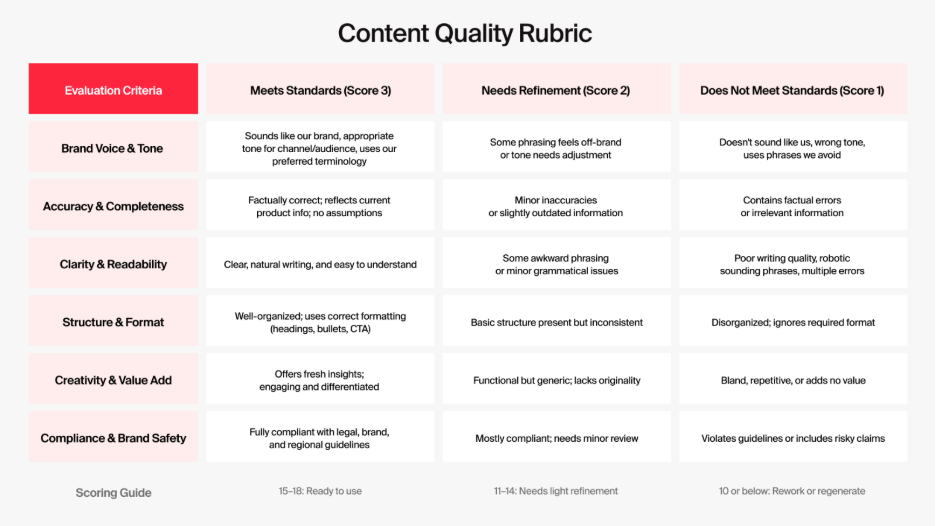
For content quality standards, create a written rubric for what "good" looks like. This helps you and your AI vendor grade outputs consistently:
"Yes, this meets our standards."
"No, this doesn't work."
"This is good enough for now but needs refinement."
Having that documented rubric gives you a baseline for continuous improvement. Below is an example of what it could look like.
Who needs to be involved in the discovery phase?
For any AI implementation to succeed, the entire organization needs to be open to change. I’ve worked with clients willing to rethink everything — even legal workflows — to unlock AI’s value. I’ve also seen teams limit involvement to marketing or ops, and that isn’t the best approach.
AI is not a marketing-only project. You need input from everyone involved in the content journey, from ideation to publication.
This means involving:
Marketing leadership
Creative teams
Legal and compliance
IT/security
Marketing ops
Day-to-day content creators
I like to map out the different responsibilities using a RACI chart (Responsible, Accountable, Consulted, and Informed) and ensure that everyone understands how their work is changing and how they fit into the transformation.
Phase 2: Controlled implementation
Now you start using AI for real work, but in a structured, low-risk environment. A controlled implementation is about learning, refining, and building internal confidence.
How do you train teams for AI marketing tools?
Start with an in-person kickoff with your AI vendor and your teams. Even if only 5 or 10 people will be in the later enablement sessions, invite the full marketing org, plus legal and other stakeholders. This kickoff is less about training and more about change management. You’re signaling that something meaningful is happening and giving everyone a chance to see it firsthand.
During the session, get people onto the platform. Show what’s possible and let them experiment. That early exposure builds excitement and buy-in you’ll never get from email announcements or training videos.
After the kickoff, shift to focused, hands-on training for the first users. Skip long workshops; creators need short, specific sessions — ideally small group or one-on-one.
What works best is grounding training in real content. I usually ask participants to bring a campaign or deliverable they need to produce soon and walk them through creating it step-by-step.
Example
Example
If someone needs a blog for an upcoming product launch, build that particular blog with them, and not a generic example. This approach gives people something they can use immediately and confidence to repeat the process on their own.
Why AI rollouts fail without workflow integration
Quite often in enterprise AI rollouts, everything seems to be running smoothly during the training but as soon as enablement finishes, the vendor team steps back, suddenly usage drops.
Not because people disliked the tool, but because they can’t see how it fits into their actual day-to-day work.
During enablement, someone walks you through creating content step-by-step. After enablement, you're staring at your to-do list wondering
Where do I get the brand guidelines and assets from?
How does this fit with my approval process?
Where does this content go after I create it?
If end users can't answer those questions quickly, they'll default to their old workflow because it's familiar.
This is why integrations matter. When AI connects to your:
DAM
CMS
Publishing tools
Knowledge bases
Brand guidelines
… adoption becomes natural.
For instance, Typeface Arc Graph serves as your single source of truth for all brand rules, assets, templates and more. It also integrates seamlessly with your DAMs and CMS. You create content in one place and it flows through your existing processes without friction.
To prevent the post-enablement dip, map out exactly how AI fits into real workflows for each use case.
Define the exact workflow for each early use case.
Example
Example
For social posts, use Template X from Brand Hub → pull assets from the DAM integration → generate three variations → assign to Sarah for review → publish through Hootsuite.
Also audit your technical integrations early. Fix critical gaps before expanding.
Phase 3: Guided Expansion
You’re ready to expand when:
The first team is using AI consistently
They’ve hit their success metrics
You have repeatable workflows
You’ve addressed major pain points
Expansion isn't about turning on access for everyone at once. It's more like rolling out in waves, maintaining quality, and building support systems as you grow.
When should you expand your AI rollout to more teams?
Before expanding, ask:
Have we proved measurable value?
Do we have training materials that work?
What did we learn and adjust during the enablement?
Are there remaining blockers that need fixing?
The fourth question is crucial. Every AI rollout surfaces problems: the AI doesn't understand certain brand terms, approval workflows take too long, and so on. You don't need to solve every problem, but you need to address the big ones with the vendor team before expanding.
How important is ongoing support and training?
Brand rules evolve, AI technology changes rapidly, and new questions emerge that nobody anticipated during initial implementation. This makes ongoing support extremely critical.
I typically recommend:
Twice-weekly office hours during the first month
Weekly office hours afterward
Continuous documentation of FAQs and fixes
A feedback loop for quality issues
By the end of month 3 or so, you will have a good enough database of all questions and answers to tackle future challenges.
Pro-tip: Another thing most teams don't plan for is brand kit maintenance. The brand kit isn't a one-time setup. I like to check-in every 2 to 3 months to audit quality, update guidelines, and train new brand voices.
Phase 4: Enterprise integration (Ongoing)
This is where AI becomes part of how your marketing organization works, not a special project with dedicated attention. You've moved from 50 users to potentially hundreds or thousands. The tool is integrated with your other systems. There's a support structure that doesn't require constant hands-on help from leadership.
And you're always optimizing, adding use cases, and adapting to changes.
How to continue deriving value from your AI rollout?
At enterprise scale, there's constant pressure to do more, try new things, and chase the next opportunity. Leadership sees a competitor doing something interesting, or a team pitches a different use case. However, losing focus of your primary goals is one of the most common reasons AI initiatives fail.
Teams start multiple projects and tend to pivot before finishing any of them.
Here's a real example
Here's a real example
A customer launched with clear goals after a major product release. The rollout went well initially, teams were excited, and leadership saw potential. But when teams hit challenges with their initial use cases, instead of troubleshooting they kept pivoting — first to social posts, then to emails, then to a completely new approach.
Each pivot reset progress to zero. None of the use cases got enough attention to actually work. The team ended up with a lot of starts and zero closes. No proof points, no success stories, no measurable value to show leadership.
When a use case isn't working, resist the urge to immediately pivot to a different one. Set clear success metrics for each use case and commit to hitting them before expanding to new ones.
How often should you reassess your AI marketing framework?
Plan for a formal reassessment every six months, to keep up with evolving technology and organizational goals. What worked in month six might not be optimal in month twelve.
Your six-month reassessment should ask:
Are we achieving what we set out to do?
Where are we seeing time savings or quality gains?
How satisfied are our users?
Are our workflows still efficient?
Then ask the strategic questions:
Should we add new use cases?
Do we need new governance or processes?
Are teams asking for capabilities we haven’t explored?
How has the broader AI landscape changed in the last 6 months?
As new capabilities emerge and new use cases surface, staying updated will help you make better decisions for your organization.
Common pitfalls to avoid at each phase
Every phase has predictable failure modes. Here's what to avoid:
Discovery and assessment: The biggest mistake is treating discovery as a checkbox exercise instead of genuine workflow mapping. Teams write down high-level use cases without understanding their integration requirements, rushing brand training, or identifying the real pain points.
Controlled implementation: Teams often pick participants poorly: all enthusiasts, no skeptics to find real problems. You need diverse perspectives to learn what actually works. Also, prevent the post-enablement dip in usage by mapping exact workflows and answering critical questions.
Guided expansion: The common pitfall is expanding too fast. Expand in waves and maintain control. Another mistake is cookie-cutter training based on generic examples. Each team needs enablement tailored to real content they actually create.
Enterprise integration: Chasing too many new use cases simultaneously. Stay focused on priorities and measure impact before taking up new challenges. Keep investing in governance, training, and optimization. Quality degrades without regular updates as models improve and standards evolve.
Frequently asked questions about AI rollouts
How long does a complete enterprise AI rollout typically take from implementation to full integration?
Most enterprise AI rollouts take between nine and eighteen months to reach full integration, though you can see value much earlier. The timeline depends on your organization's size, approval processes, and how many legacy systems need integration.
What's the minimum team size needed to start an AI rollout in marketing?
You can start with as few as five people, but they need to be the right five. Your early team could include a content creator who'll use the tool daily, a brand lead who'll review quality, someone from marketing ops, a stakeholder from IT or Legal, and an executive sponsor.
This diversity matters more than team size.
Do we need a formal AI governance structure before starting a rollout?
Before your rollout AI starts, you need three things: a simple approval workflow (who reviews what), basic brand guidelines (what your content should sound like), and clear usage policies (what you can and can't use AI for).
What's the difference between an AI rollout and a proof of concept?
A proof of concept tests whether the technology works. This is usually two to four weeks with one or two people testing specific features. You're answering, “Can this tool do what the vendor claims?”
An AI rollout is bigger with people using the tool for actual work. You're answering, “Can this tool work in our organization, with our people, processes, and constraints?” An AI rollout happens in your real environment with real brand guidelines, real workflows, and real content going to real audiences.
Typeface is built to support enterprise AI rollouts with built-in governance, brand controls, and approval workflows that scale with your organization. Get a demo or contact our sales team to find out how.
Related articles
March 9, 2025
Leveraging breakthroughs in generative AI, visionary enterprises like Microsoft, ASICS, Marks & Spencer, and Johnson Controls are partnering with Typeface's industry-leading Marketing AI Platform to a

August 25, 2026
The quality of your visual content directly affects sales. 85% of shoppers say product photos are a deciding factor in what they buy. The problem is volume. Enterprises have to hold a consistent visu

November 26, 2024
The holiday season is just round the corner and winter holidays, or an end-of-the-year event, is the #1 holiday where most marketing teams invest heavily according to a recent HubSpot survey. Creating