
AI summary
We're rolling out a set of exciting enhancements across our Ad and Video agents, plus a first look at what's next with Arc Loop and Chat Cowork. Marketing and creative teams can now:
- •Turn a single approved asset into channel-ready ad variants, automatically
- •Turn a brief or existing footage into a finished video, on-brand and sized for every channel
- •See how your pages are performing, and decompose flat images into editable layers
- •Plus: automated email citations, multi-step task generation, and more
Welcome back to Feature Focus!
June brings major upgrades to Ad and Video Agents. Your creative team can produce more ads and videos, on-brand and sized for every channel, while performance marketers get more control over the process. There's more beyond that too: all-new webpage analytics, granular image editing, and other updates across email, chat, and agents.
We're also giving you a quick teaser for what's in store for July. Let's dig in:
Coming soon: a first look at what's next
We can't wait to show you what's coming to Typeface this summer. Here's an early look at two major innovations.
Arc Loop: Every campaign should be smarter and more effective than the last one. That's the frontier we're building towards with a focus on optimization. Most AI marketing tools today are open loop. You publish content, but the performance data lives somewhere else, so every campaign starts from scratch. Arc Loop closes that gap. With this upcoming innovation, performance signals feed straight back into your brand context, so each campaign builds on what worked before.
Chat Cowork: Teams will soon be able to hand off complex tasks and come back to finished work. Typeface chat plans the job, breaks it into steps, and works through them on its own. It holds context across the whole task, so nothing gets lost along the way.
More on these in our next newsletter.
Resize an ad into every channel, without the manual rebuild with Ad Agent
If you're running paid media across retail and social channels, you know the drill: one approved creative, a dozen platform specs, and a launch deadline that doesn't move.
Our new ads resizing feature within Ad Agent changes the equation. Performance marketers can now take a single approved asset and turn it into compliant ad variants for every channel, ready to launch. Most tools leave you to read each platform's guidelines and rebuild the layout by hand. Typeface now handles that step for you.
Upload your channel guidelines once. Typeface generates compliant ad variants across platforms like Walmart and Amazon, reading the safe zones and placement rules for each. Your creative team gets time back and doesn’t have to chase down spec sheets or spend hours on resizing before every launch.
You stay in control. Before anything scales, you get a review checkpoint: approve a set of seed layouts first, then full generation kicks off.
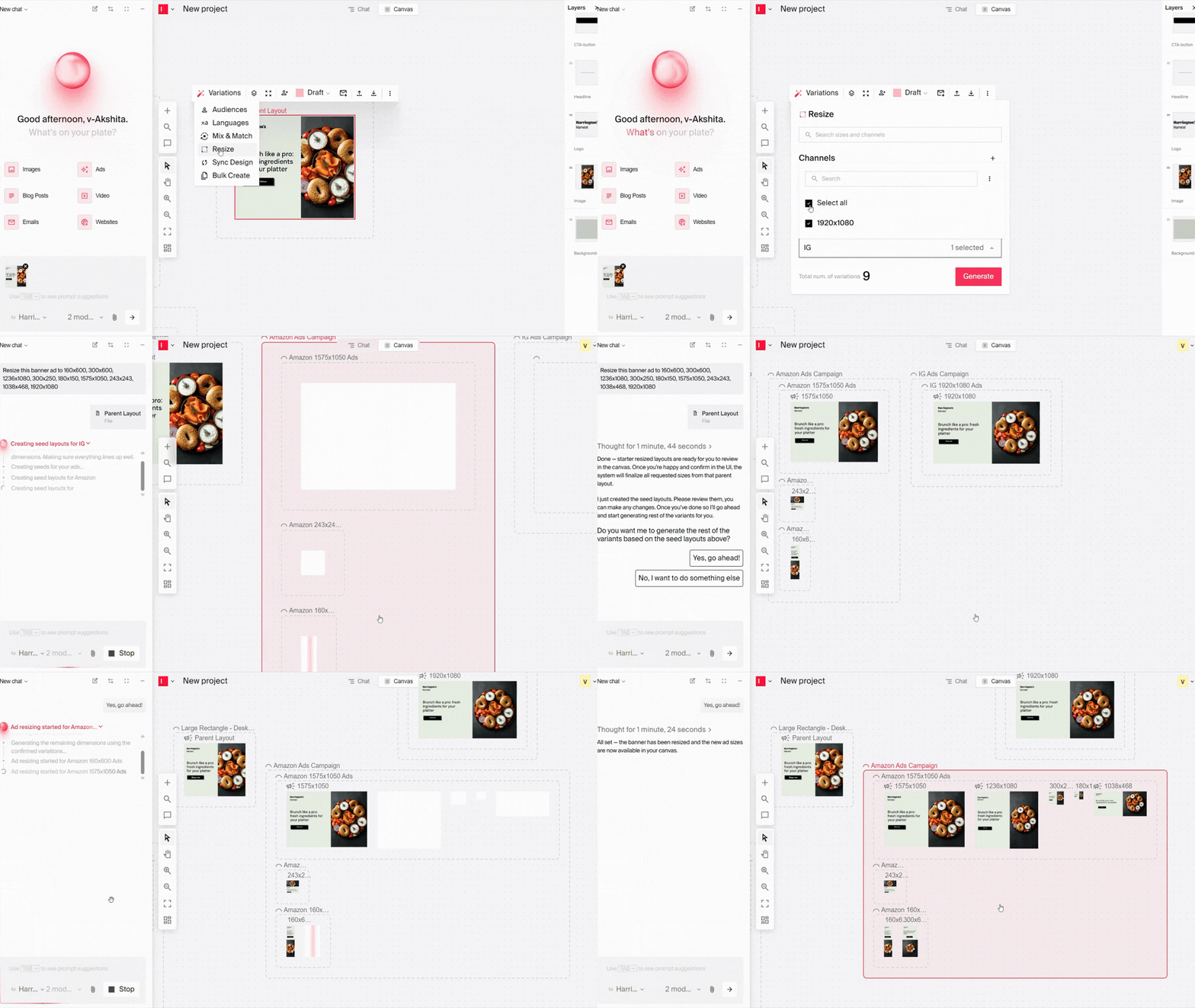
Individual ad edits are faster too. When performance data calls for a mid-flight change, you can tweak copy and creative right on the canvas, and a single change pushes across every banner variant at once. Your font and color rules travel with the asset, so everything that goes live is already on-brand and ready to pass platform review.
Ads resizing spots are filling fast. Talk to your Engagement Manager to get on the waitlist.
Go from brief to finished video, with control over every scene using Video Agent
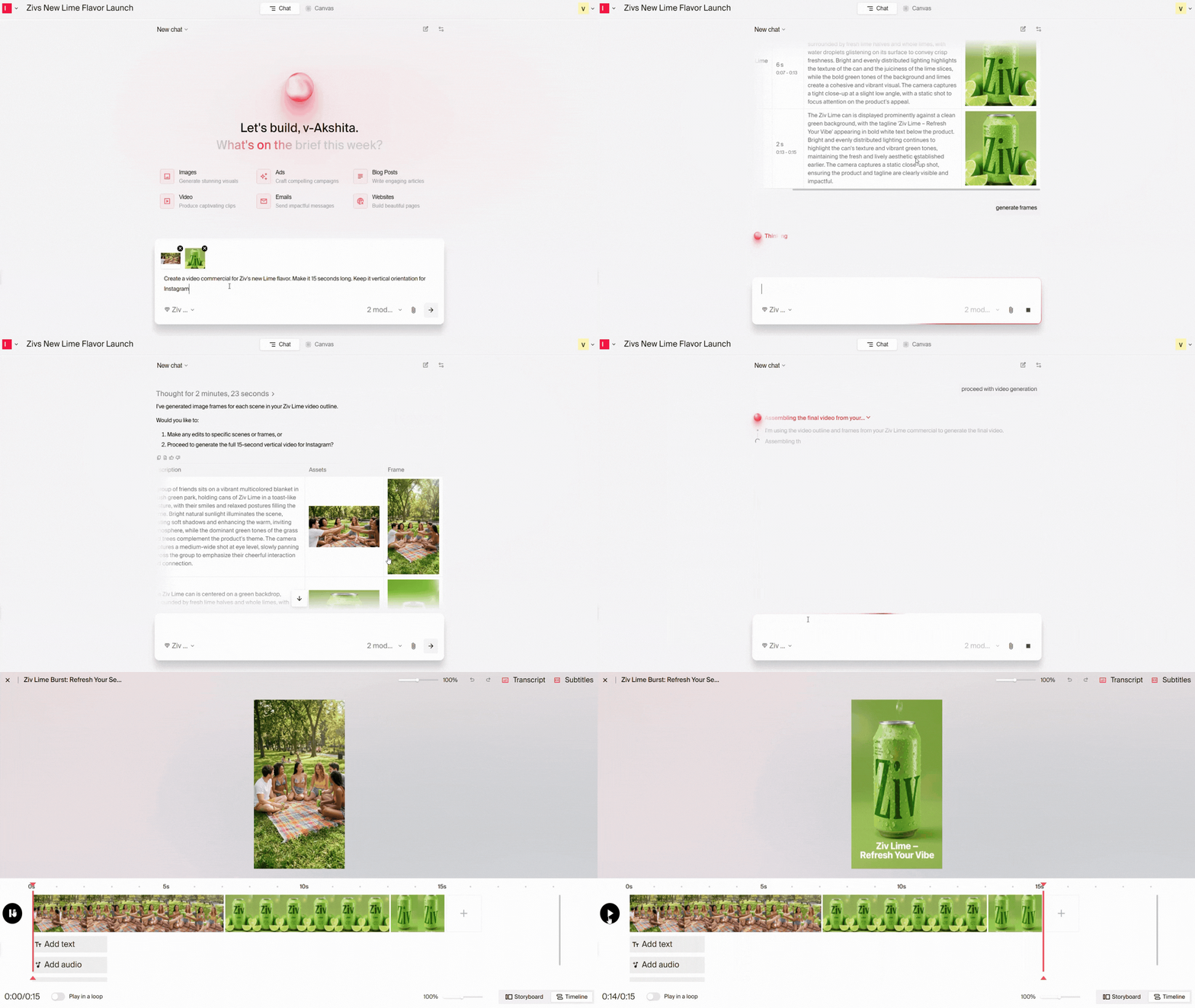
If you're leading a creative team, you know the tradeoff: either recreate scenes from an existing video or build a new one from scratch. Agentic Video Composer, a new feature within Video Agent, gives you the ability to do both. Turn a brief or a pile of existing assets into a finished, brand-compliant video, with the scene-by-scene control your team expects from a real edit.
Your team can now fix one scene without redoing the whole video. Agentic Video Composer builds video at the scene level, so each moment is its own slot. Swap, replace, reorder, or retime a single scene, and the rest of the cut stays untouched.
You can also add music, right in the editor. Teams can now generate music using Google's Lyria model. It reads the video's duration and vibe, then creates a track that fits.
There are two ways to do this:
Start from a prompt or your own assets. The agent can generate sizzles with an outline, storyboard, and video, dropping your assets into specific scenes and filling the gaps with generated content. There's no length cap on generated videos, so your team can create long-form work, not just short cuts.
Upload long-form footage and let the agent do the editing bay work. Typeface’s Video Agent transforms your strongest moments into a ready-to-publish highlight reel, the kind of pass your team used to do manually.
Generated scenes, text overlays, motion, and transitions follow your brand standards as they're created, not flagged in a review afterward, so your creative review stays focused on the story instead of compliance. One outline gives your team every format it needs: 9:16 for Reels, TikTok, and Shorts, 16:9 for YouTube, and 1:1 for LinkedIn and Meta. Marketers can scale video output across every channel without adding review risk, with this new functionality.
See what the Video Agent can do for your creative team
See how your webpages are performing without leaving Typeface
Getting a read on how campaign landing pages are performing usually means digging into separate analytics tools or waiting on someone else to pull the numbers. That adds a step between publishing and learning, which slows down iteration. We've removed that friction with Web Agent.
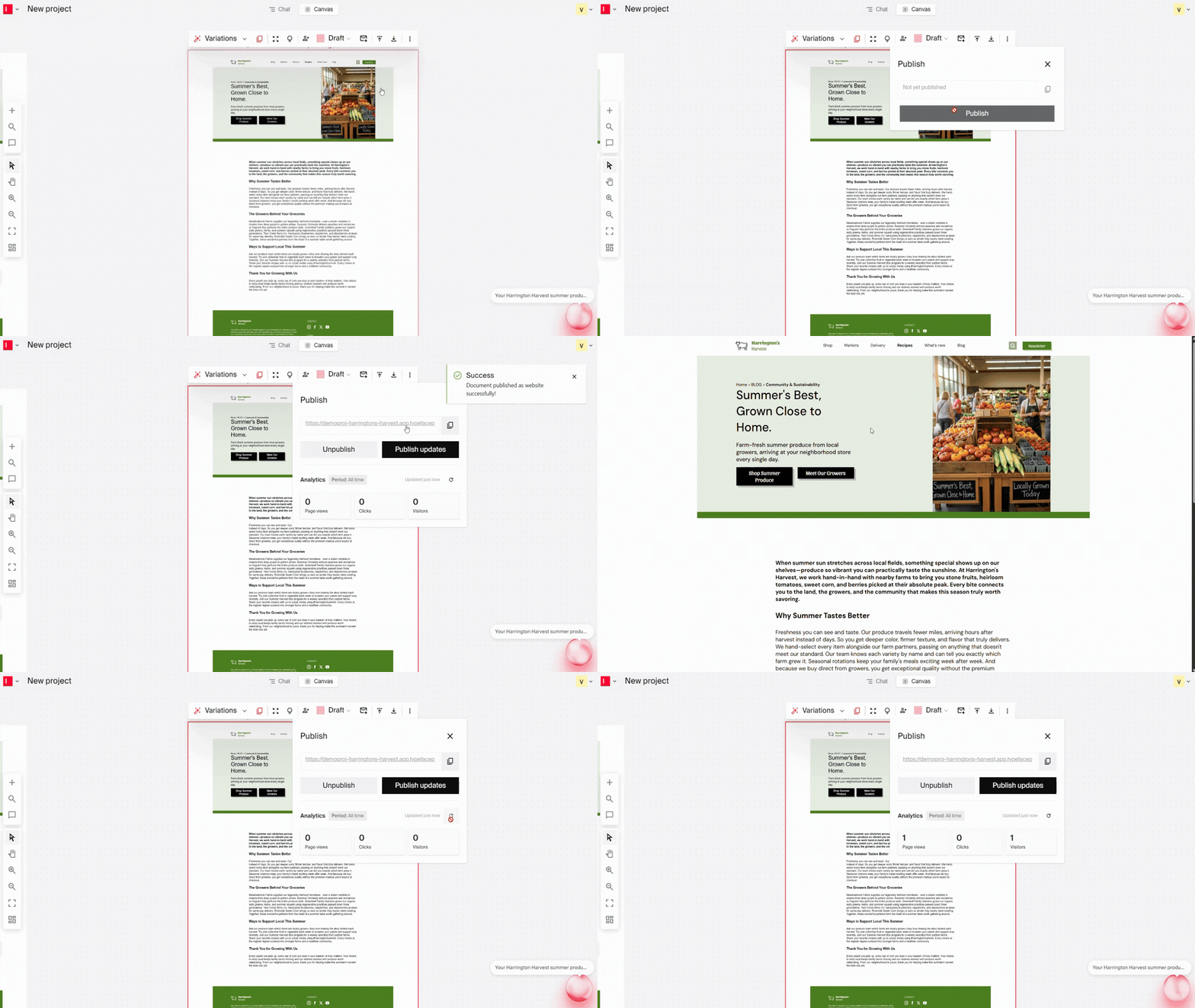
Add your analytics script once, and Typeface applies it to every page you publish, so you can see page views, visitors, clicks, and engagement over time. Marketers can then use these insights to tweak copy, CTAs, or imagery on their landing pages.
Because publishing happens independently of your CMS, you can spin up landing page variations to pair with different ads or emails, then test and retire them on your own timeline. It's an early step toward the bigger optimization loop we're building toward with Arc Loop.
Check out the Web Agent
A last-minute logo swap shouldn't mean rebuilding the whole image
You've got one flat, exported image and a last-minute logo change. Until now, even a small fix meant prompting back and forth or rebuilding the whole graphic from scratch. With Image Agent, you can swap a logo, update a line of text, or adjust one element while the rest of the composition stays exactly as it was. And if a round of edits goes sideways, version history is now available for images too, so you can get back to the original without starting over.
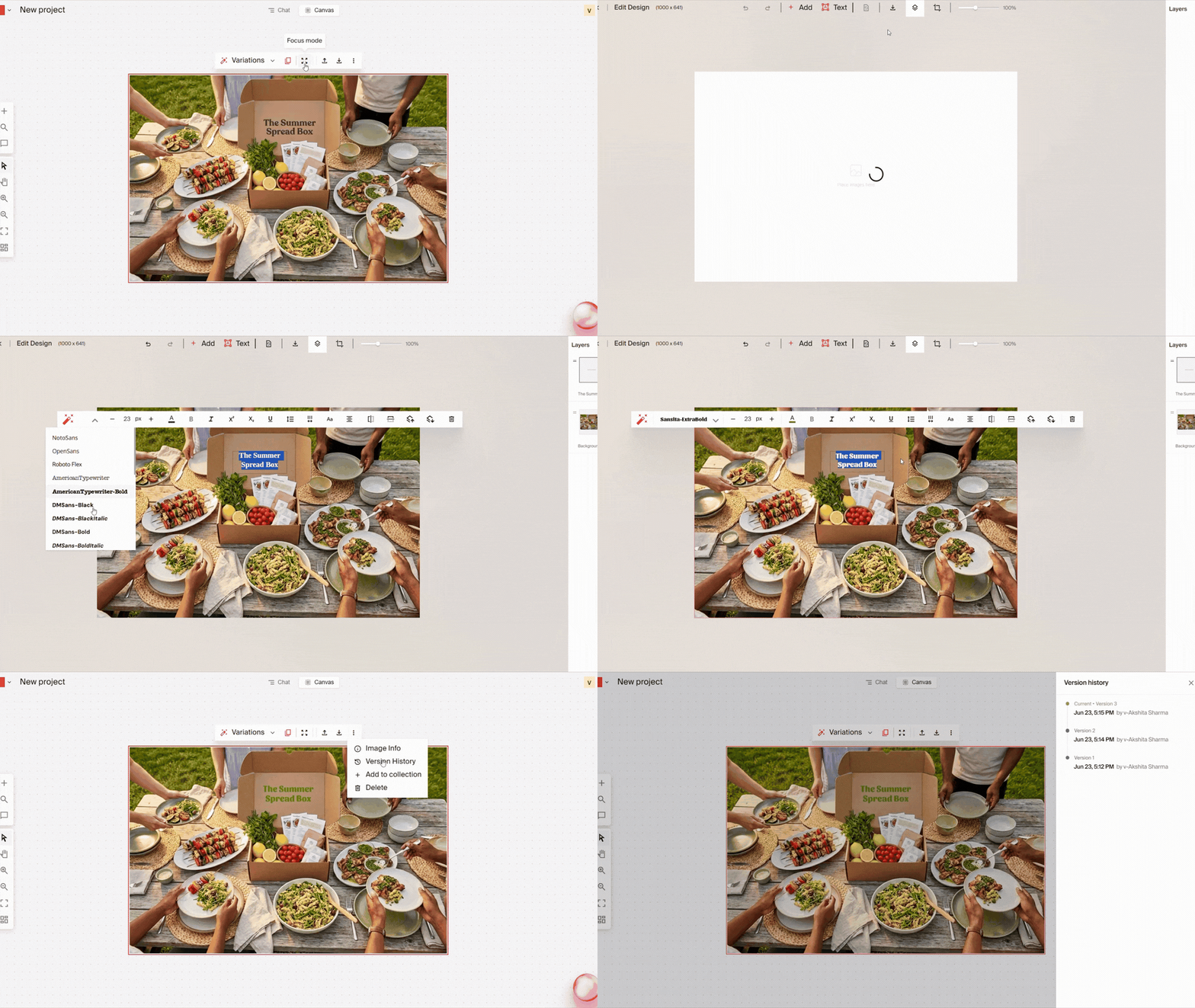
Learn more about Image Agent
Bonus enhancements
Add email citations and footnotes automatically: Drop in a file of approved claims and Typeface inserts them into the reference section with the right superscripts in the body. Our responsive previews now show how your email renders on mobile and desktop, and you can generate SMS copy alongside your email campaigns from the same workflow.
Run multi-step tasks and edit docs in chat: Give Typeface a full set of tasks up front and let it work through them while you move on, with any input issues flagged before generation starts. Document editing through chat updates in one section without regenerating the rest, all inside a redesigned, searchable chat interface.
Capture individual voices without breaking brand rules: Define how a specific person sounds, like a CEO or a named persona, separate from your company guidelines, while your brand safety and compliance rules still apply underneath.
Keep custom agents on track, every step: Your custom agents follow your configured instructions all the way through a task. They can also run on a set schedule and kick off automatically when a document status changes.
Connect external tools to your workflows: When something happens in another system your team uses, it can now trigger the next step inside Typeface automatically, with no one manually starting it.
Typeface in the news
Our latest Signal Report: The AI Speed Paradox is out, and the headline finding is hard to ignore: 93% of marketing leaders feel pressure to move faster because of AI. The report digs into why campaign timelines keep stretching even as teams adopt more AI tools, and what separates the teams pulling ahead from the ones falling behind. Worth a read if you're making the case for a more connected workflow.
Read the Signal Report.
That's a wrap for June. Stay tuned for what's coming, and happy creating with Typeface.
Related articles
June 2, 2026
Welcome back to Feature Focus! Following our recent launch of new creative team solutions and native Figma integration, May's updates keep the momentum going. This month's focus: less manual work, fe
May 5, 2026
Welcome back to Feature Focus! We're building on our evolution into a Marketing Orchestration Engine, giving teams more flexibility in how they create and distribute content. This month, that means t
March 25, 2026
Welcome back to Feature Focus. This month marks Typeface’s biggest evolution yet: we’ve crossed a new frontier as a Marketing Orchestration Engine, bringing Marketing, IT, and Creative teams together