March 18, 2026
5 Google Ads Examples & How to Use Typeface Ad Agent to Create Them

Akshita Sharma
Senior Content Marketing Associate

AI summary
Google Ads span multiple formats—search, display, shopping, local service, and call-only—and each one requires a different approach to copy, design, and targeting. This blog breaks down five real-world Google ad examples to show what high-performing ads actually look like in practice.
You'll also get to learn how AI ad generators can help your team produce more variations, adapt creative across platforms, and stay on-brand without stretching production timelines.
With 11.4 million searches happening every minute across Google Search and Display Network, the opportunity to reach customers is massive, but so is the work required to do it well.
Creating a single responsive search ad requires up to 15 headlines and 4 descriptions. All tested in different combinations. Multiply that by multiple audiences, product lines, or markets, and the manual workload stacks up fast.
That's the gap Ad Agent fills. Instead of drafting each Google Ads variant from scratch, you give the agent your brand details, campaign goals, and audience, and it generates ad copy and visuals, ready for review and publishing.
What follows are some real Google Ads examples to inspire your next campaign and show you how Ad Agent can help you create, scale, and ship more of them, faster.
What are Google Ads?
Google Ads are paid placements that run across Google's network: search results, websites, YouTube, Gmail, shopping listings, and more. The format varies depending on where the ad appears, so you'll encounter everything from text-based search ads to video pre-rolls to product listing cards.
Because of this wide range of formats and placements, running Google Ads campaigns at scale can quickly become complex and resource intensive. The catch is familiar: most teams know that they should be testing more ads, more often, but creating, approving, and managing variations manually is slow and inconsistent.
That's where an Ad Agent comes in.
How do AI agents help with Google Ads?
AI agents handle the parts of ad creation that slows teams down most: generating creative variations, resizing assets to fit different placements, and maintaining brand consistency across every format.
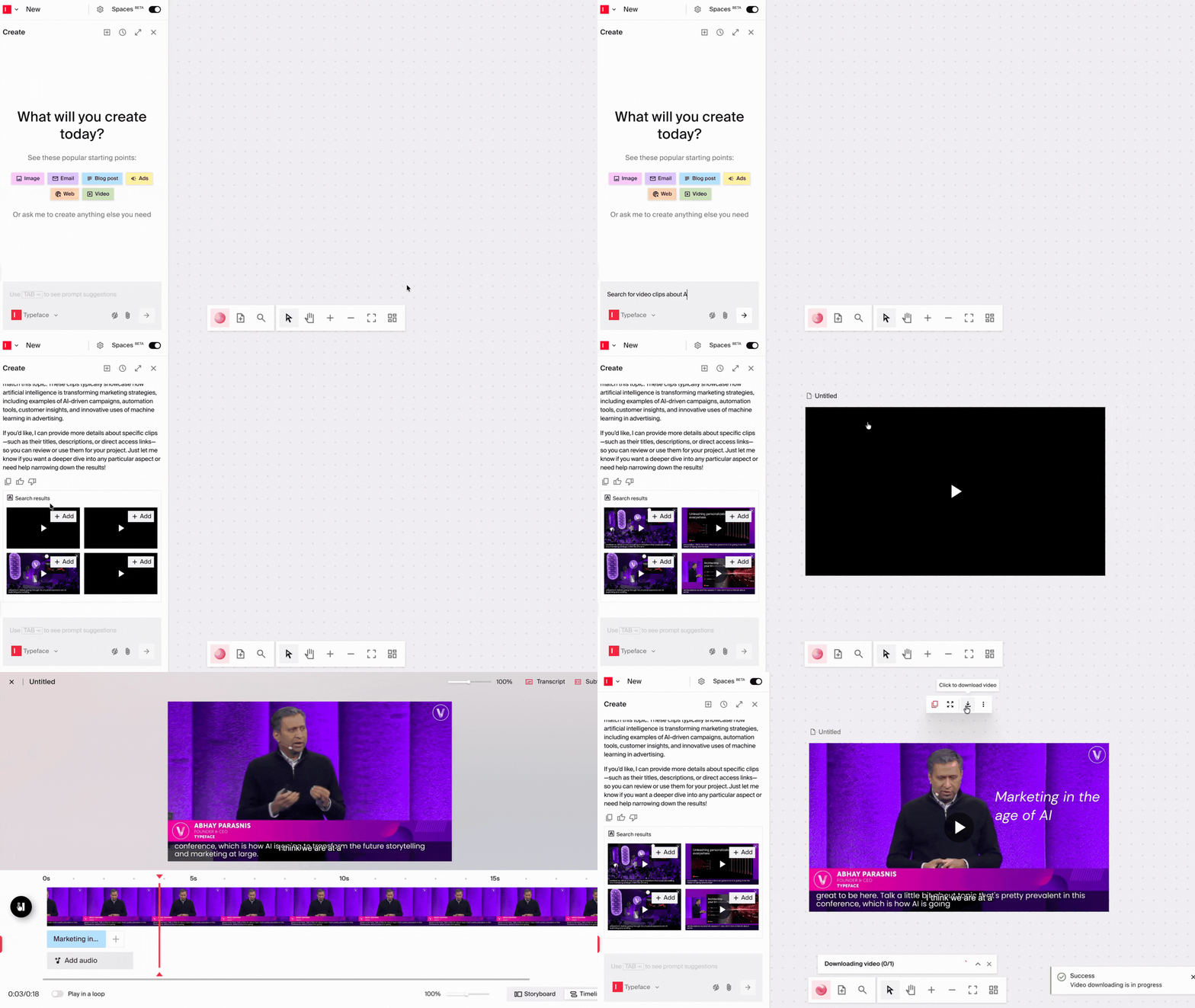
Ad Agent is our chat-based AI assistant that can turn high-level ideas into fully executed, cross-channel ad campaigns. You describe what you need, attach relevant assets or briefs, and the agent handles the creative production from there.
Unlike other AI ad tools that generate ad creatives in isolation, our Ad Agent works from your Arc Graph, a unified intelligence layer that continuously pulls in your brand standards, approved assets, audience data, and performance signals. Every ad it produces is brand-aware from the start.
It can help you generate:
Banner and display ads: Create ads from your saved layouts, then scale them across audience segments, languages, or formats.
Social posts and paid social ads: Generate platform-specific copy and visuals for Meta, LinkedIn, Instagram, and X, with a live preview showing how each ad will look.
Short-form videos for social: Generate campaign teasers, product intros, and seasonal promos for Instagram, LinkedIn, and Meta directly from a prompt or existing video assets.
It can also generate multiple ad variations, automatically resize and reformat assets to fit the specs of each platform, and repurpose your content for the specific channels.
The agent works from your saved Brand Kit on the platform, so tone, voice, and visual guidelines are applied automatically without having to re-enter them. And once a campaign is approved, connectors ensure that it publishes straight to your platforms without any manual exporting.
Google Ads examples to inspire your next campaign
Here are some high-converting Google Ads examples, along with what makes them work.
Example 1: Search ad
Google Search ads remain powerful conversion drivers that appear alongside organic results on the Google Search Network. When prospects enter specific queries, these ads are displayed prominently at the top or bottom of search results pages (or even inside AI overviews), creating immediate visibility for your brand.
Because they show up in response to what someone is actively looking for, they're one of the highest-intent ad formats available. After all, the person has already told you what they want.
High performing Google Search ad examples reliably do these few things:
Mirroring the query in the headline so the user immediately feels, “Yes, this is for me.”
Leading with the core outcome or pain (“Prove Your True ROI,” “24/7 Emergency Service in 30 Minutes”).
Stacking credibility fast with specific proof, whether that’s ratings, review counts, awards, customer counts.
Offering a friction-light CTA that matches intent (“Book a Demo,” “Get Instant Quote,” “Schedule Now”).
Here are two search ads that appeared for the query, "project management software."
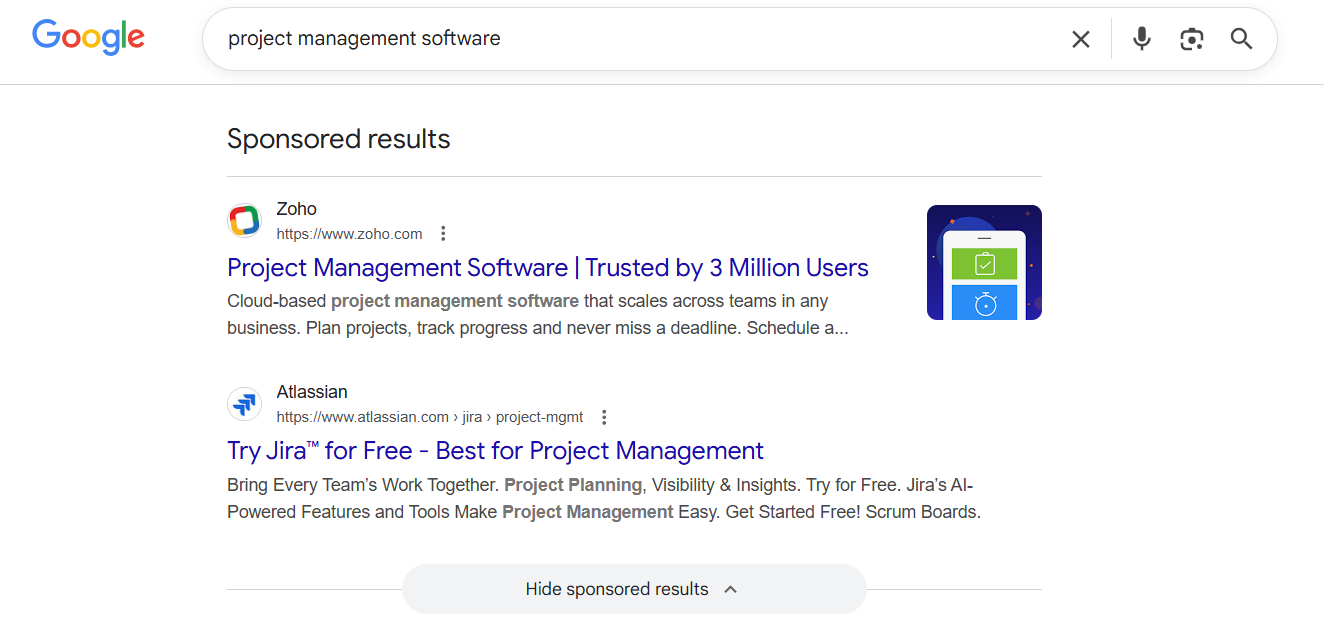
Zoho
Headline: "Project Management Software | Trusted by 3 Million Users"
Description: "Cloud-based project management software that scales across teams in any business. Plan projects, track progress and never miss a deadline."
The headline does two things at once: it matches the search query exactly ("Project Management Software"), which signals relevance to both Google and the searcher, and immediately follows with social proof ("Trusted by 3 Million Users").
The description stays practical: three concrete benefits in one sentence, no filler. It also repeats the keyword naturally, which reinforces relevance without feeling forced.
Atlassian (Jira)
Headline: "Try Jira™ for Free - Best for Project Management"
Description: "Bring Every Team's Work Together. Project Planning, Visibility & Insights. Try for Free. Jira's AI-Powered Features and Tools Make Project Management Easy. Get Started Free! Scrum Boards."
The headline leads with a low-friction CTA ("Try for Free") before the brand name, which makes sense because not everyone searching for "project management software" already knows Jira. The CTA removes the biggest barrier upfront.
The description packs in a lot: a broad benefit statement, specific capabilities, an AI angle, and a repeated free trial prompt.
Both examples avoid the trap of leading with the company name or a generic tagline. The ads open with something that the person searching already cares about, then give them a reason to click.
Framework: The 3P Structure
When thinking about how to write Google Search ads, use a simple 3P structure:
Problem/Intent Match: Repeat or tightly echo the core query in H1 or focus on the outcome the user actually cares about: save time, increase revenue, reduce risk, get help fast.
Proof: Description lines carry the benefits along with proof: “Trusted by 4,200+ teams,” “4.8★ from 1,300+ reviews,” “Serving [City] Since 2009.”
Path/CTA: Direct the click toward one clear action: “Compare Plans,” “Start Free Trial,” “Book a Live Demo.”
Example 2: Google display ad
Display ads run across Google's network of 3M+ websites and apps. These Google ads are more flexible than search ads in terms of format. They can run as static images, animated banners, or video, depending on where they appear and what you're trying to achieve.
Because they appear alongside editorial content, not in response to a search query, they need to earn attention rather than respond to it. That means a single, clear message, a visual that doesn't need explanation, and a CTA that doesn't ask for too much.
The best Google Ads on Display act like mini billboards, not shrunk-down landing pages. If the headline, sub-headline, logo, tagline, product image, and CTA button are all competing for space, none of them will land.
High converting Display ads tend to share these four traits:
One clear message instead of a collage of benefits.
High-contrast visuals that reinforce the offer or outcome.
Bold, readable typography that survives smaller placements.
A clear, visible CTA button that sets expectations (“Book Demo,” “Get Quote,” “Shop Sale”).
The HPE GreenLake ad is a good Google display ad example that gets the balance of visual and copy right.

Copy:
The headline "Bolster your end-to-end AI deployment" does exactly what a display ad headline should: it speaks to one specific concern for one specific audience. The CTA, "Read report," sets a low-commitment expectation. It doesn't ask the viewer to buy, book a demo, or start a trial, it asks them to read something. That's the right ask for a B2B audience that's still in research mode.
Visual:
The layout earns attention without fighting for it. The report cover image on the left gives the ad a tangible, content-forward feel. You can see what you're getting before you click. The HPE GreenLake logo sits prominently in the center, but it doesn't dominate. The headline and CTA do the work, with the logo providing the brand anchor. The CTA button uses the same green from the brand palette, keeping everything cohesive.
Why it works as a unit:
Every element earns its place. There's no tagline, no secondary message, no extra copy. Just a headline, a CTA, a logo, and a visual of the content being offered. On a busy webpage competing with editorial content for the viewer's eye, that restraint is what makes it readable in under two seconds.
Framework: 3-Word Promise + Visual Proof
For banners, think in components, not paragraphs:
Primary Text (3–6 words): A big, bold benefit line: “Prove Marketing ROI,” “Cut Ad Waste 30%,” “Fix Your Tax Stress.”
Support Line (6–10 words): A short clarifier about who it’s for or how it works.
Visual Proof: A product interface shot, a lifestyle image, or a clean brand visual.
CTA: A contrasting button with clear text: “See It in Action,” “Start Free Trial,” “Get Instant Quote.”
Tip
Tip
When creating Google responsive display ads, make use of all available headline and description fields, include various logo formats, and take advantage of up to 15 image slots.
Example 3: Shopping ads
Shopping ads show product images, titles, pricing, and retailer information directly in Google Search results. Unlike search ads, you don't write headlines; the ad is built from your product feed in the Merchant Center. Your product title, description, image, and other feed attributes act as the ad creative and help Google match your products to search queries, which strongly influences when and where your ads appear.
Shopping ads underperform when product titles are written for a catalog, not for search. "Women's Sneaker. Style 4821B" tells Google almost nothing about who should see it.
When looking for Google shopping ad examples, the winners almost always:
Front‑load the brand and key attribute in the title.
Use crisp, clear imagery on a neutral background that showcases the product and core use case.
Surface clear pricing and promotions.
Use trust signals like reviews and ratings.
Here are some examples of Google shopping ads.
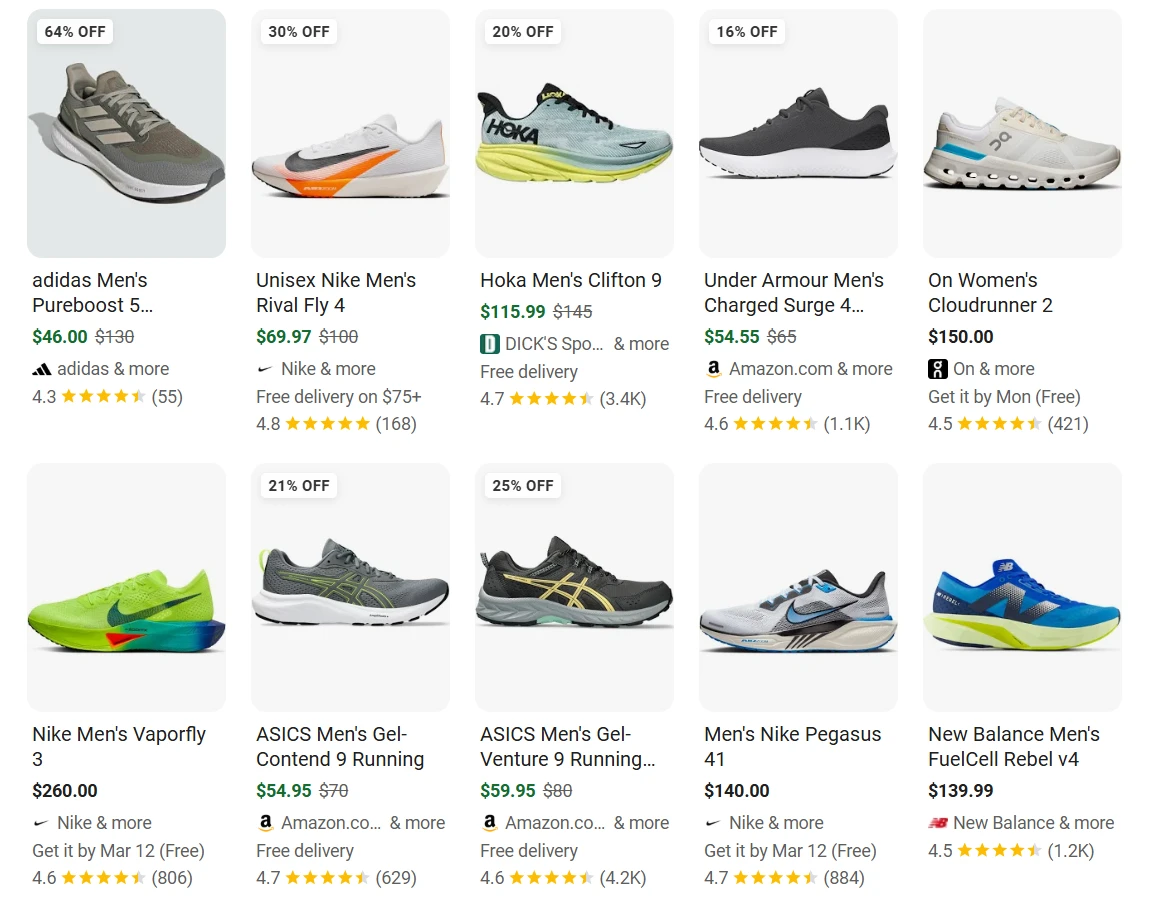
What works:
Every listing uses a clean, white or near-white background with the shoe shot at a consistent three-quarter angle. This matters because it makes the product the entire focal point. No lifestyle shots, no model, no props. It also means the grid reads cohesively, so shoppers can compare silhouettes, colorways, and design details at a glance, without visual noise getting in the way.
What's missing across the board:
None of these titles include specific attributes like colorway, width, or intended use case (trail vs. road vs. track). These are the details that could help Google match the listing to more specific queries and help shoppers self-qualify before clicking.
Framework: Query-led product titles and benefit-led descriptions
When creating Shopping ads, break it down into two parts:
Product Title Framework: [Primary Keyword] – [Brand] [Key Attribute] [Variant/Size]
Example: “Running Shoes – BrandX Lightweight Men’s Size 10”Description Framework: Line 1: Main benefit + key attribute (“Lightweight, breathable running shoes built for daily training.”). Line 2: Proof + differentiator (“4.7★ rated by 1,200 runners. Free 2-day shipping.”)
Example 4: Video ad
Google video ads run primarily on YouTube, but they can also serve across websites and apps within the Google Display Network that carry video inventory. That said, YouTube is where most advertisers concentrate their video strategy.
The most common format is skippable in-stream: ads that run before or during YouTube videos, with a skip button appearing after five seconds. Those first five seconds are everything. If you haven't given someone a reason to keep watching, most won't.
The mistake most brands make is opening with a logo animation or brand intro. That's five seconds of the viewer's skip window spent on something they didn't ask to see.
The best YouTube ad examples look less like traditional TV spots and more like fast, intent‑aware explainers. They usually follow a predictable pattern:
First 5 seconds: Call out the audience and core problem.
Next 10–15 seconds: Show the product in action with a simple before/after.
Proof: Flash logos, stats, or quick testimonial soundbites.
CTA: Spell out exactly what to do next.
Here’s an example of a video ad:
Not to brag, but... this video ad quickly communicates value, visually explains the product, and focuses on business outcomes for a specific audience.
What works:
Strong hook in the first few seconds: The ad quickly introduces the product and its purpose before viewers can skip.
Clear problem → solution structure: It explains marketing workflow challenges and immediately positions the platform as the solution.
Visual product demonstration: The UI, workflows, and platform visuals help viewers quickly understand how the product works.
High-quality visuals and motion graphics: Clean design and smooth animations increase credibility and make the ad feel premium.
Outcome-focused messaging: The ad emphasizes benefits like scaling marketing and automation instead of just listing features.
Clear target audience: The language and visuals speak directly to enterprise marketing and IT teams.
Consistent branding: Colors, typography, and interface visuals reinforce brand identity throughout the ad.
Framework: 30-second video ad script
Here’s the blueprint for creating video ads:
Hook (0–5s): Call out who you’re talking to and the core pain: “Still guessing which ads actually drive pipeline?”
Problem (5–10s)” Show the chaos: messy dashboards, spreadsheets, and disconnected channels.
Solution Demo (10–20s): Show the product solving that problem, focusing on 1–2 key features.
Proof (20–25s): Overlay “Trusted by 4,200+ marketing teams,” add logos, or drop in a customer quote.
CTA (25–30s): Give a clear next step: “Book a live demo and see your true ROI.”
Example 5: Local service ad
Local service ads appear at the very top of Google Search results, above standard search ads. When someone searches for a service in a specific area. They show your business name, star rating, and a click-to-call or message button. They provide a direct line to potential customers who are actively seeking services in their area.
Because the format is tightly constrained (no custom headlines, no description copy you write yourself), most of the optimization happens off the ad: in your Google Business Profile, your review count and rating, and your response rate to leads.
The strongest local Google Ads examples (across Search, Display, and Maps placements) share a few traits:
Location clarity: neighborhood, city, or service area clearly stated.
Speed or convenience promise: “Same-Day,” “24/7,” “Open Late,” “Walk-Ins Welcome.”
Social proof: star ratings, review counts, years in business.
Simple, action-oriented CTA: “Call Now,” “Book Online,” “Get Directions.”
Here’s an example of a local-service ad on Google.
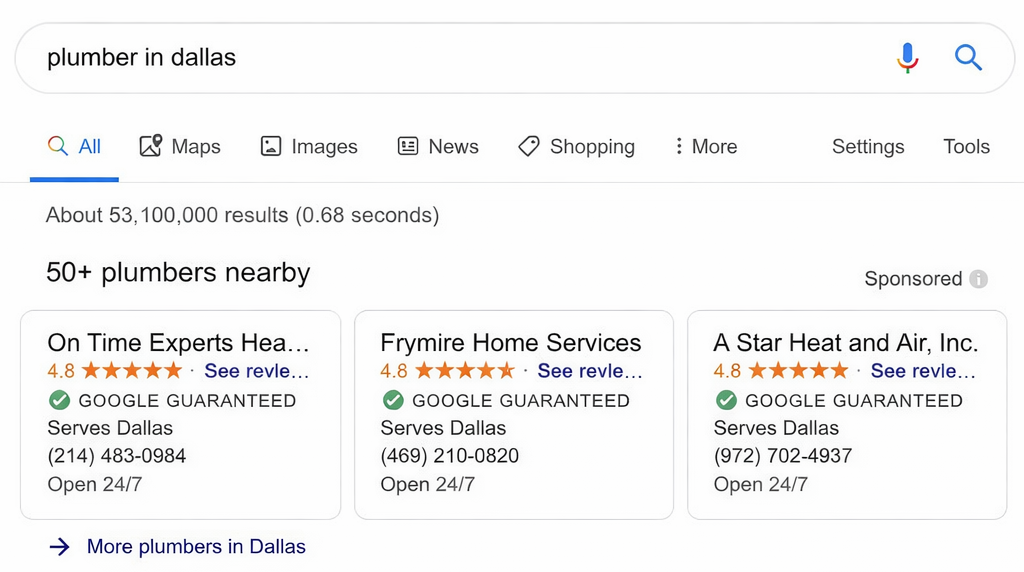
The businesses listed here have almost no copy to differentiate themselves. Same stars, same badge, same city, same hours. In a format this constrained, the ranking factors like review volume, response time, and dispute history become the real differentiators.
Also worth noting is that some of the business names are truncated: "On Time Experts Hea..." cuts off before you even get the full name. It points to something important about LSAs: your business name is effectively your headline. There's no separate headline field like in search ads, so a short, complete name like "Frymire Home Services" has a real advantage
What works: "Open 24/7" appears on all three, which is exactly the right signal for a plumbing query. Someone searching "plumber in Dallas" needs to know the business hours immediately. "Serves Dallas" on all three confirms geographic relevance instantly.
Take your Google Ads campaigns from inspiration to brand-approved and ready to publish
If you’re ready to move beyond inspiration and build your own Google Ads campaigns, start with one of the frameworks above. Configure your Brand Kit, generate your first ad with Ad Agent, and create variations to extend into new audiences, languages, and formats.
Ad Agent handles the production work that slows most enterprise ad teams down: drafting variations, resizing for every format, personalizing for multiple audience segments, and getting campaigns from approval to live.
The results speak for themselves: A Fortune 500 automotive manufacturer used Typeface to quadruple their personalized ad variations—customizing creative assets across different product lines for precise audience targeting—while cutting production time by 50%.
Book a demo to learn how Ad Agent can level up your marketing campaigns.
Frequently asked questions
Q. What is an Ad Agent?
Ad Agent is Typeface's AI marketing assistant that creates and scales ad campaigns across multiple channels. It generates banner ads, social media posts and paid ads, and short-form videos while maintaining brand consistency. It covers the full workflow, from initial creation through audience variations to platform publishing.
Q. How do I use AI to scale Google Ads campaigns?
AI helps with the parts of scaling that are most time-consuming: generating creative variations for different audience segments, resizing assets to fit different placements and platforms, maintaining brand consistency across a high volume of executions, and publishing directly to ad platforms without manual exporting.
Typeface's Ad Agent handle all of this from a single workflow. You provide a campaign brief once, and the agent produces the creative, applies your brand guidelines from Arc Graph, and pushes approved ads straight to Google Ads, Meta, or Campaign Manager 360.
Learn more about scaling ad campaigns with Ad Agent here.
Q. What is a responsive search ad?
A responsive search ad (RSA) is Google's standard search ad format. Instead of writing one fixed headline and description, you provide up to 15 headlines and 4 descriptions, and Google's AI tests different combinations to find which performs best for each query.
Q. How many headlines should I write for a responsive search ad?
Google allows up to 15 headlines and recommends using all of them. More headlines give Google's AI more combinations to test, which improves performance over time. Write headlines that cover different angles, one for the core benefit, one for social proof, one with a CTA, one with a specific feature, so the algorithm has genuinely distinct options to work with, not variations of the same message.
Q. What is the best length for a YouTube video ad?
For skippable in-stream ads, the first five seconds are the only ones you're guaranteed. After that, viewers can skip, so your hook needs to land before the skip button appears. A strong skippable ad typically runs 15–30 seconds: five seconds for the hook, ten seconds to expand the value, and a final CTA. For non-skippable bumper ads, you have six seconds total, which means one message, no buildup.
Q. What is the difference between a Local Services Ad and a regular Google Search ad?
Local Services Ads (LSAs) appear above standard search ads for local service queries. They show your business name, star rating, phone number, and a Google Guaranteed or Google Screened badge, but there's no headline or description copy for you to write. Placement is determined by your review count, rating, response time, and verification status, not your bid alone.
Standard search ads for local businesses give you full control over copy and appear below LSAs on the page.
For service businesses, the two formats work best together: LSAs capture high-intent local searches, while search ads cover broader query variations.
Related articles

March 31, 2025
While new social platforms come and go, Facebook remains the top choice for marketing and advertising, with over 80% of marketers preferring it. Recent Pew Research data shows that Facebook is where m
September 7, 2026
Creating high-converting ad campaigns can take countless hours of brainstorming, crafting the right message, ensuring it resonates with the right audience and so much more. Even then, your ads may sti
January 16, 2025
Ad interactions can vary drastically, influenced by psychological factors, ad fatigue, and limited visibility due to ad blockers. When faced with such a complex mix, getting the elements you can contr