September 1, 2026
5 AI Product Photography Ideas for Ecommerce Brands

Neelam Goswami
Senior Content Marketing Associate
AI summary
Cover every product image type across a full catalog with AI, in-scale, lifestyle, variants and seasonal refreshes, without reshooting every SKU.
When a shopper lands on a product page, the images are the first thing they go to. Baymard Institute's product page usability research found that 56% of test subjects' first action was to start exploring the product images.
That said, capturing product images for every SKU across a catalog might bring the number up to thousands for an eCommerce brand.
No photography budget scales that way. AI product photography is how a growing number of ecommerce teams close the gap.
Five AI product photography ideas for ecommerce
1. Give every product an "in scale" image
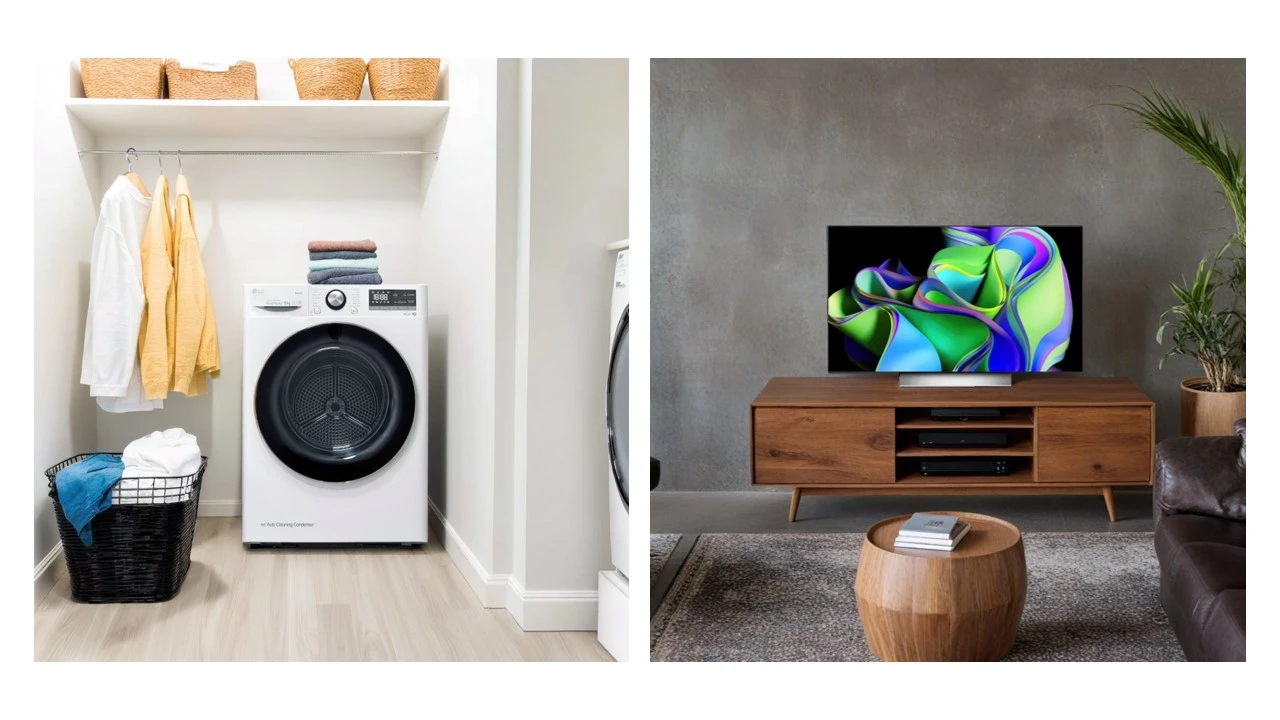
This is the highest-value gap on the list, because it's both common and directly tied to abandonment. A cut-out on white tells a shopper nothing about size. A grill on a patio, a speaker in a hand, a mixer next to something of known size, it's this perspective that resolves the question.
AI makes this possible at catalog scale. Place your existing product asset into its likely use environment and generate the same treatment across a product line. And since shooting in-scale imagery for every SKU isn't realistic. AI product photography can help brands automate this process.
2. Build lifestyle context for the long tail
Most brands shoot lifestyle imagery for hero products and leave everything else on white. But the long tail is where margin often lives, and those products get the thinnest visual treatment.
Generating in-context imagery costs roughly the same for the 500th SKU as the first. Be it furniture in a styled room or apparel in a setting that matches the target customer, the products that never justified a full-fledged photoshoot can finally get one with AI image generators.
3. Cover every variant without reshooting
Colorways, finishes, and material options multiply a catalog fast. Shooting each variant separately is an added cost and that's why many brands' product pages show one color while the dropdown offers eight. This means you are missing out on showcasing the other variants in their full glory.
With your product asset and image style trained into the AI platform, you can generate consistent imagery across variants. Shoppers comparing variants need the images to differ only in the thing that actually differs, and AI can help you deliver this.
4. Refresh the catalog for seasons and campaigns
Ecommerce imagery tends to be static because updating it means reshooting it. With AI product photography, you can put the same product asset into a spring setting, a holiday scene, or a back-to-school context whenever the merchandising calendar calls for it.
This is where a lot of ecommerce teams find the fastest return, because it turns a static catalog into a merchandising surface they can actually use. Our AI product photography ideas for ad campaigns covers the seasonal side in more depth.
5. Meet each channel's image spec from one source
Your own PDP wants lifestyle depth. Amazon wants a pure white background on the main image. Google Shopping has its own requirements, and every marketplace or ad platform needs images in different aspect ratios.
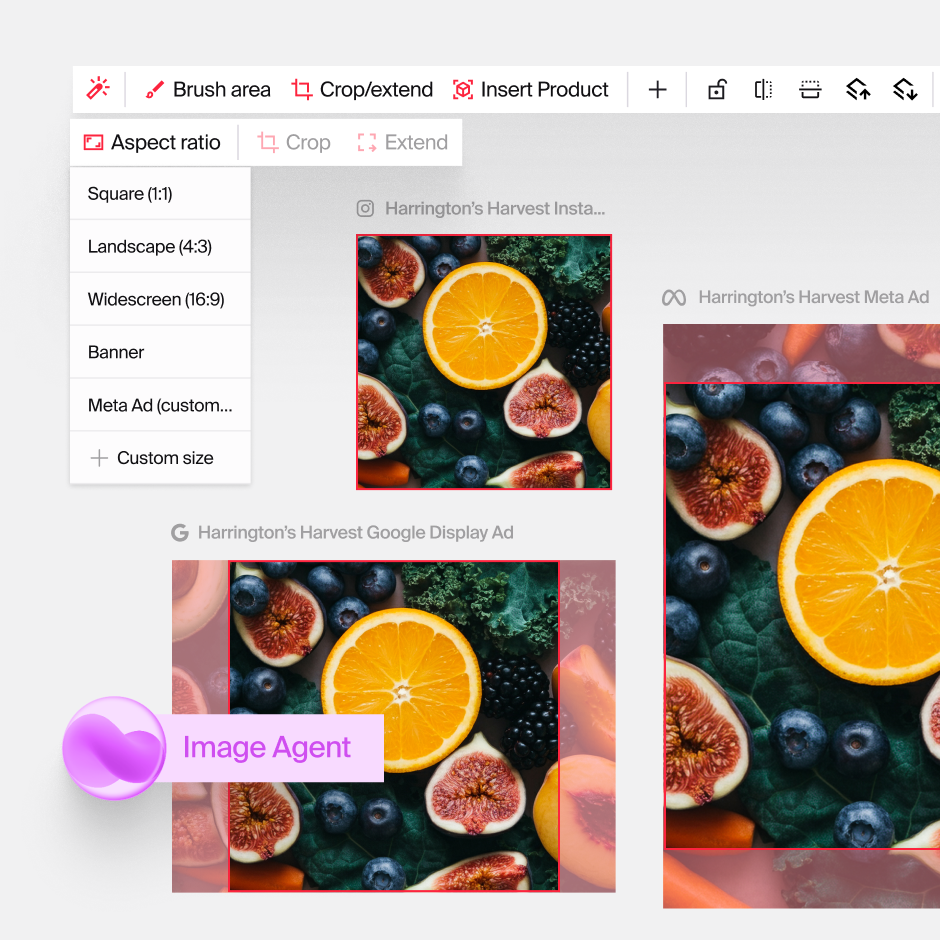
AI makes this faster and easier, involving no manual editing or resizing. Typeface Image Agent, for instance, can easily create platform-specific versions by resizing and reformatting images. Just type in the specifications in the chat or use the quick edit options, and the AI does the rest.
How ecommerce teams do this on Typeface
Start from the product shot you already have. Upload it to Image Agent and describe the environment you need, for example, on a marble top table or a hand holding it for scale. Flux-based blending matches textures, lighting, and shadow so the result reads as photographed rather than composited, and your packaging, logos, and finish stay accurate.
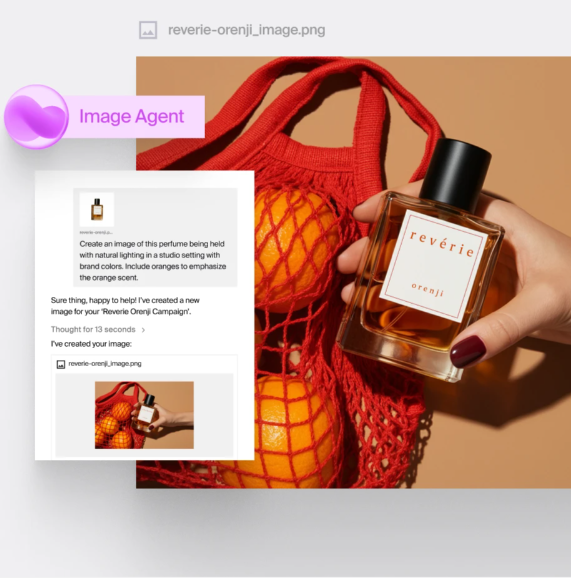
Work from references for consistency. Drop in one approved shot as a reference and generate the rest of a product line against it, asking the agent to maintain the same angle, lighting, and treatment. This makes a catalog look like a catalog instead of a collection.
Hold the line on brand. Store your color palette and image styles in Arc Graph so every generation inherits them. At catalog scale this makes a huge difference in turning a thousand scattered images into one visual system.
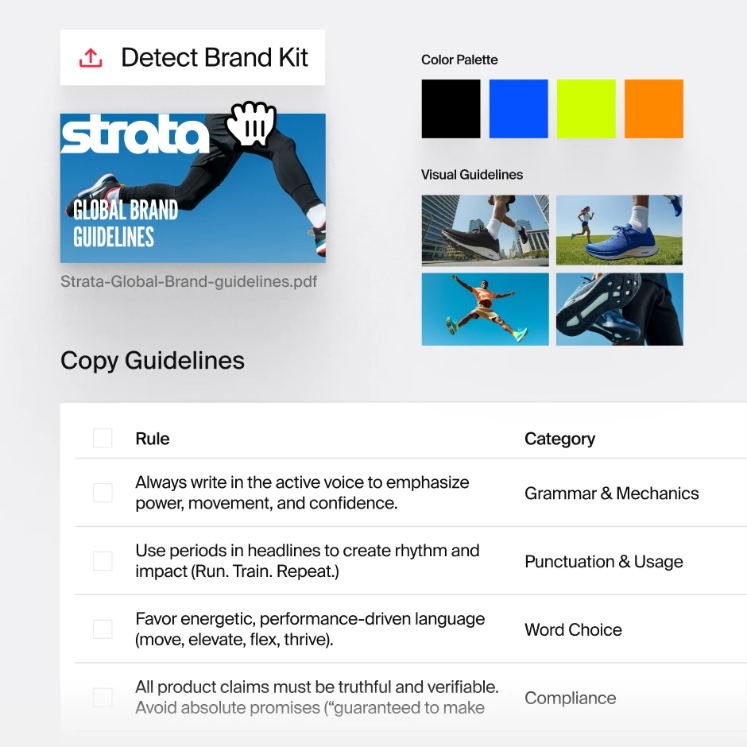
Adapt per channel. Generative resizing produces the aspect ratios each marketplace and channel requires from the same approved image, extending or cropping the scene so the composition holds. Semantic search then finds the right asset later, and you can export at any resolution or publish straight to HubSpot, Adobe Experience Manager, Aprimo, or Dropbox.
Close the imagery gap in your catalog
Ecommerce brands that are successful answer every question a shopper has about scale, context, variants, and detail with their visuals, before they even get to the description
Book a demo of Typeface and try it on your own catalog.
Frequently asked questions
Can you use AI-generated images in Amazon listings?
Yes, with conditions. Amazon treats routine AI retouching like background removal, color correction, lighting adjustment, etc. the same as traditional photo editing, provided the final image accurately represents the product and meets the standard image policies.
Certain types of imagery involving AI-generated models or people may need to be disclosed. The main image rules don't change regardless of how the image was made: pure white background, product filling at least 85% of the frame, no added text, logos, or watermarks.
Marketplace policies shift, so verify against current documentation before a large rollout.
Do you have to tell shoppers an image is AI-generated?
Legally it depends on your market and channel. Marketplace rules and regional AI transparency regulations are both tightening, and worth checking against your own footprint rather than assuming.
The practical reading isn't "hide it." It's that quality carries the risk. An image that looks synthetic loses trust whether or not you've labeled it, so the investment belongs in making the imagery genuinely good.
Does AI product photography increase product returns?
It can, if you let it drift from the truth, and this is the single biggest risk in the whole practice.
Returns rise when the image promises something the parcel doesn't deliver. Amazon's own guidance names the failure mode directly: don't use AI to add accessories that aren't in the box, like generating a case for headphones sold without one. It reads as a small embellishment but lands as "item not as described."
Used well, AI should reduce returns, because size-and-proportion and in-context images are exactly what stop people ordering the wrong thing. Just make sure the image accurately represents what the customer will receive.
Related articles

April 24, 2025
The eCommerce customer journey is no longer a linear path but a complex, multi-touchpoint experience that can make or break a brand's digital success. Today's consumers expect more than just a transac
August 5, 2026
eCommerce is constantly evolving, driven by advancing technology, shifting consumer expectations, and an expanding digital marketplace. A new era of retail marketing is emerging, with AI at its heart,

August 5, 2026
82% of consumers use social media for product research. Social commerce (buying directly through social platforms) is no longer a niche behavior. It's a primary purchase path, and brands that aren't i